Vigor2760 Series User’s Guide
116
Guard Interval - It is to assure the safety of propagation
delays and reflections for the sensitive digital data. If you
choose auto as guard interval, the AP router will choose
short guard interval (increasing the wireless performance) or
long guard interval for data transmit based on the station
capability.
Aggregation MSDU - Aggregation MSDU can
combine
frames with different sizes. It is used for improving MAC
layer’s performance for some brand’s clients. The default
setting is Enable.
TX Power - Set the power percentage for transmission
signal of access point. The greater the value is, the higher
intensity of the signal will be.
Apply
Click it to save the settings.
Reset
Click it to retrieve the default settings of this page.
Refresh
Click it to fresh the web page.
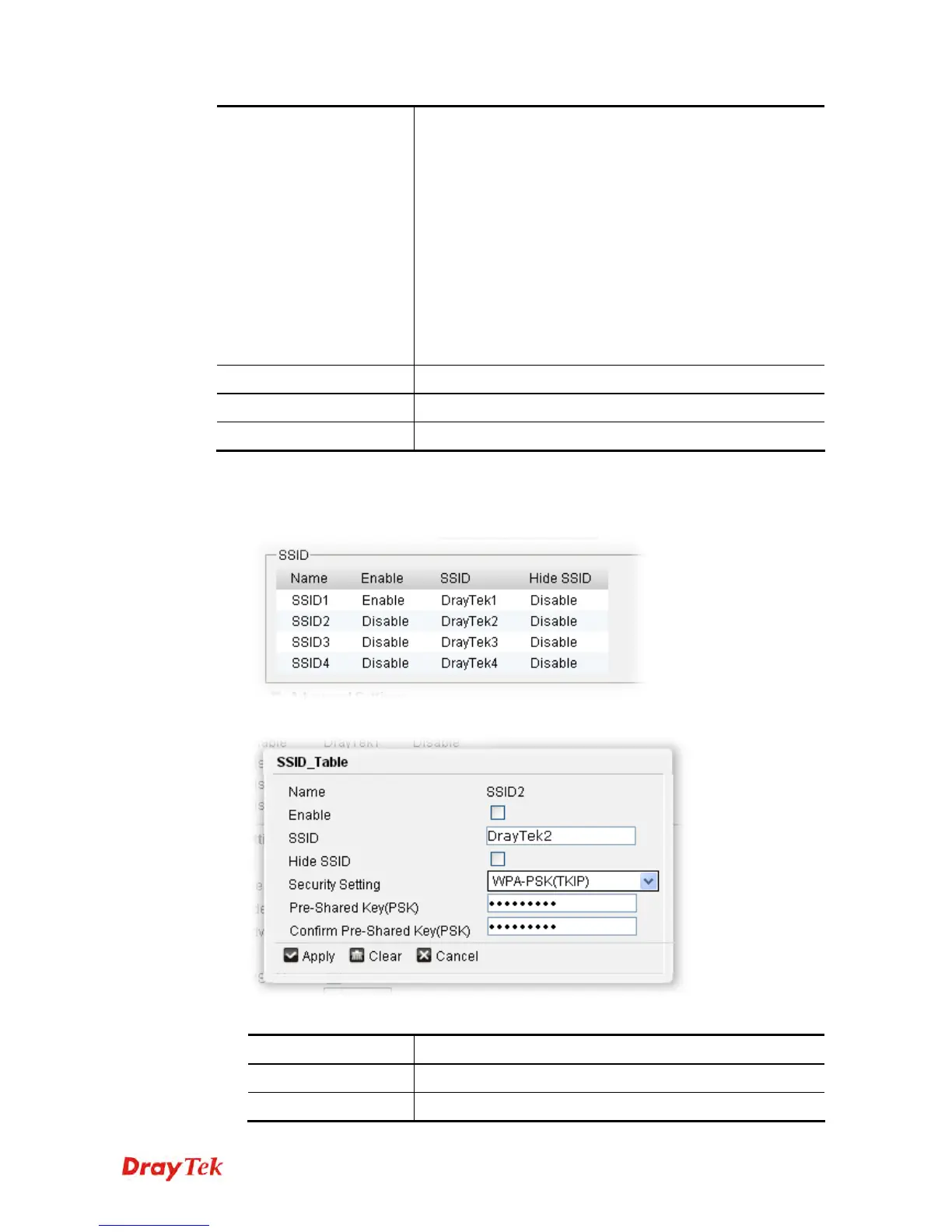
To edit the SSID setting, please do the following:
1. Move your mouse cursor on the SSID profile (from SSID1 to SSID4 based on the order)
you want to edit and click on it. In this case, we choose SSID2.
2. The following page will appear immediately.
Available parameters are listed below:
Item Description
Name
Display the name of the selected SSID.
Enable
Check the box to enable such SSID setting.











 To Next Page