Vigor2760 Series User’s Guide
225
interface.
Inbound QoS Class
Display the percentage for each QoS class used by such
profile.
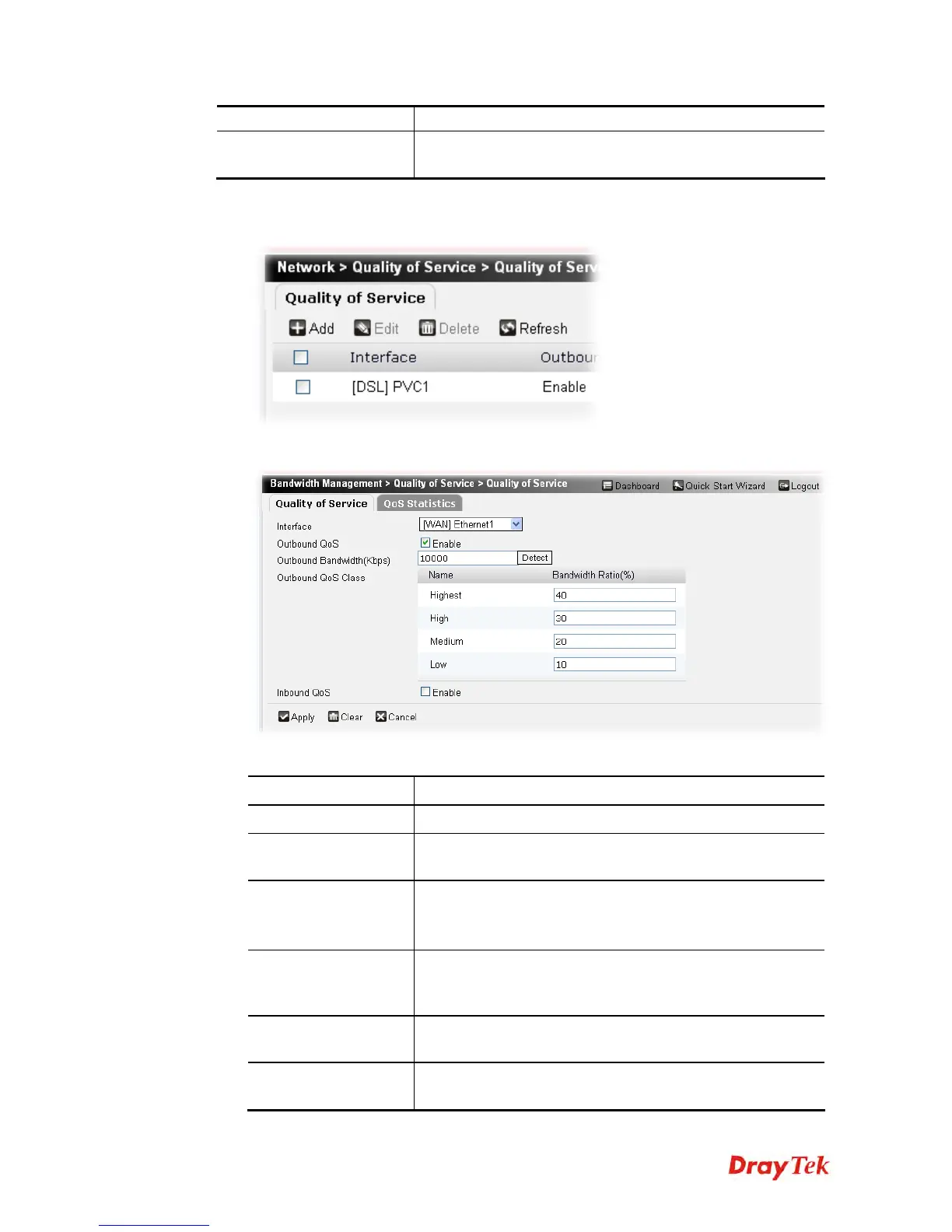
To add a static route profile, please do the following:
1. Click Add.
2. The following page appears.
Available parameters are listed below:
Item Description
Interface
Choose an interface for applying the QoS function.
Outbound QoS
Check the box to make the outgoing traffic following the
limitation specified in this page.
Outbound
Bandwidth (Kbps)
Type the transmission rate to limit the outgoing traffic.
Click Detect to let the router detect the bandwidth for your
computer automatically.
Outbound QoS Class
Specify the value for Low, Medium, High and Highest.
Highest class means it owns the highest priority. Usually it
will occupy the most of the bandwidth ratio.
Inbound QoS
Check the box to make the incoming traffic following the
limitation specified in this page.
Inbound Bandwidth
(Kbps)
Type the transmission rate to limit the incoming traffic.
Click Detect to let the router detect the bandwidth for your











 To Next Page