Vigor2760 Series User’s Guide
28
used to enable the function of VLAN with tag. The router
will add specific VLAN number to all packets while sending
them out. Please type the tag value and specify the priority
for the packets sending by the router.
VLAN ID – It is available for PPPoE only. Type the value
as the VLAN ID number. The range is form 1 to 4000.
Priority(802.1p) - It is available for PPPoE only. Type the
packet priority number for such VLAN. The range is from 0
to 7.
IPv4 Setting and/or
IPv6 Settings
Such field will appear according to IP version specified on
the page of STEP1.
Nothing needs to be configured here for such protocol.
DHCP: if you click DHCP as the protocol, just enter the values for ADSL settings (it can
be ignored if VDSL service is offered) provided by your ISP. Then click Finish to
complete the configuration.
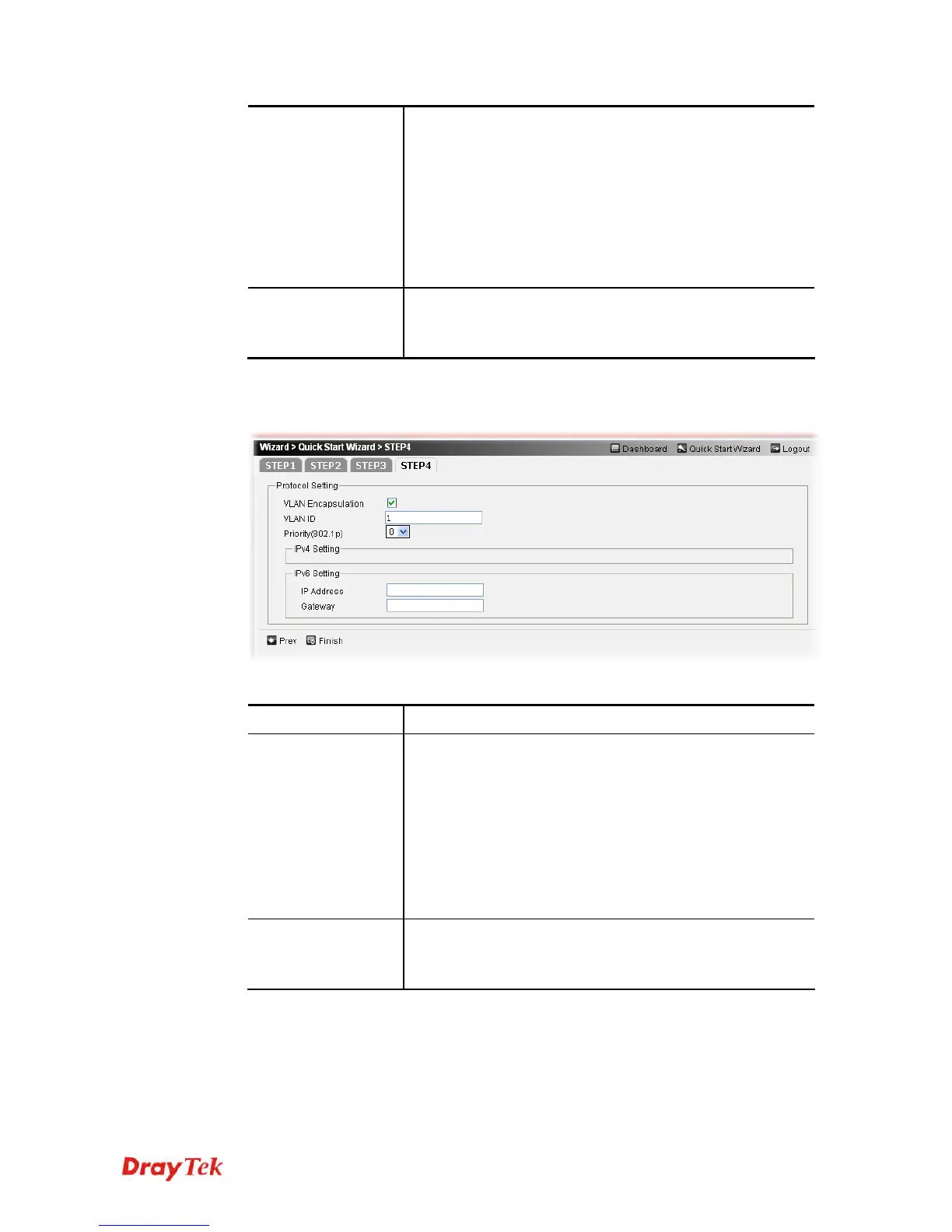
Available parameters are listed as follows:
Item Description
Protocol Setting
VLAN Encapsulation – It is used to enable the function of
VLAN with tag. The router will add specific VLAN number
to all packets while sending them out. Please type the tag
value and specify the priority for the packets sending by the
router.
VLAN ID –Type the value as the VLAN ID number. The
range is form 1 to 4000.
Priority(802.1p) - Type the packet priority number for such
VLAN. The range is from 0 to 7.
IPv4 Setting and/or
IPv6 Settings
Such field will appear according to IP version specified on
the page of STEP1.
Nothing needs to be configured here for such protocol.
Static IP: if you click Static IP, you will get the following page. Please type in the IP
address information and type the values for ADSL settings (it can be ignored if VDSL
service is offered) originally provided by your ISP. Then click Finish to complete the
configuration.











 To Next Page