125
5
Replacing Consumables
Replacing the Master Roll
○○○○○○○○○○○○○○○○○○○○○○○○○○○○○○○○○
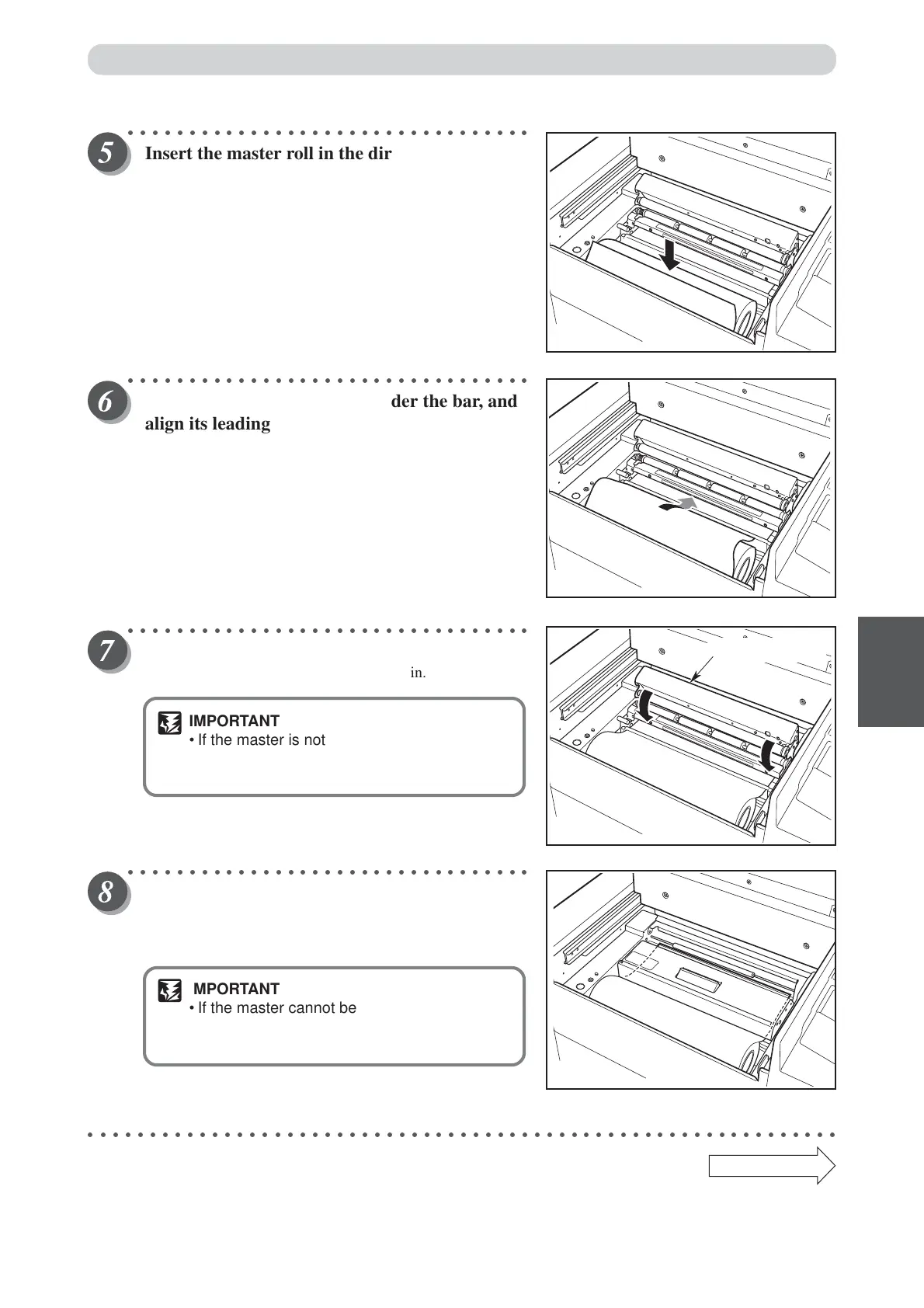
Insert the master roll in the direction shown in
the figure on the right.
○○○○○○○○○○○○○○○○○○○○○○○○○○○○○○○○○
Pull out the master, insert it under the bar, and
align its leading edge with the loading line.
○○○○○○○○○○○○○○○○○○○○○○○○○○○○○○○○○
Close the master cover.
The master is will automatically be pulled in.
IMPORTANT
• If the master is not pulled in open the master
cover, and gently press in as far as possible
to set again.
○○○○○○○○○○○○○○○○○○○○○○○○○○○○○○○○○
Make sure that the leading edge of the master is
protruding from the inner side of the master
cover.
IMPORTANT
• If the master cannot be set correctly, "RESET
MASTER" is displayed.Open the master
cover, and set again.
○○○○○○○○○○○○○○○○○○○○○○○○○○○○○○○○○○○○○○○○○○○○○○○○○○○○○○○○○○○○○
Continue Page
•••
Master cover



 To Next Page