Basic SkyView Display Operation
3-2 SkyView System Installation Guide - Revision K
Display Bezel Layout
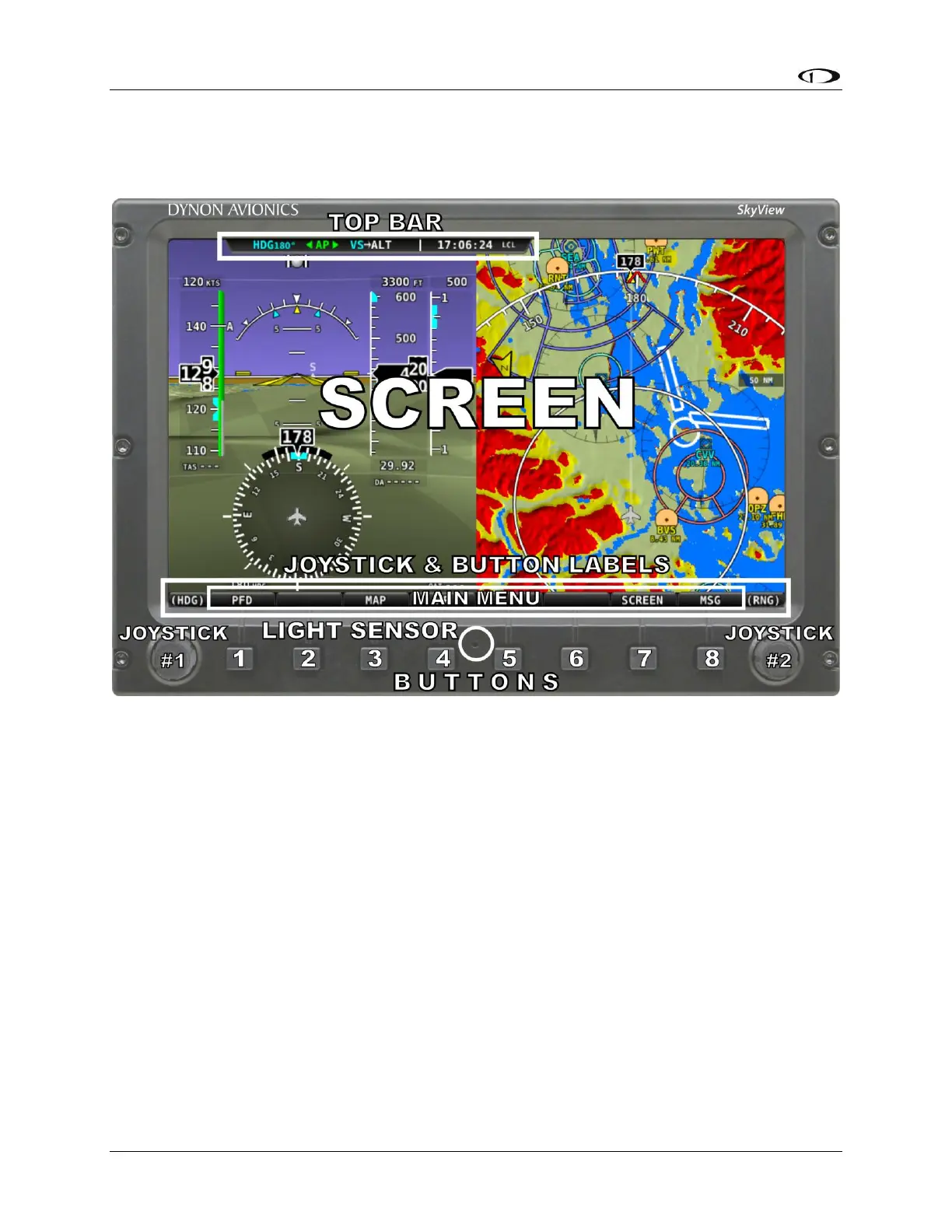
The following diagram illustrates the front of an SV-D1000 display and its important parts.
Figure 9–SkyView Display Front Bezel Layout
Note the top bar, screen, joystick and button labels, light sensor, two joysticks and eight
buttons.
The top bar displays important textual information. The top bar in the current release of
SkyView shows, time, autopilot status, and transponder status. Future firmware updates will
enable expanded functionality. Reference the Local Display Setup Menu Section of this guide
for details on how to configure the top bar.
The screen shows PFD, Engine, and Moving Map data, configuration information, and system
alerts. Its layout is user-configurable. Reference the SkyView Pilot’s User Guide for instructions
on how to configure the layout of your screen.
Joystick and button labels are also on the screen. Joystick and button functionality is contextual
based on what is onscreen and these labels show the user the current function. For example, the
(RNG) label above joystick 2 in Figure 9 shows that turning that joystick will either increase or
decrease the range shown on the Moving Map.



 To Next Page