Titanium Interfaces User Guide
Table 38: LVDS RX Signals (Interface to FPGA Fabric)
Signal Direction Clock Domain Description
IN[9:0] Output SLOWCLK Parallel input data to the core. The width is programmable.
ALT Output Alternate input, only available for an LVDS RX resource in bypass
mode (deserialization width is 1; alternate connection type). Alternate
connections are PLL_CLKIN, PLL_EXTFB, GCLK, and RCLK.
LOCK Output (Optional) When DPA is enabled, this signal indicates that the DPA has
achieved training lock and data can be passed.
FIFO_EMPTY Output FIFOCLK (Optional) When FIFO is enabled, this signal indicates that the FIFO is
empty.
SLOWCLK Input – Parallel (slow) clock.
FASTCLK Input – Serial (fast) clock.
FIFOCLK Input – (Optional) Core clock to read from the FIFO.
FIFO_RD Input FIFOCLK (Optional) Enables FIFO to read.
RST Input FIFOCLK
SLOWCLK
(Optional) Asynchronous. Resets the FIFO and serializer. If the FIFO is
enabled, it is relative to FIFOCLK; otherwise it is relative to SLOWCLK.
ENA Input – Dynamically enable or disable the LVDS input buffer. Can save power
when disabled.
1: Enabled
0: Disabled
TERM Input – Enables or disables termination in dynamic termination mode.
1: Enabled
0: Disabled
DLY_ENA Input SLOWCLK (Optional) Enable the dynamic delay control or the DPA circuit,
depending on which one is enabled.
DLY_INC Input SLOWCLK (Optional) Dynamic delay control. Cannot be used with DPA enabled.
When DLY_ENA is 1:
1: Increments
0: Decrements
DLY_RST Input SLOWCLK (Optional) Reset the delay counter or the DPA circuit, depending on
which one is enabled.
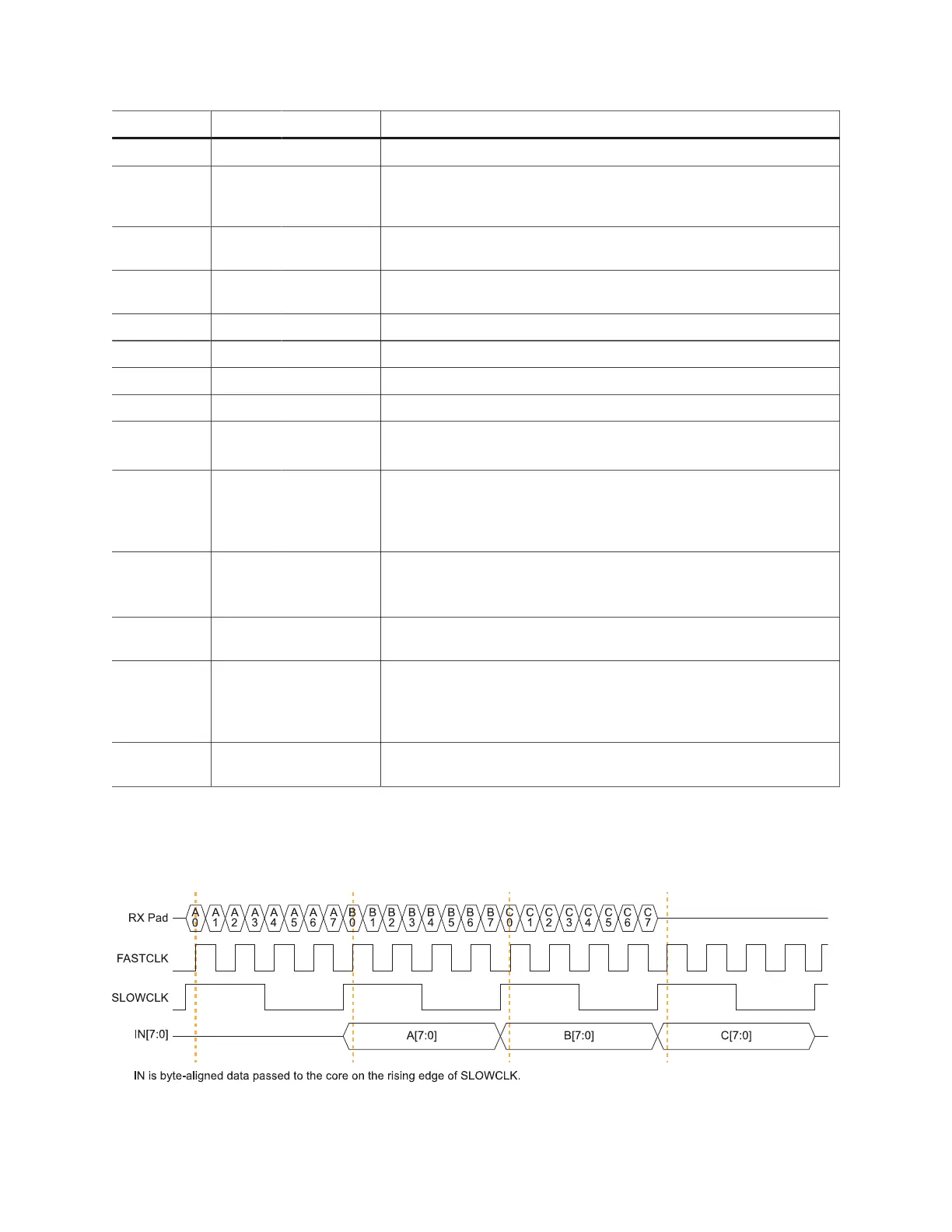
The following waveform shows the relationship between the fast clock, slow clock, RX data
coming in from the pad, and byte-aligned data to the core.
Figure 23: LVDS RX Timing Example Serialization Width of 8 (Half Rate)
www.efinixinc.com 69



 To Next Page