MANUAL ELDES ESIM264 V2.0 19
4. Operation Description
4.1 Arming & Disarming
ESIM264 alarm system arming and disarming process can be performed:
• by entering a valid 1 out of 10 user (keyboard) passwords using EKB2/EKB3 keyboard;
• by making a free call to the system from any out of 5 preset user phone numbers;
• by sending an SMS message to the system from any out of 5 preset user phone numbers (possible to arm/disarm both
system partitions at once);
• by touching 1 out of 5 iButton® keys to a reader;
• using EWK1 wireless key-fob;
• by violating/restoring a zone set up to operate under Arm-Disarm by Zone mode;
• using EGR100 GPRS software at the monitoring station site.
The system initiates the Exit Delay countdown intended for user to leave the secured area when the system is being armed. During
the countdown period the mini buzzer (if any) is providing short beeps and/or LED (if any) is providing illumination signals. By default,
Exit Delay duration is 15 seconds. After the countdown is complete the system becomes armed and locks the conguration possibility
by keyboard (if any). In case the user does not leave the secured area before the countdown is complete, the system switches to Stay
mode if at least 1 zone is set up to operate under Stay mode. By default, if there is at least 1 violated zone or tamper, the user will not
be able to arm the alarm system until the violated zone or tamper is restored. In case it is required to arm the alarm system despite the
violated zone presence, the violated zone can be bypassed or set up to operate under Force mode.
The system initiates the Entry Delay countdown intended for system disarming after the user enters the secured area. The mini buzzer
(if any) is providing short beeps and/or LED (if any) is providing illumination signals during the countdown period . By default, Entry
Delay duration is 15 seconds. The system unlocks the keyboard (if any) after the user successfully performs the disarming process. The
alarm will be caused in case the user does not disarm the alarm system during the Entry Delay countdown.
NOTE: There is no Exit Delay countdown when arming the alarm system by phone call, SMS message or EGR100 GPRS software.
For more details, please, refer to chapter 5.4.5 Arming & Disarming the System.
4.2 Zones
ESIM264 alarm system has 6 built-in on-board zones with expansion possibility for additional sensor connection. The number of
zones can be expanded by:
• enabling the ATZ mode which doubles the on-board zone quantity;
• connecting EPGM1 - zone & PGM output expansion module;
• connecting the keyboards;
• adding the wireless devices;
• creating the virtual zones manually.
The maximum supported zone quantity is 44.
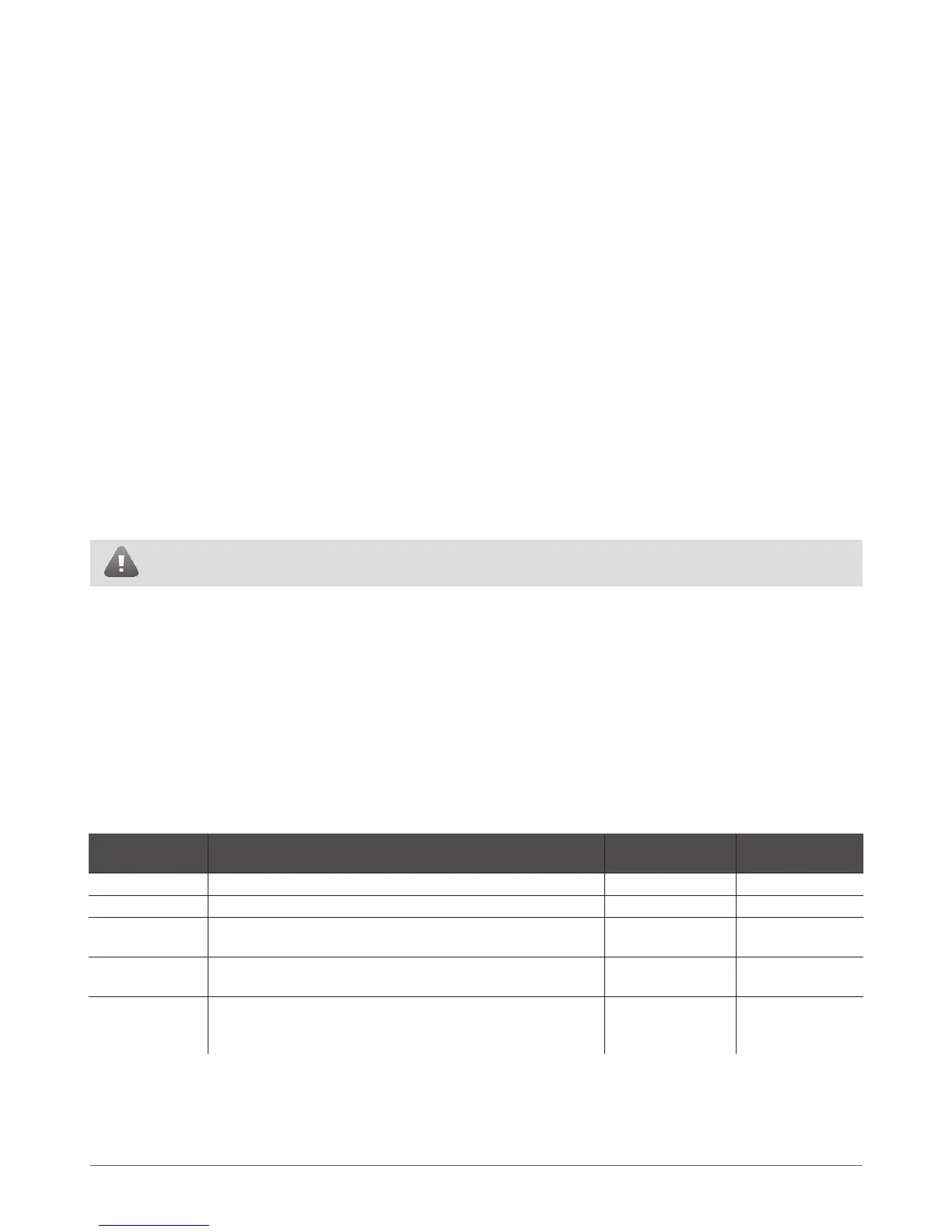
ESIM264 zones are classied by 5 categories:
Zone Category Description
Max. Quantity of
Zones per Device
Max. Quantity of
Zones in Total
On-board Zones Built-in wired zones of ESIM264 alarm system. 6/12* 6/12*
Keyboard Zones Built-in wired zones of EKB2/EKB3 keyboard. 1 4
EPGM1 Zones Built-in wired zones of EPGM1 - zone & PGM output expansion
module.
16 16
Wireless Zones Non-physical zones automatically created by connected wireless
devices.
2** 32***
Virtual Zones Non-physical zones intended for alarm activation by EWK1 wire-
less key-fob and manually created by the user using ELDES Con-
guration Tool.
32**** 32****
* - 6 zone-mode is enabled by default. ATZ mode doubles the zone quantity and increases it to 12 in total.
** - Depends on the connected wireless device.
*** - Available only if no keyboard zones, EPGM1 zones and virtual zones are present.
**** - Available only if no keyboard zones, EPGM1 zones and wireless zones are present.



 To Next Page