MANUAL ELDES ESIM264 V2.0 71
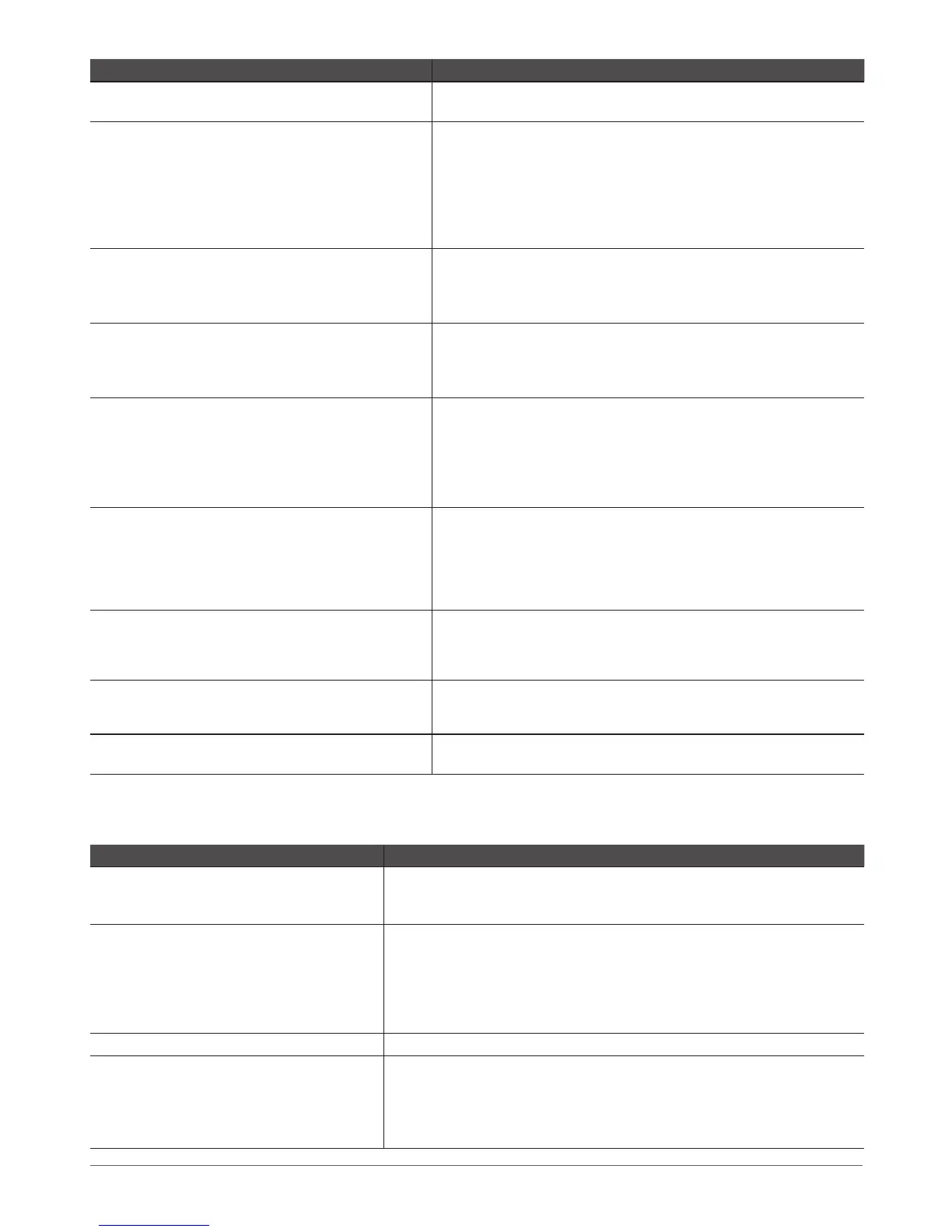
Question Answer
13. The buzzer remains active when I disarm the alarm
system using the keyboard. Why?
The buzzer is intended for iButton indication only and it is not related to
disarming process by keyboard.
14. One of wireless devices connected to ESIM264
system sends a tamper alarm from time to time,
although no tamper was violated. Why?
This happens due to wireless connection loss. There might be several
reasons:
1. ELDES wireless device is installed too close or too far from
ESIM264 system.
2. Interference of other electronic equipment.
3. Physical interference (building walls, oors etc.)
4. Metal material interference.
15. I have connected a wired magnetic door sensor, but
I receive tamper alarm instead of zone alarm. What’s
wrong?
This happens due to incorrect resistor connection. Please, refer to
corresponding connection circuit according to the selected zone con-
nection type (Type 1 – 5). See chapter 2.3.2 Zone Connection Types
for more details.
16. I disconnected the backup battery, but did not re- I disconnected the backup battery, but did not re-I disconnected the backup battery, but did not re-
ceive any SMS report on this event. How do I enable
SMS report on backup battery disconnection?
This feature is permanently enabled and cannot be disabled manually.
The system checks the backup battery resistance once a day and sends
an SMS report to User 1 on backup battery expiration if more than 1,5Ω
resistance is detected.
17. When I check system SIM card credit balance I see
a lot of SMS delivery conrmation reports. How do I
disable SMS delivery conrmation ESIM264 system?
Everytime an SMS message is sent to the user, the system must “know” that
the message was successfully delivered. The only way to partly disable the
SMS delivery report (for alarm notications only) is to enable alarm SMS
notications to all users. This is useful when having only User1 phone num-
ber set up, as in case of alarm the system sends the alarm SMS to all preset
users simultaneously, but does not require any SMS delivery report.
18. I have set zone alarm text and/or PGM output names
containing some cyrillic and/or non-English characters.
The alarm texts/PGM output names do not fully t in
the SMS message. What‘s wrong?
According to GSM standards 1 SMS message may consist of 160 latin alpha-
bet/English characters max. If the message contains at least one non-latin/
non-English character, the length of SMS message becomes at least half
shorter, since those characters occupy more size of the SMS than the latin
ones. It is reommended not to use any non-latin/non-English characters in
zone alarm texts/PGM output names.
19. The conguration of added wireless key-fob EWK1 to
ESIM264 system is not visible in ELDES Conguration
Tool. What‘s wrong?
1. ELDES Conguration Tool version is too old. Please, update it.
2. The rmware version of EWT1 module is outdated. Note that EWK1 is
supported in EWT1 rmware v16.4 and later. Please, return EWT1 module
for replacement.
20. I am unable to run ELDES Conguration Tool - I receive
error messages in Windows. Why?
Microsoft .NET Framework v3.5 is not installed in Windows system. Please,
download this package from ocial Microsoft website free of charge and
install it to your Windows system.
21. Info SMS report comes with wrong date and time.
How do I correct it?
Please, set the correct system date and time using either ELDES Congu-
ration Tool, EKB2, EKB3 or SMS message.
6.3 Troubleshooting
Indication Possible reason
LED PWR is o
· No main power supply
· Wiring done improperly
· Blown fuse
LED NETWORK is o or solid on
· Missing SIM card
· PIN code is enabled
· SIM card is inactive
· Disconnected antenna
· GSM network signal too weak
· Problems with GSM provider
LED STATUS solid on or solid o
· Microcontroller is not started due to electrical mains noise or static discharge
System does not send any SMS messages and/or
does not ring
· SIM card account depleted
· Incorrect SIM central number
· No GSM network signal
· User number is not preset (or control from unknown numbers disabled)
· SIM card changed before disconnecting main power supply or backup battery



 To Next Page