24
5.3.1 Establishing Remote Connection Between ESIM264 System and Conguration Server
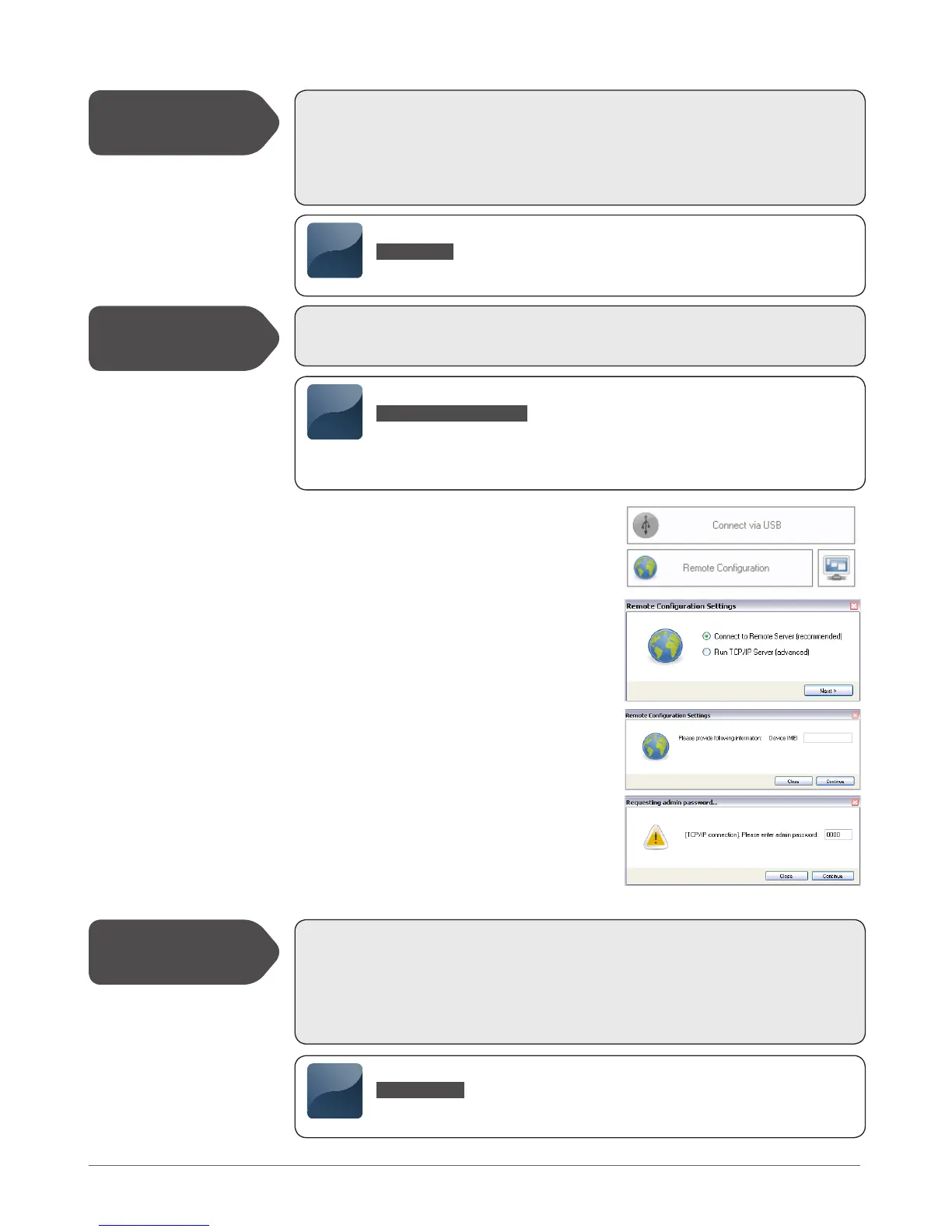
5.3.2 Connecting to ELDES Conguration Server
using ELDES Conguration Tool Software
5.3.2.1 Run ELDES Conguration Tool software.
5.3.2.2 Press Remote Conguration button.
5.3.2.3 In the next window, select Connect to Remote Serv-
er (recommended) and press Next button.
5.3.2.4 Enter the received IMEI number in Device IMEI entry.
5.3.2.5 Press Continue button.
5.3.2.6 Upon the successfully established connection, the sys-
tem prompts for an administrator password.
5.3.2.7 By entering a valid administrator password, the sys-
tem grants access to full conguration remotely..
5.3.2.8 Remote Conguration Management window dis-
plays all performed conguration actions.
5.3.3 Ending the Conguration Process
In order to activate a remote GPRS connection between ESIM264 system and ELDES congu-
ration server, please, send the following SMS message from user phone number.
Upon the successful SMS message delivery, the system establishes a connection session for
20 minutes. An SMS reply, containing device IMEI number and conrming a successful con-
nection establishment, is sent shortly.
In case it is necessary to establish a connection between ESIM264 system and a third-party
conguration server, send the following SMS message.
SMS text:
XXXX_stcong
Example: 1111_stcong
SMS text:
XXXX_stcong:IPaddress:Port
Value: Ipaddress – public IP address of third-party conguration server; Port – port
number of third-party conguration server
Example: 1111_stcong:62.80.115.102:4522
Initiate the
Connection to
ELDES Server
Initiate the
Connection to
Third-Party Server
SMS
SMS
After the system conguration is complete, use one of the following methods to end the con-
guration process:
- Press Disconnect button and close ELDES Conguration Tool software;
- Wait for the system to reply with an SMS message conrming the end of the session;
- Shut down the connection with the server at any time by sending an SMS message.
Shut down the
Connection with
the Server
SMS text:
XXXX_endcong
Example: 1111_endcong
SMS



 To Next Page