EasyManua.ls Logo

evertz 3025SW - Page 187

evertz 3025SW
208 pages
Print Icon
To Next Page IconTo Next Page
To Previous Page IconTo Previous Page
Loading...
3025SW Master Control Switching & Channel Branding
Revision 1.0 Page 173
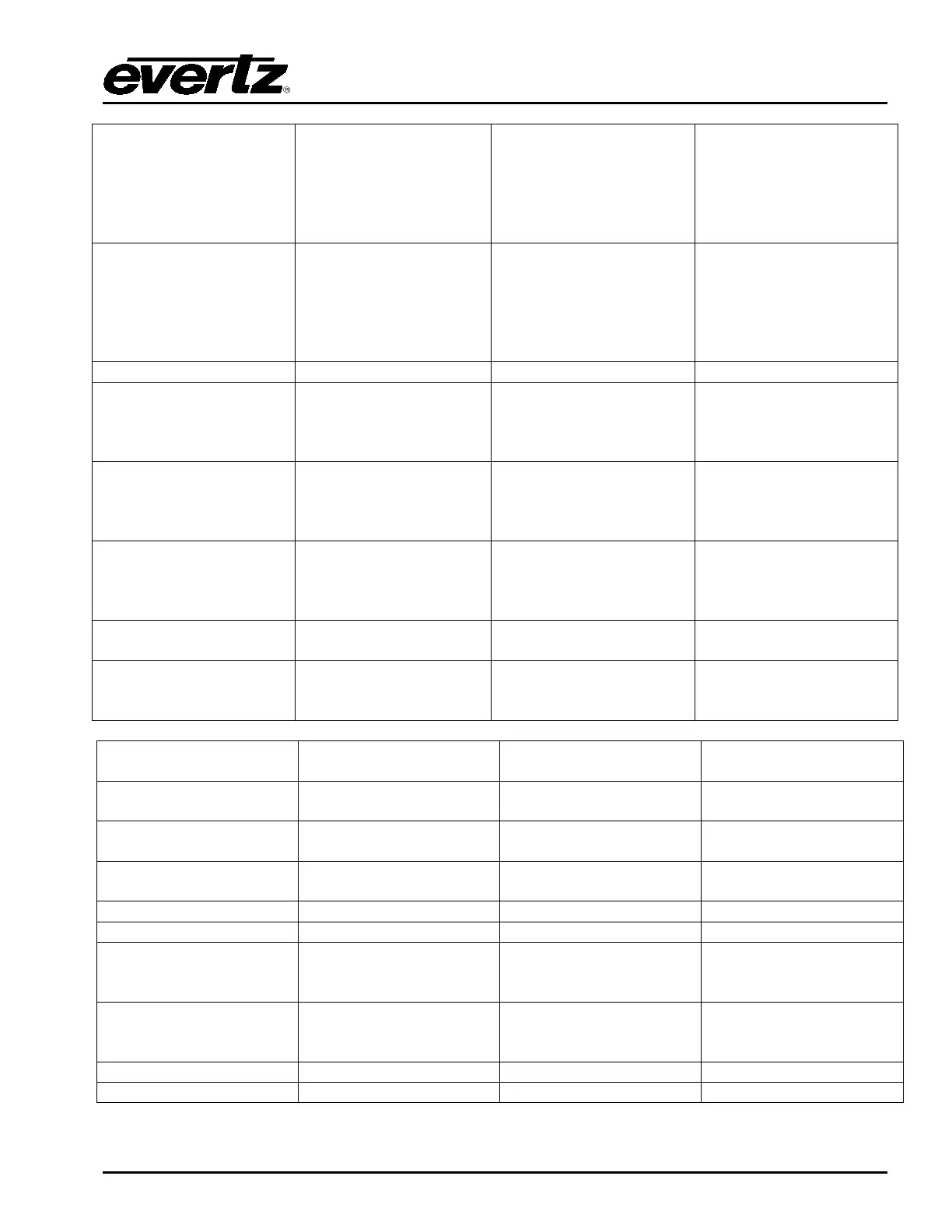
Audio Gain Up
Selection or Currently
Selected (using “Audio
Input” key type).
Adjust the audio gain
level up.
If this button is
configured directly above
a rotary dial then this
button configures the
function of this dial as
audio gain up/down.
Audio Gain Down
Selection or Currently
Selected (using “Audio
Input” key type).
Adjust the audio gain
level down.
If this button is
configured directly above
a rotary dial then this
button configures the
function of this dial as
audio gain up/down.
Audio Input Format
Not Supported
Audio Input
N/A (scrolling)
Scroll through the audio
inputs so that
adjustments can be
made accordingly.
N/A
Duration Up
N/A
Adjust the length of the
transition (frames) up.
Note: This will adjust and
be saved to the currently
selected transition speed
ONLY.
Duration Down
N/A
Adjust the length of the
transition (frames) down.
Note: This will adjust and
be saved to the currently
selected transition speed
ONLY.
Dwell Time Up
N/A
Adjust the transition
dwell time (frames) up.
Note: Dwell only applies
to some transition types.
Dwell Time Down
N/A
Adjust the transition
dwell time (frames)
down.
Note: Dwell only applies
to some transition types.
Audio Lag Time Up
N/A
Adjust the audio lag time
(frames) up.
N/A
Audio Lag Time Down
N/A
Adjust the audio lag time
(frames) down.
N/A
Audio Lead Time
Up
N/A
Adjust the audio lead
time (frames) up.
N/A
Audio Lead Time
Down
N/A
Adjust the audio lead
time (frames) down.
N/A
Audio Input Shuffle
Not Supported
Audio Default
Not Supported
Audio Gain +1/4dB
Selected Input Pair
Adjust the audio gain
level of the selected pair
up.
N/A
Audio Gain -1/4dB
Selected Input Pair
Adjust the audio gain
level of the selected pair
down.
N/A
Audio Shuffle Scroll
Not Supported
Audio Lead Lag
Not Currently Supported

Table of Contents

Related product manuals