Running DSL/IP Tests and Viewing Results
380 MAX-635G
VoIP Call
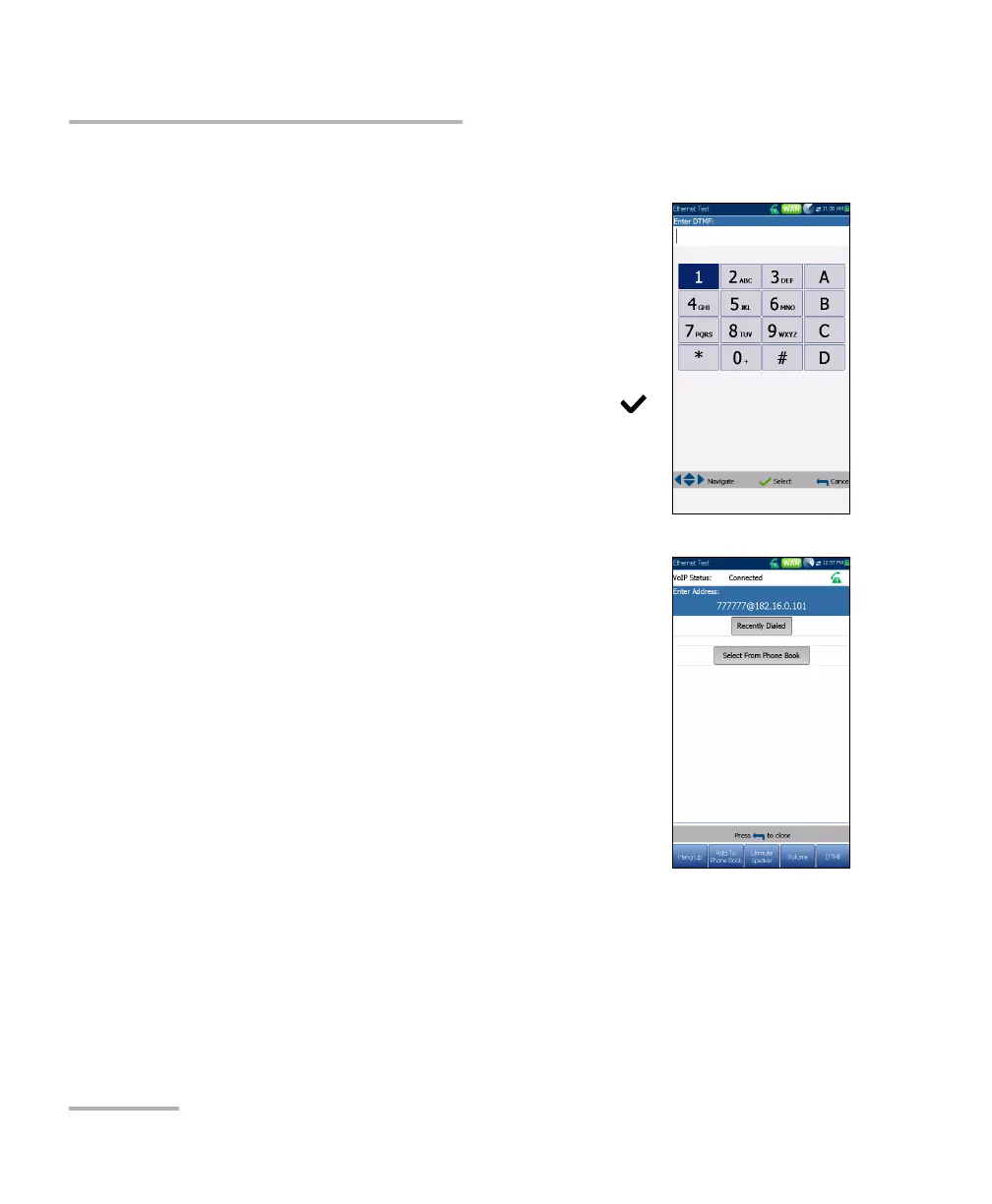
Touch-Tone Keypad
The Touch-Tone Keypad allows you to enter a DTMF
number to dial a VoIP Call. The page contains
alphanumeric keys to send a DTMF tone, and
special-use alpha keys: A, B, C, D. For example, some
systems require these keys for entering admin mode.
To enter a phone number:
Press any of the buttons on the keypad by using
the navigation keys on the unit and pressing .
The selected numbers are entered in the text box.
Phone Book
The Phone Book page allows you to enter a new
address, access Recently Dialed numbers, or Select
From Phone Book.
VoIP Status shows the current status of the dialed
number.
Enter Address displays the dialed number
entered or selected from the Recent Dialed
Numbers list or Phone Book.
When Enter Address is selected, it opens the
alphanumeric keypad to enter a SIP Address.
If the call is already connected after Enter
Address is selected, it opens the DTMF/Touch-Tone Keypad.
Recent Dialed button opens a list of recently dialed numbers for
selection.
Select From Phone Book button allows you to select a number from
the Phone Book.













 To Next Page