Appendix 1 PLC2Way App1-15
2. Memory card setting
When [SRAM] or [CF Card] is selected for [Store Target] in the [Buffering Area Setting] dialog, the
memory card setting is required.
* The used memory capacity of SRAM and CF card can be calculated in the same way as the
buffering area.
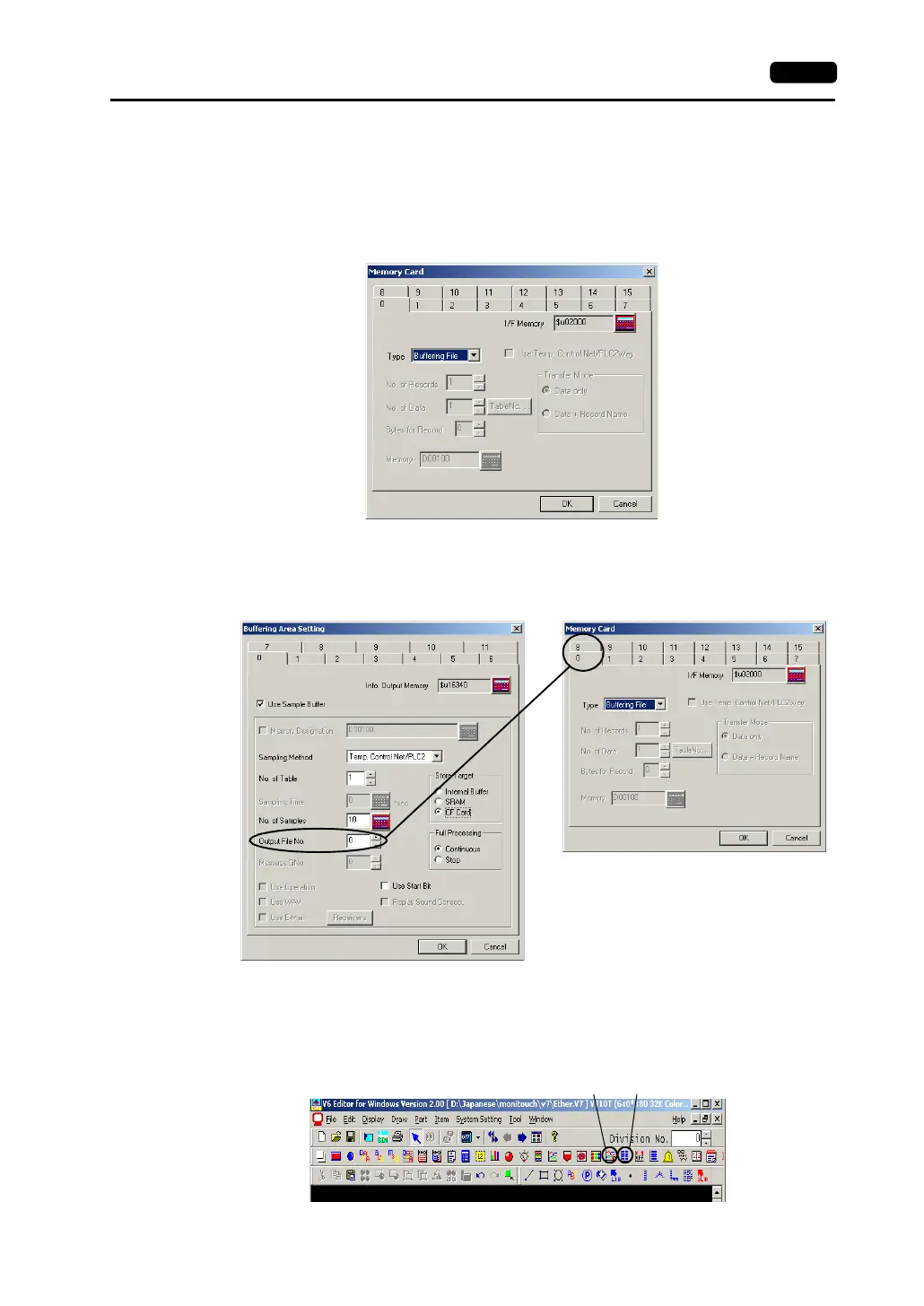
1) Click [System Setting] → [Memory Card Setting]. The [Memory Card] dialog is opened.
2) Select [Buffering File] for [Type].
3) Match the file number (tab) in the [Memory Card] dialog with [Output File No.] in the
[Buffering Area Setting] dialog.
3. Trend sampling or data sampling setting
To show data stored in the specified buffer number, trend sampling or data sampling must be set.
Click the [Trend Sampling] or [Data Sampling] icon and make the setting.
For more information, refer to the Reference Manual (Function).
Select the tab of the same number.
Trend sampling Data sampling



 To Next Page