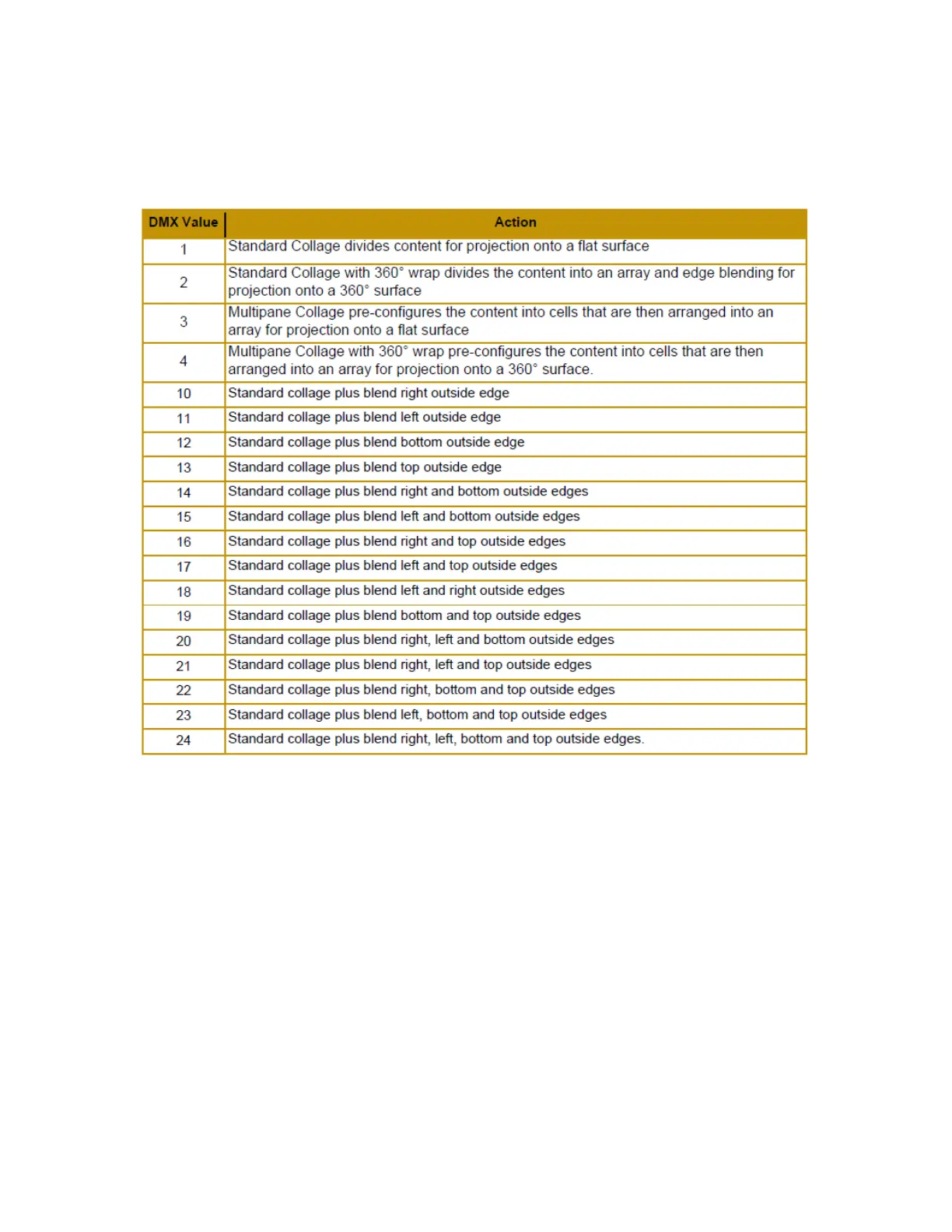
Collage Type
The Collage Type global parameter has eighteen collage options including 14 Collage+
modes:
In Standard Collage and Standard Collage with 360° Wrap options, the content is automatically divided into cell
segments by the graphics engine after you define the array size. This yields good results in situations where moderate
output resolution is suitable.
In Multipane Collage options where you pre-configure the content into cells and project each cell from a separate server,
you can project the native resolution from each server.
In situations where you require extremely high resolution output of custom content, the Multipane Collage option
resolution capabilities is greatly increased because the graphics
engine is no longer taking a single file and stretching it across multiple servers; but is, instead, showing the file as
rendered. Using Multipane Collage gives you the option to use video files that match the resolution of the display devices
exactly. For example, if you have four 1080p HD projectors using a 4 part Multipane Collage with individual 1080p HD
video files, the resulting collage resolution will be much higher. In standard collage modes, a single file is divided by the
number of parts in the collage. To equal the same resolution in standard collage mode, the single file would have to be 4
times larger, and it would have a negative impact on server performance.
The Collage+ mode expands the Standard Collage modes, by additionally allowing blend edges on Top, Right, Bottom,
Left and all combinations. In Collage+ Modes the blend edges are no longer prescribed by the positions in the cell layout
arrangement. Instead each external boundary edge can be set independently. The simplest scenario is a 1x1 collage with
4 blended edges. These multiple blend options allow for unique technical scenarios, or allowing the ability to combine
several collage types in a larger installation.



 To Next Page