Content Layer Rotation
The Rotation parameters for each object control 3-D object rotation with 16-bit precision. You can rotate a 3-D object up to
720° in either a clockwise or counterclockwise direction around the X, Y and/or Z axis.
The X, Y or Z Rotation parameter rotates the selected Graphic Object around the its axis with 16-bit precision. You can
index the rotation or set a continuous rotation creating a vertical flip at variable speeds. This parameter lets you view an
object from a different angle by turning the object or create an effect by continuously turning the object.
Default DMX Value: 32768 (50%) = No X,Y, or Z Rotation.
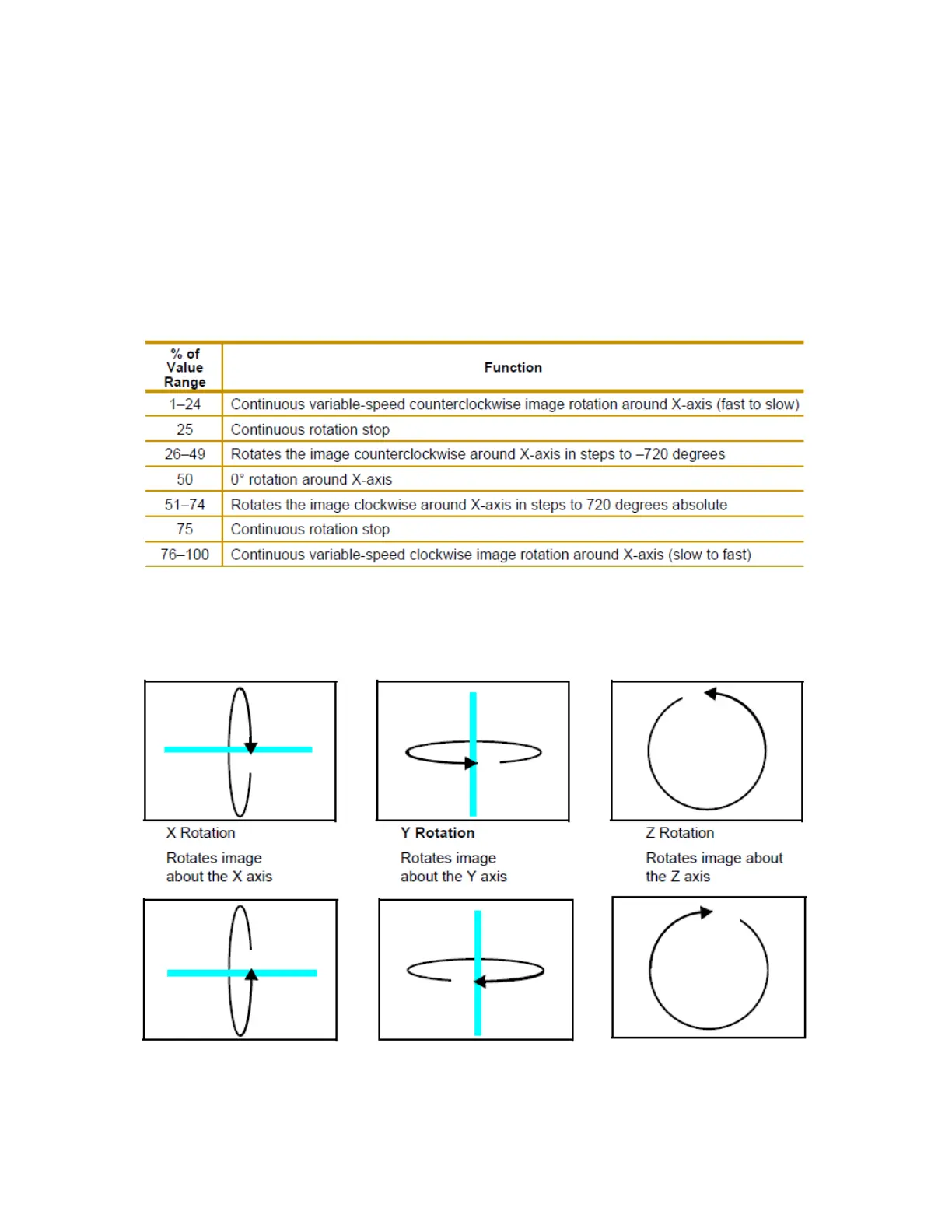
X-Axis Example - Y and Z axis use the same values
NOTE:Remember that rotation changes could affect an object’s relationship to other objects.
When you rotate an object, you are rotating it around the selected axis. X Rotation produces the effect of a top-to-bottom
flip. Y Rotation produces a left-to-right flip. Z Rotation causes a circular motion.
The Rotation parameters’ suggested default values are the midpoint of the 16-bit DMX value range, which is equal to no
rotation. Increasing the DMX value from the midpoint indexes the object in a clockwise direction. Reducing the DMX value
below the midpoint indexes the object in a counterclockwise direction.



 To Next Page