4–6 Replacing drives
Hitachi Unified Storage Hardware Service Guide
Spare drive is not set or there is no spare drive that can be used
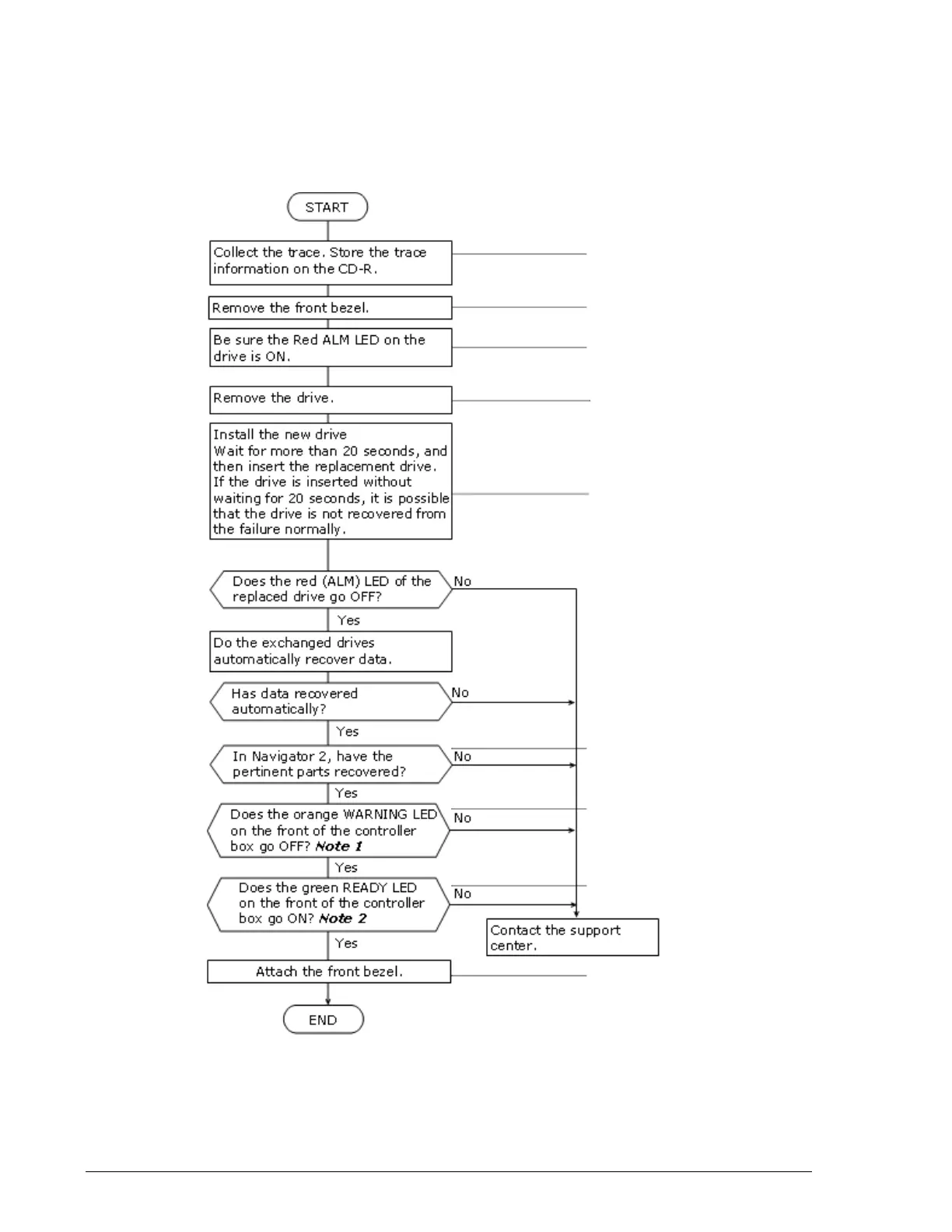
Perform the procedure in Figure 4-5 when replacing a drive in a storage
system that has a RAID 1, 5, 6, or 1+0 configuration and the red ALM LED
is ON. If two or more data and/or spare drives need to be replaced, replace
the data drives first.
Figure 4-5: Drive replacement flowchart
See Collecting trace
information on page 3-13
See Removing and
replacing the front bezel
on page 3-10
See Locating drives on
page 4-3
See Chapter 2
See Removing and
replacing the front bezel
on page 3-10
See Chapter 2
See Removing and
replacing drives on
CBXSL/CBSL Controller
Boxes and DBL Drive Box
on page 4-10 and
Removing and replacing
drives on CBXSS/CBSS
Controller Boxes and
DBS Drive Box on page
4-11
.



 To Next Page