General maintenance and best practices 16–9
Hitachi Unified Storage Hardware Service Guide
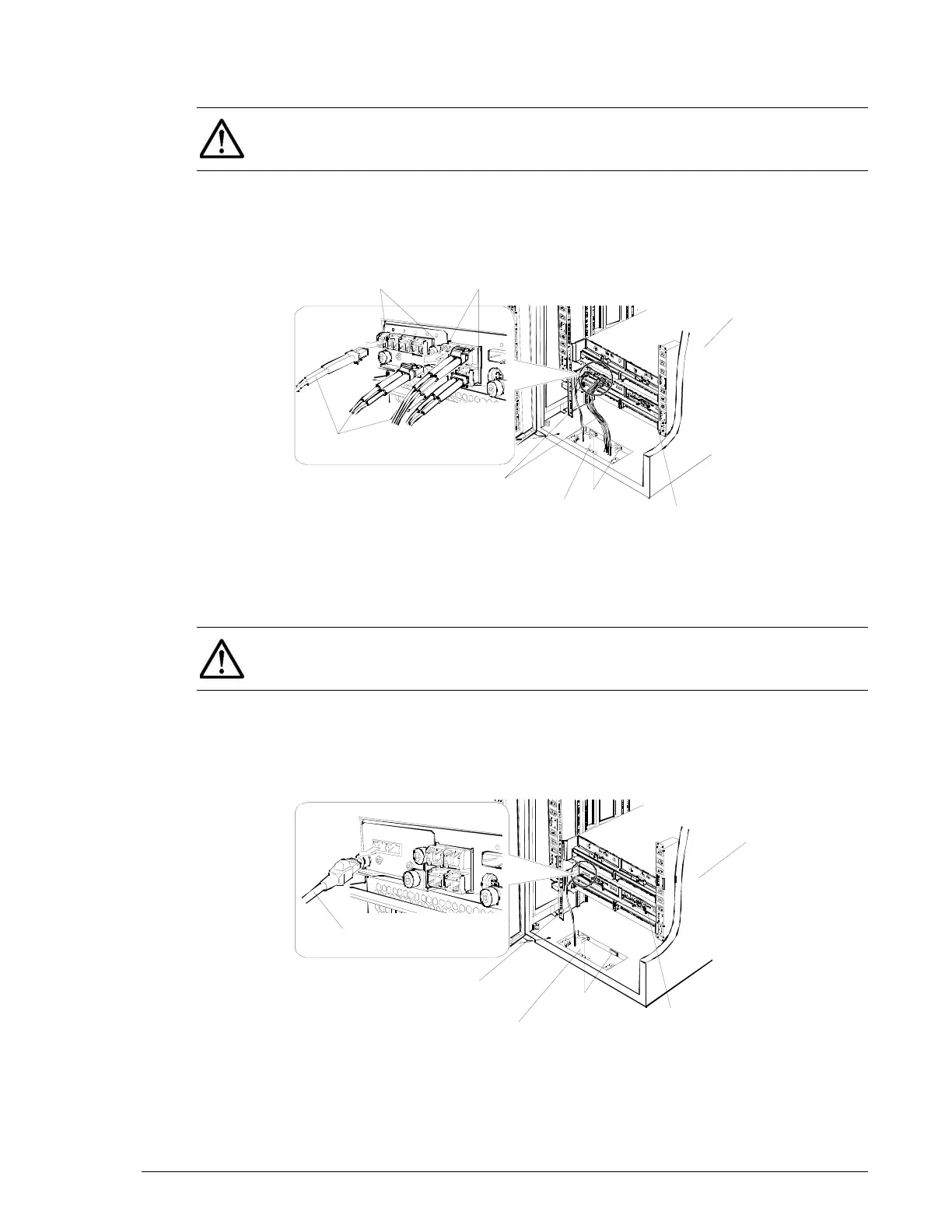
Disconnecting Fibre Channel interface cables
To disconnect Fibre Channel interface cables:
1. Disconnect the Fibre Channel interface cable from the clamp.
2. Disconnect the Fibre Channel interface cable connected to the controller.
Figure 16-7: Example of disconnecting Fibre Channel cables on a CBSL
Disconnecting iSCSI interface cables
To disconnect iSCSI interface cables:
1. Disconnect the iSCSI interface cable from the clamp.
2. Disconnect the iSCSI interface cable connected to the controller.
Figure 16-8: Example of disconnecting iSCSI cables on a CBSL
NOTE: If the cable cannot be removed easily, do not pull it by force;
gently pull out as much of the cable as you can, repeating this action until
the cable is removed.
CBSL
Port 0E-0 - Port 0H
0
Fibre Channel
Interface cables
Cable passing opening
Clamp
Fibre Channel
Interface cables
Sam
le
rac
NOTE: If the cable cannot be removed easily, do not pull it by force;
gently pull out as much of the cable as you can, repeating this action until
the cable is removed.
Sample rack
ISCSI Interface
cable
ISCSI Interface
cables
Cable passing
opening
Clamp
CBSL



 To Next Page