Upgrading a Hitachi Unified Storage 130 system 15–25
Hitachi Unified Storage Hardware Service Guide
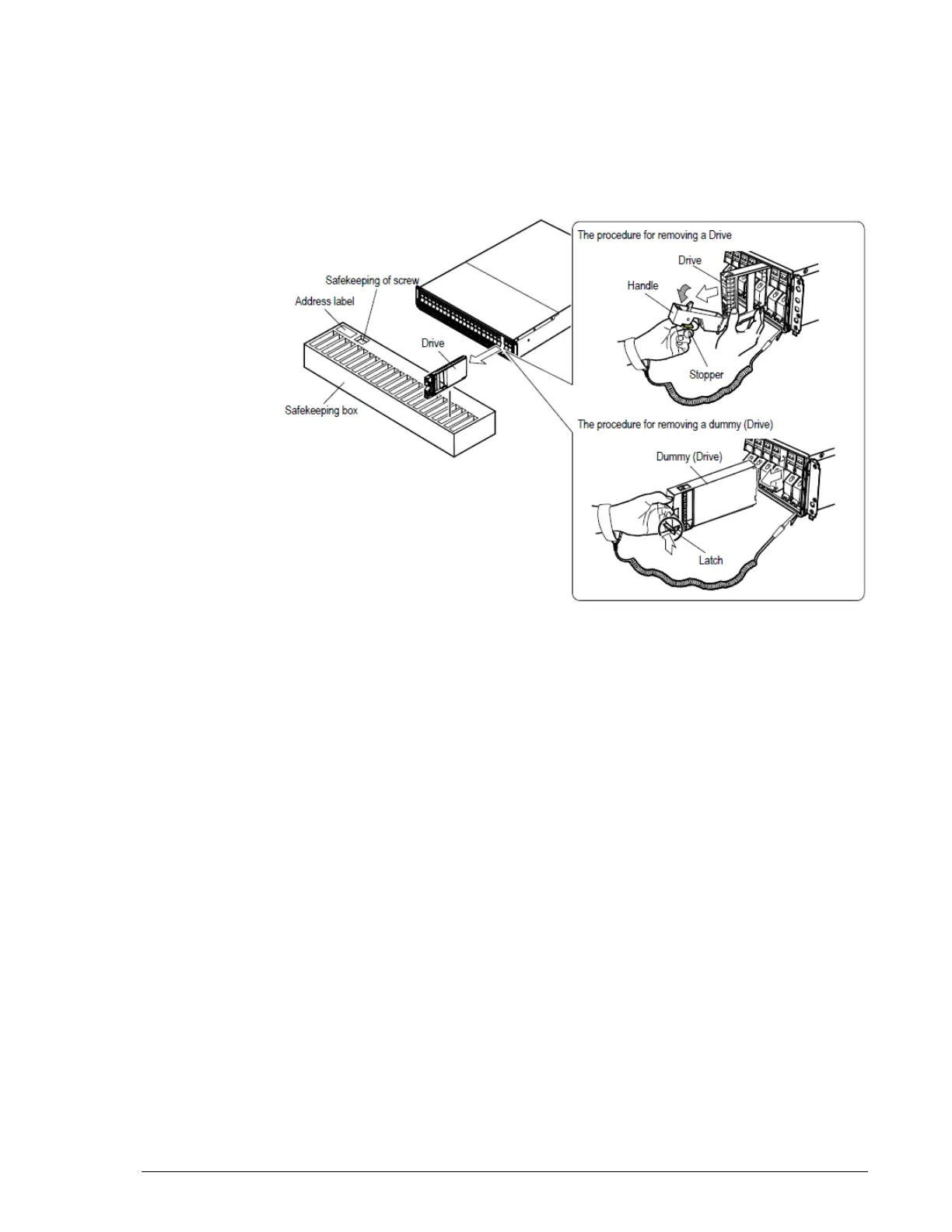
Removing a drive from the DBS Drive Box
To remove a drive from the DBS Drive Box:
1. Pull the stopper of the handle toward you to set the lock off (
?
in
Figure 15-9).
2. Tilt the handle toward you and remove the drive by pulling it out.
Figure 15-9: Removing a drive from a DBS Drive Box
3. Pressing the latch on the lower side of the real or mock (“dummy”) drive
in the direction of the arrow, hold the top part of the drive, pull it out,
and then remove it. Do not apply shock or vibration to the drive when
removing it.
4. Keep the drive in the component box at the location shown on the
address label, with the drive’s handle returned to its original state and
locked by the stopper.
Removing a drive from the DBX Drive Box
To remove a drive from the DBX Drive Box:
1. Remove the top cover of the DBX (see Removing and replacing the front
bezel on page 3-10).
2. Slide the blue latch on the real or mock (“dummy”) drive, open the
handle, and then pull out and remove the real or dummy drive. Do not
apply shock or vibration to the drive when removing it.
3. Keep the drive in the component box at the location shown on the
address label, with the drive’s handle returned to its original state and
locked by the stopper.
4. Attach the top cover of the DBX (see Removing and replacing the front
bezel on page 3-10).



 To Next Page