9–6 Replacing cache memory
Hitachi Unified Storage Hardware Service Guide
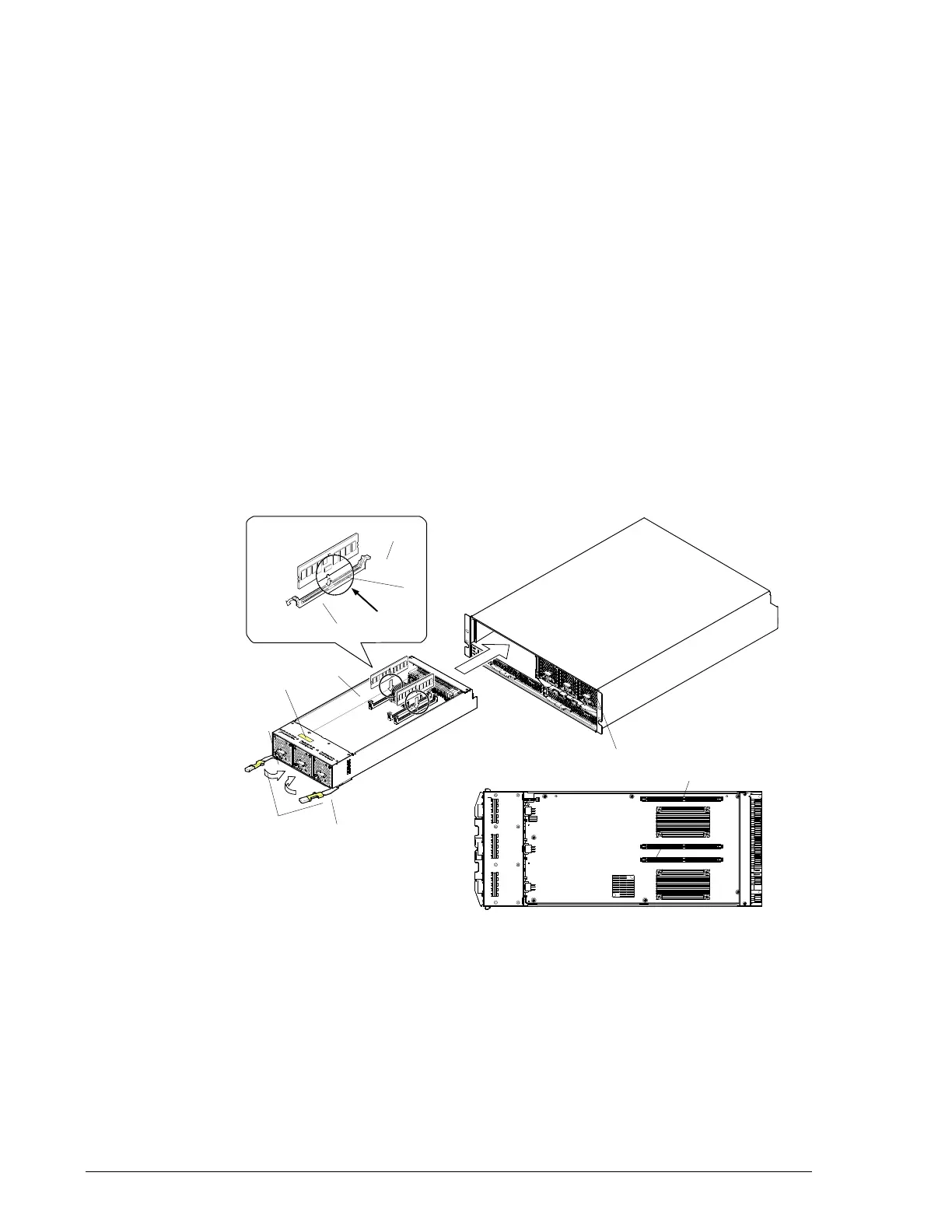
Replacing cache memory on a CBL Controller Box
To replace cache memory on CBL Controller Boxes:
1. Be sure the red ALM LED or orange RST LED is ON at the controller
whose cache memory you want to replace. If either LED is not ON, visit
the HDS Support Portal at portal.hds.com.
2. Slide the right and left blue latches, and then open the levers forward.
When the levers are opened completely, the controller can be removed.
3. Slide the controller forward and remove it.
4. Before removing the cache memory, record the slots where it is
installed, its capacity, and its model name.
5. Push the slot levers that secure the cache memory.
6. Using both hands, gently pull up the cache memory and remove it.
7. Using both hands, hold the new cache memory and insert the modules
into the same slots where the old cache memory was installed, according
to the slot information you recorded earlier.
8. Align the projection inside the slot with the cut on the cache memory,
and then gently push the cache memory into the slot until the slot levers
close completely.
Figure 9-3: Installing cache memory on a CBL
Controller #0
Controller #1
Lever
Projections
(CMM0)
Controller (Upper)
Cache Memory



 To Next Page