Upgrading a Hitachi Unified Storage 130 system 15–29
Hitachi Unified Storage Hardware Service Guide
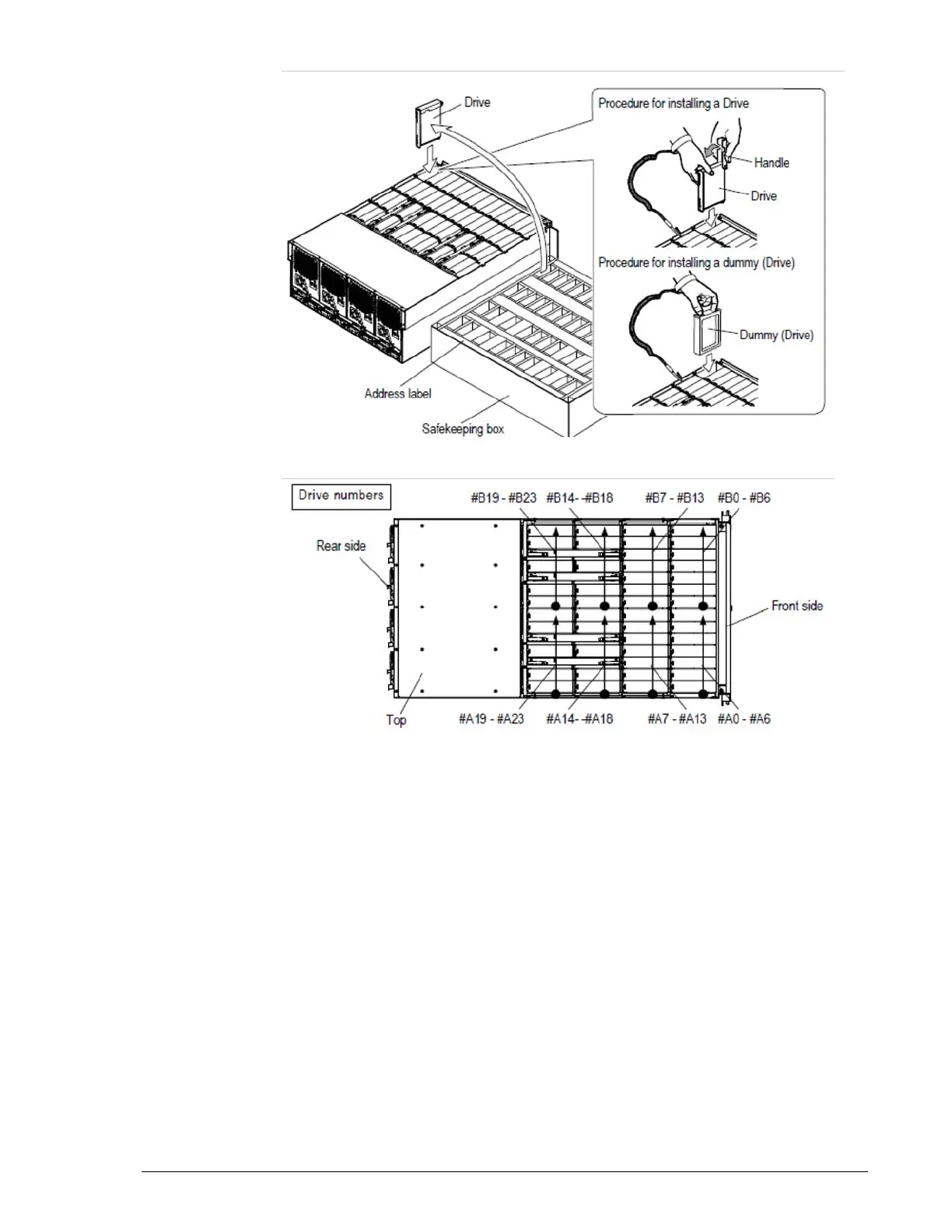
Figure 15-15: Installing a dummy drive in the DBX
Figure 15-16: Drive locations in a DBX
7. Attach the front bezel (see Removing and replacing the front bezel on
page 3-10).
Mounting the CBL
Mount the CBL into the rack and adjust the components in the rack as
necessary to accommodate the CBL and DBL, DBS, or DBX Drive Trays. For
more information, refer to the Hitachi Unified Storage Hardware Installation
and Configuration Guide.
After mounting the CBL, connect the SAS (ENC) cables, power cables, and
data interface cables. For more information about these interfaces, see
Chapter 2, Hardware description and refer to the Hitachi Unified Storage
Hardware Installation and Configuration Guide.



 To Next Page