Adding and replacing controllers 8–3
Hitachi Unified Storage Hardware Service Guide
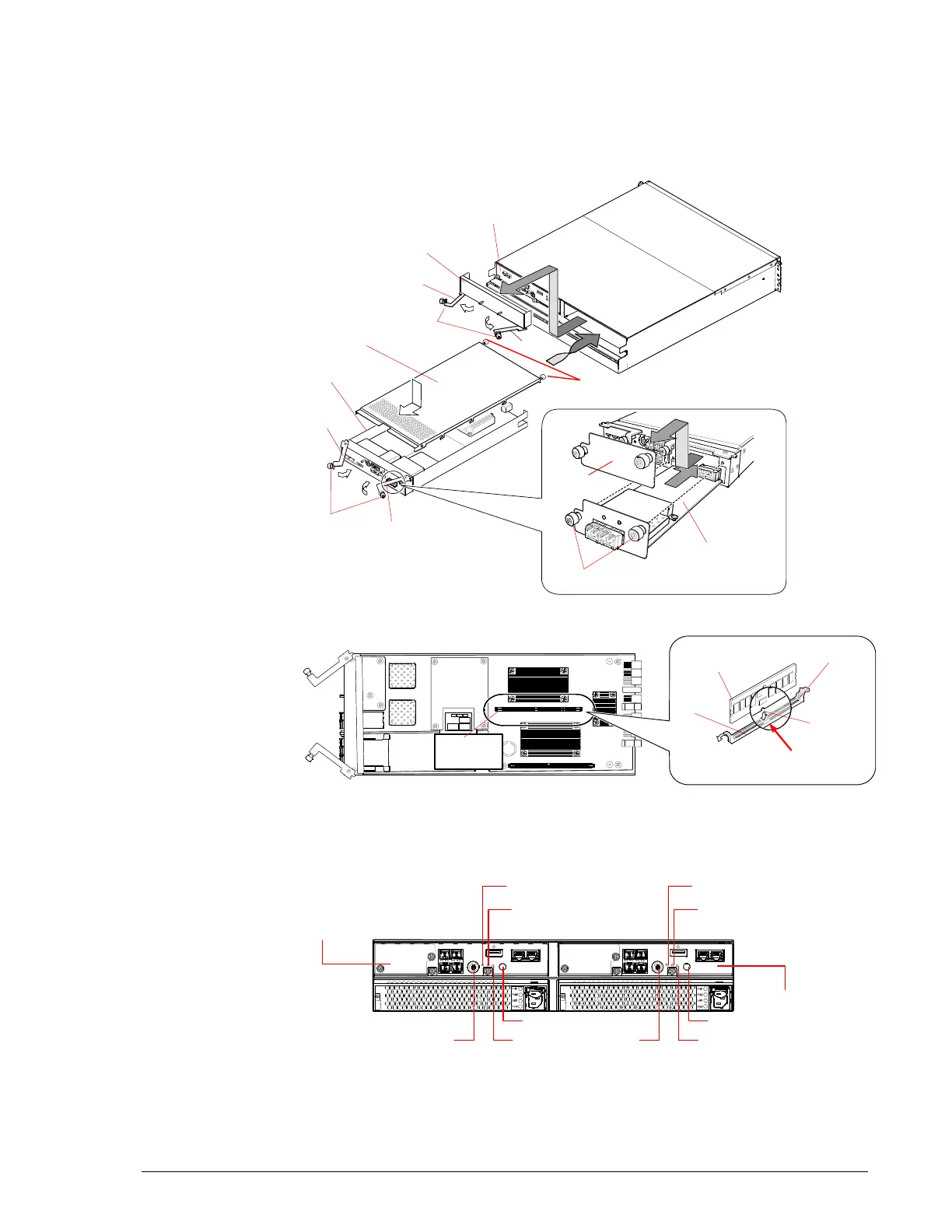
Adding a controller to a single-controller CBXSS/CBXSL
This section describes how to add a second controller to CBXSS and CBXSL
storage systems equipped with a single controller. See Figure 8-1 and
Figure 8-2 as you perform this procedure.
Figure 8-1: Adding a Controller
Figure 8-2: LEDs on the CBXSS/CBXSL Controllers
Controller #1
Controller #0
Screws
(blue)
Lever
Leve
Cover
Host I/O Board screw
Cover screws (blue)
iSCSI Host I/O Board
Dummy (Controller)
Screws
(blue)
Lever
Lever
Dummy
Slot lever
Cache Memory
Slot
Projections
Cut
Slot #0
(CMM0)
Controller (CBXSS/CBXSL Upper)
Controller #0
Controller #1
ALM LED
RST SW
UPS
RST SW UPS
ALM LED



 To Next Page