SYSTEM CONFIGURATION
940043-002 INTEGRATED ENTERPRISE NETWORK 5-13
DIP Switch Settings
The Hypercom IEN 5000 chassis may be bus connected using a Hypercom Type B cable, up
to three chassis. By bus connecting three IEN 5000 chassis, a 51 port node is possible. The
Type B cable used only for standard bus expanding the IEN 5000 chassis.
The IEN 5000 chassis can be connected in any order as long as only one master and one
redundant are configured.
n
Up to three chassis may be connected
n
The redundant clock chassis backs up the master clock chassis
n
The standard bus speed should always be set to “A” (default factory setting)
n
Using this method, only the standard bus is extended
n
The bus cable is Hypercom Type B
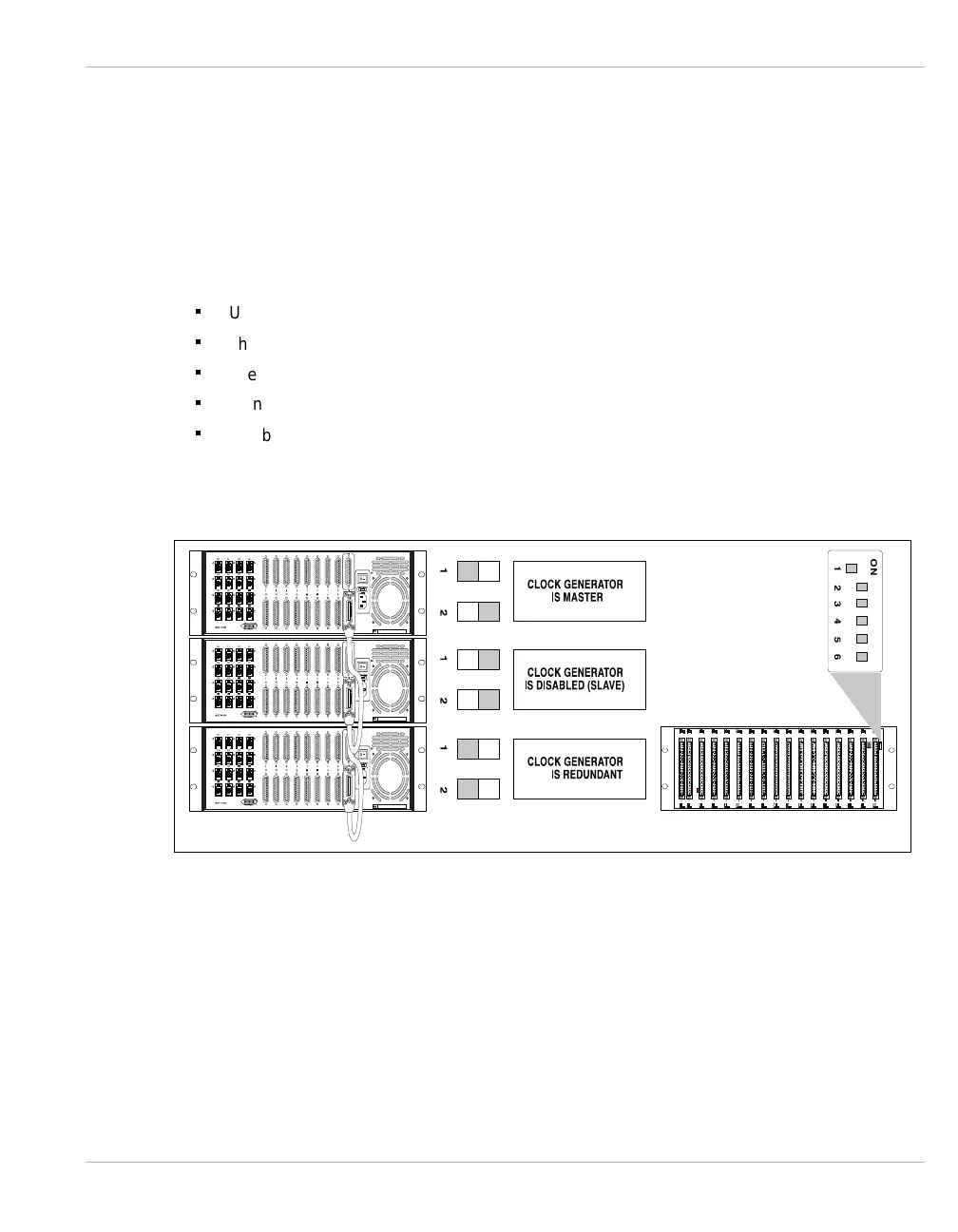
Figure 5-9 illustrates the DIP switch settings for the IEN 5000 chassis.
Figure 5-9 DIP Switch Settings
Note: The Master and Redundant chassis are end points of the extended bus and require bus
terminators attached to the Type B cables. Refer to CHAPTER 4, Type B for more information
about the Hypercom Type B cable and terminator.



 To Next Page