56
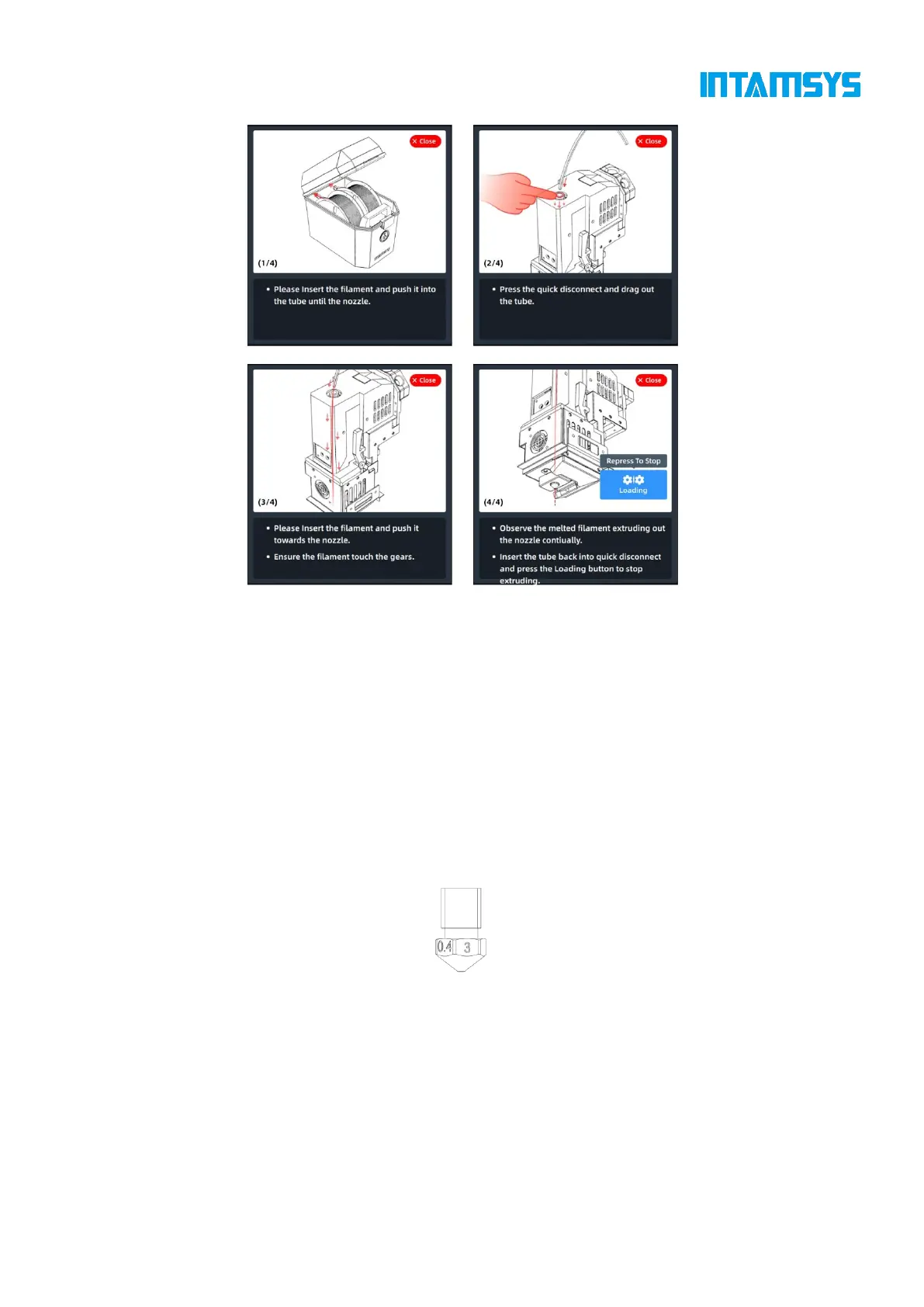
Fig. 5.8 Material Loading Guidance Interface
Please refer to 4.4 "Materials" for operations such as material unloading, material process template
modification and material database modification.
5.3 Nozzle Replacement and Material Change
There are two types of printing nozzles: The silver-white nozzle is made of CuCrZr and can print
all materials except fiber-containing materials (PA6-CF/PA12-CF, etc.); the black nozzle body is
made of hard steel and mainly prints fiber-containing materials (PA6-CF/PA12-CF, etc.).
It is strongly recommended that one nozzle prints only one material, which is conducive to stable
operation of the device and easy management.
Fig. 5.9 Schematic Diagram of Nozzle Structure
5.3.1 Nozzle Replacement
The procedure of nozzle replacement is as follows:
1. Click the "Material" button on the main interface to enter the Material interface.
2. If there is still material in the nozzle, click the "Unload" button first to unload the material
according to the prompts.



 To Next Page