- Digital Microscope VHX-5000 User’s Manual -
Settings
13-4
Configuring the Operating Environment
Configuring FTP and file-sharing
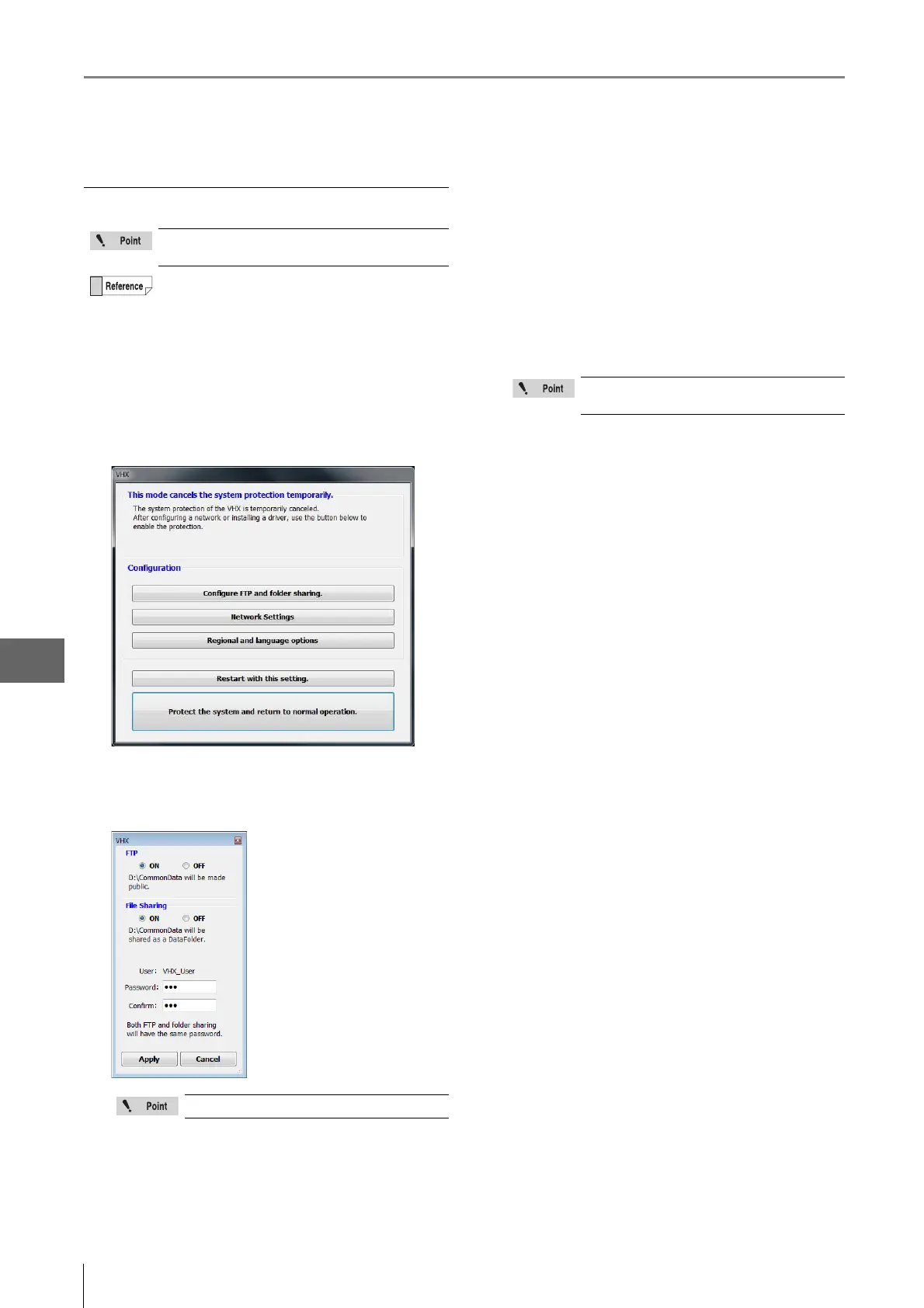
1 Temporarily disable system protection.
Refer to the procedures to temporarily disable system
protection (Page 13-2).
2 Click [Configure FTP and folder sharing].
The [FTP] and [File Sharing] settings dialog appears.
3 Select the ON/OFF options as desired for FTP and
file sharing.
4 Specify a password for FTP and file sharing, as
necessary.
Passwords are case-sensitive. This password is
necessary to connect to the microscope. Be sure to
record it and store it in a safe place.
5 Click [Protect the system and return to normal
operation.].
The system restarts.
6 Access the microscope from a PC using the FTP
server and/or file sharing.
Password entry is required to use the FTP and
file-sharing features.
The following folders are used by the FTP server
and for network sharing.
FTP server: D:\CommonData will be made public.
File sharing: D:\CommonData will be shared as the
data folder.
The user name cannot be changed.
The network settings (Page 13-5) must be
configured in order to use the FTP server.



 To Next Page