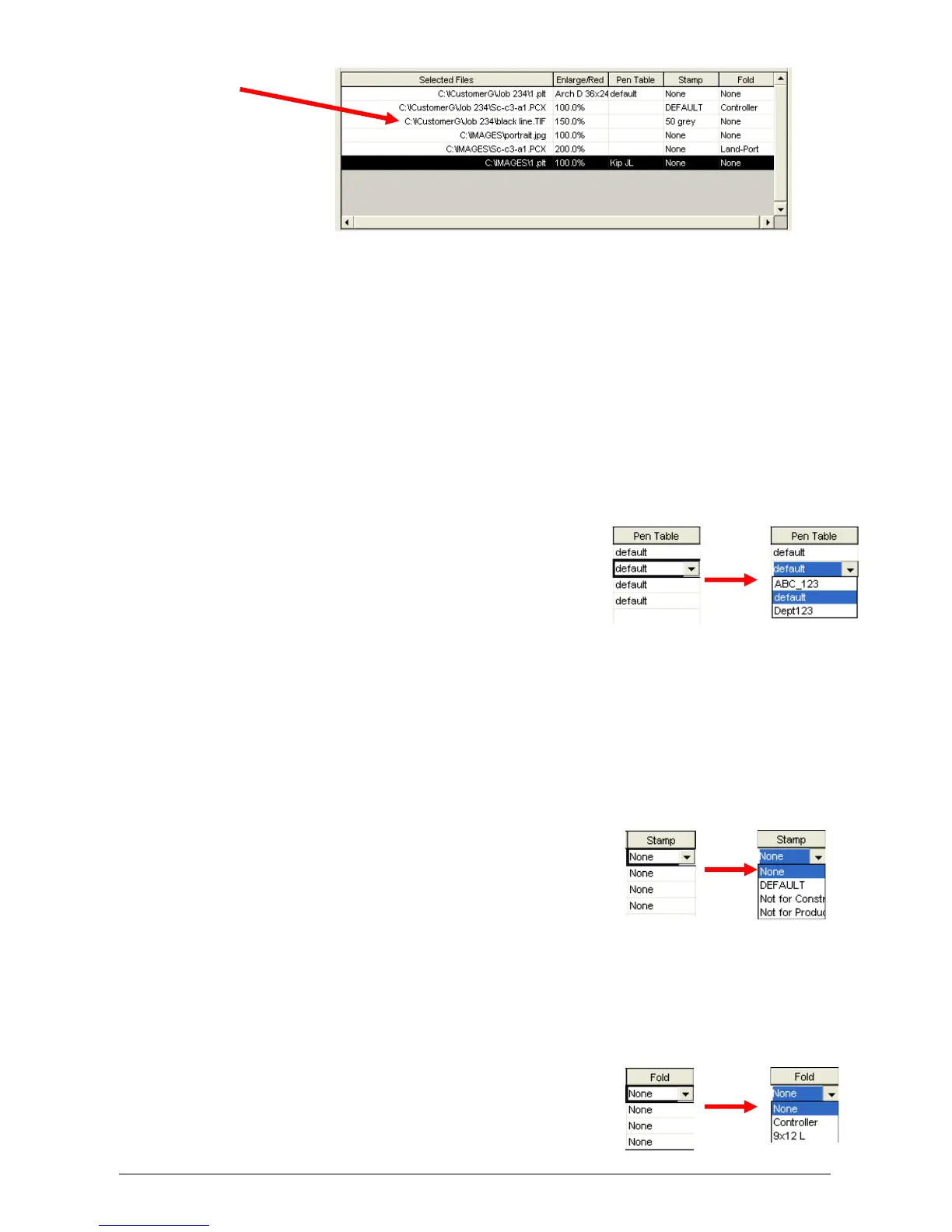
Section 6 Request 6-9
In the above example, the third file from the top (black line.TIF) will be enlarged
150%, applied a pen pattern called “50 Grey” and it will not be folded.
2.3.2 Enlarge / Reduce
Other zoom settings can be applied from the Advanced Job Settings.
2.3.3 Pen Table
Pen type and styles can be applied to vector or hybrid files. They can include pen
widths, raster density, junctions, etc. Please see Pens in 2.5.1 for greater details.
The name of the applied pen table is displayed here and can be changed prior to
printing.
a) Click on the “pen Table” of the file you wish
to change
b) A drop down arrow will appear
c) Select a predetermined pen table. (see
2.5.1 to create tables)
2.3.4 Stamp
Stamps (or watermarks) can be applied to any printed document. Please see
Pens in 2.5.3 for greater details.
The name of the applied stamp is displayed here and can be changed prior to
printing.
a) Click on the Stamp of the file you wish to change
b) A drop down arrow will appear
c) Select a predetermined stamp. (see 2.5.3 to
create stamps)
2.3.5 Fold
If an optional Folder is connected, fold patterns can be applied to the documents.
This is called matrix Folding. To set up fold patterns please see 2.5.4 for greater
details. The name of the Fold Pattern is displayed here and can be changed prior
to printing.
a) Click Fold on the file you wish to change
b) A drop down arrow will appear



 To Next Page