Section 1 Basic Printer Functions
1-61
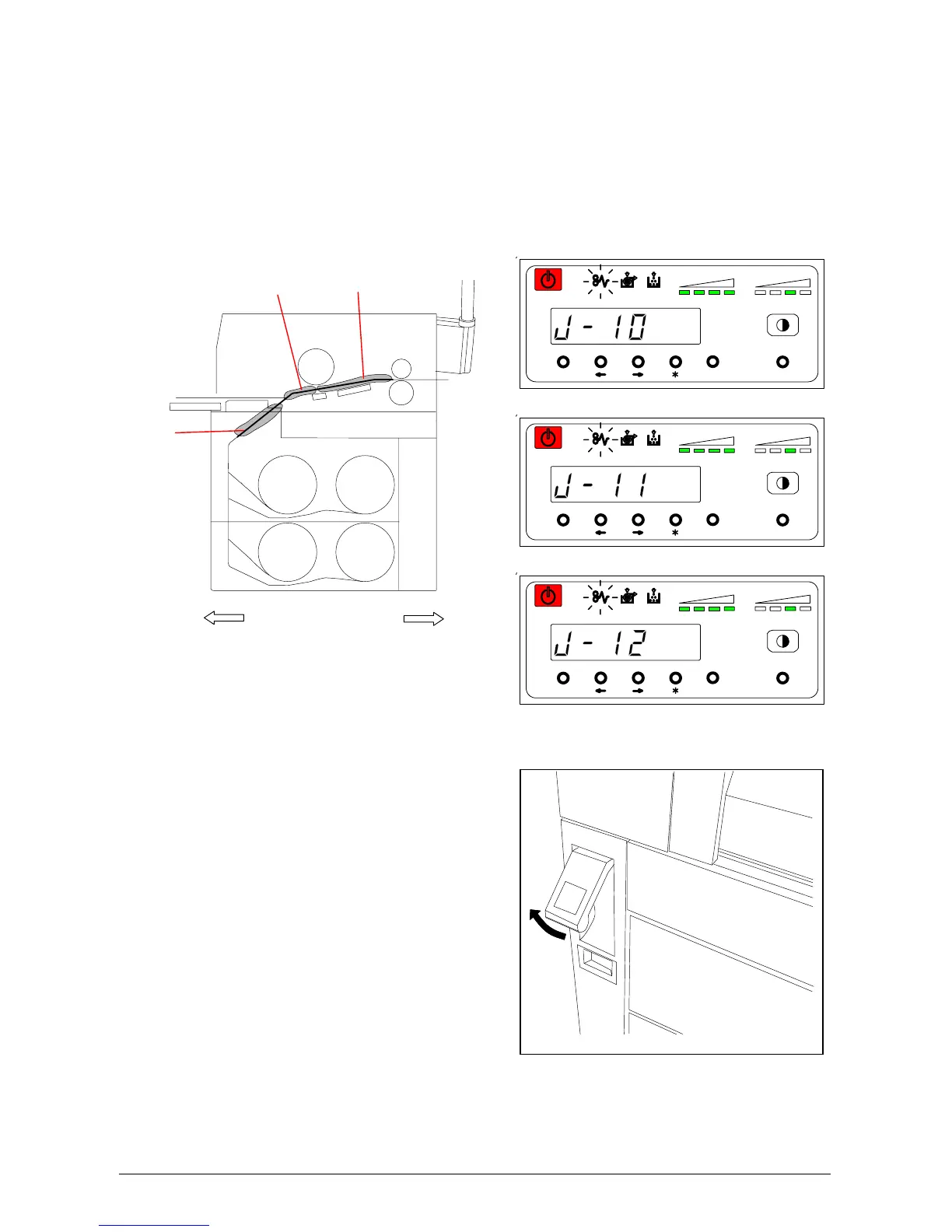
4. 1. 3 Paper Mis-feed in Paper Feed Section
(J-10, J-11, J-12)
When the Paper Mis-feed occurs in the Paper Feed Section, Operation Panel indicates “J-10”, “J-
11” or “J-12”.
J-10 : Mis-feed in the Front Area
J-11 : Mis-feed in the Middle Area
J-12 : Mis-feed in the Rear Area
Clear the Paper Mis-feed using the
following procedure:
1) Lift up the Lever of the Internal
Feeder Unit.
MENU ENTER TEST
TONER REMAIN IMAGE DENSITY
job
MENU ENTER TEST
TONER REMAIN IMAGE DENSITY
job
MENU ENTER TEST
TONER REMAIN IMAGE DENSITY
job
Roll 3
Roll 4
Roll 1
Roll 2
Front Rear
J-10
J-11
J-12



 To Next Page