Section 5 AutoCAD Driver
5-12
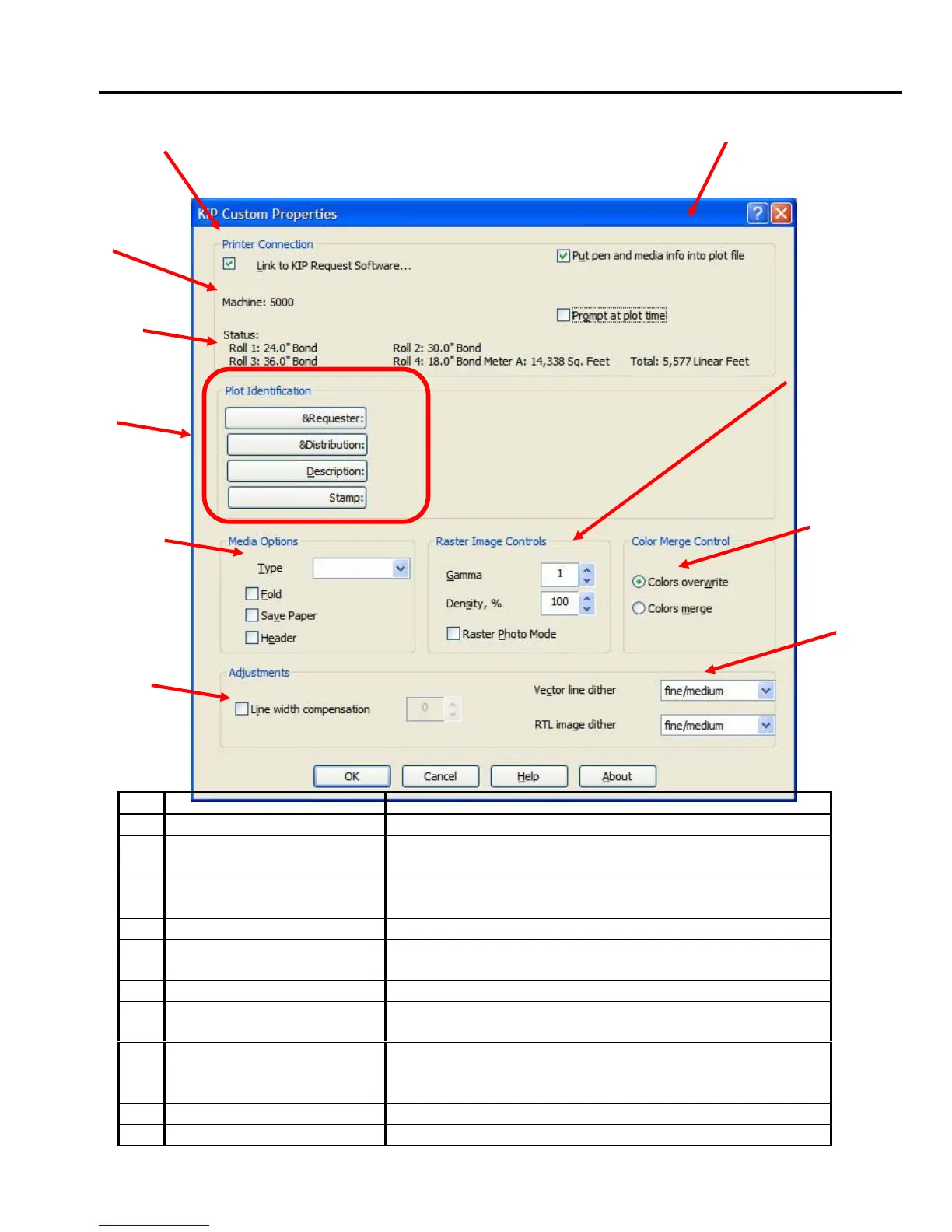
5.0 Custom Settings
No. Name Function
1 Link to KIP Request Enables advanced features on Custom Properties
2 Put Pen and Media info in
plot file
Places all media and advanced pen information inside
the file to overwrite default settings.
3 Raster Image Control Adjustment for raster embedded images. Gamma and
density controls.
4 Color Merge Control Line Merge and color overlay control.
5 Dither Patterns Controls dither patterns for vector lines and raster
embedded images
6 Line Width Compensation Controls overall line thickness or thinness
7 Media Options Selects the type of media, folded output (optional,
media save and printed header.
8 Plot Identification Used for accounting / job tracking and header
information. Preset stamps from KIP Request can also
be selected.
9 Status “Real-Time” printer status. Includes installed media.
10 Machine Displays currently select printer model
1 2
7
3
8
4
9
10
6
5



 To Next Page