Section 1 Basic Printer Functions 1-53
3. 2.10 User Mode 9: L / L Environment Setting Mode
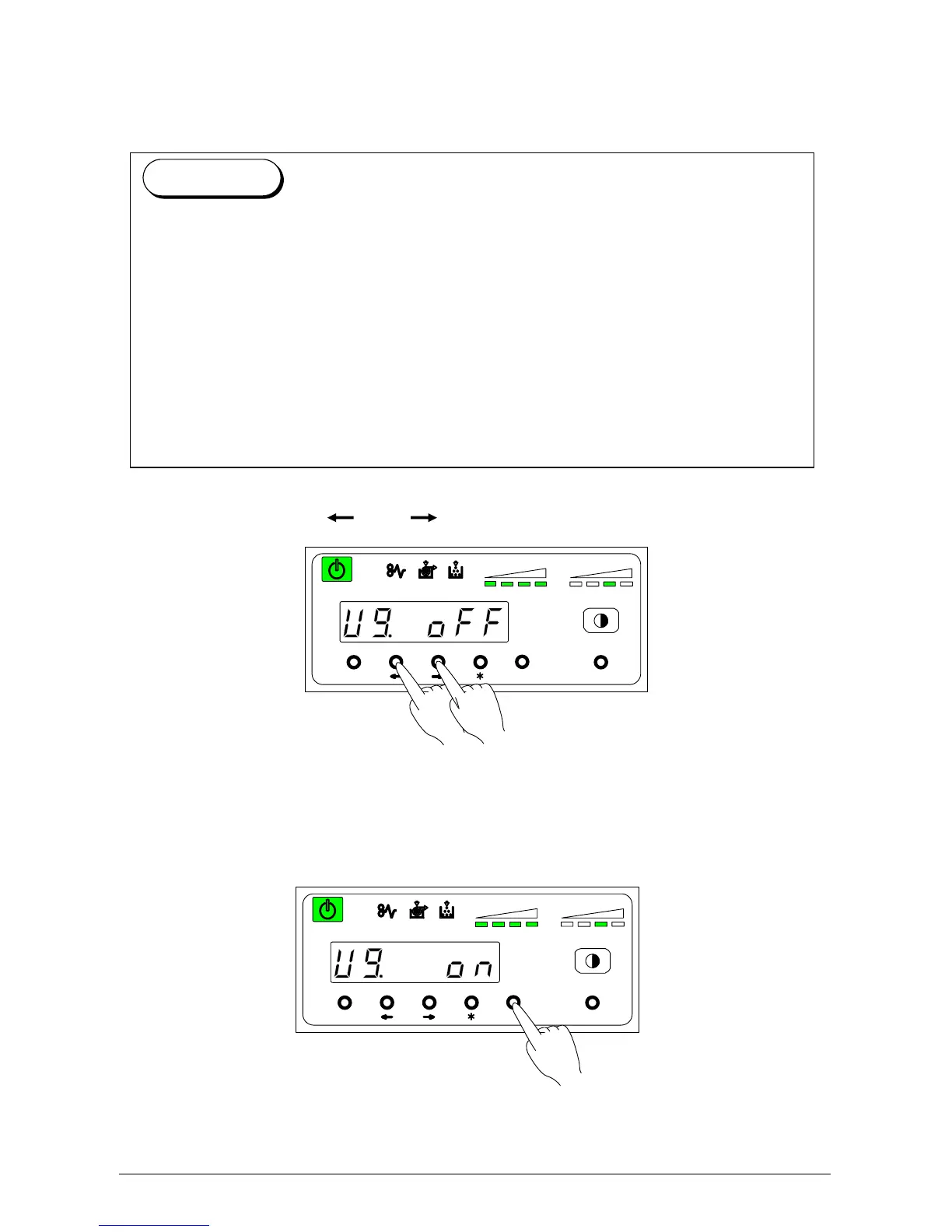
It is possible to select whether or not the L / L Environment Setting Mode is functional.
1) Select “U9.” by pressing [ ] or [ ] key.
U 9. on: Low Temperature / Low Humidity Environment Setting is on.
U 9. off: Low Temperature / Low Humidity Environment Setting is off. (Normal operation)
2) Select either “on” or “off” according to user preference by pressing the [Enter] key.
MENU ENTER TEST
TONER REMAIN IMAGE DENSITY
job
MENU ENTER TEST
TONER REMAIN IMAGE DENSITY
job
“Creasing of paper” or “Defective fusing” may occur on the prints under the extreme
environment of Low Temperature / Low Humidity (called L / L Environment.) You can avoid
the above problem if the User Mode 9 is on.
Please note that the interval of prints becomes longer than usual, and print productivity
reduces as follows if the User Mode 9 works.
(A) If continuous printing is done with 30” or wider roll media, the interval between prints
becomes 6.5 seconds.
(B) If continuous printing is done with 22” or wider vellum roll, the interval between prints
becomes 20 seconds, 30 minutes after the printer becomes ready.
Reference



 To Next Page