Home
KIP
Printer
5000
Page 248
KIP 5000 - Page 248
251 pages
Manual
Save Page as PDF
To Next Page
To Next Page
To Previous Page
To Previous Page
Loading...
Section 9 Connectivity
9-4
1.2.1
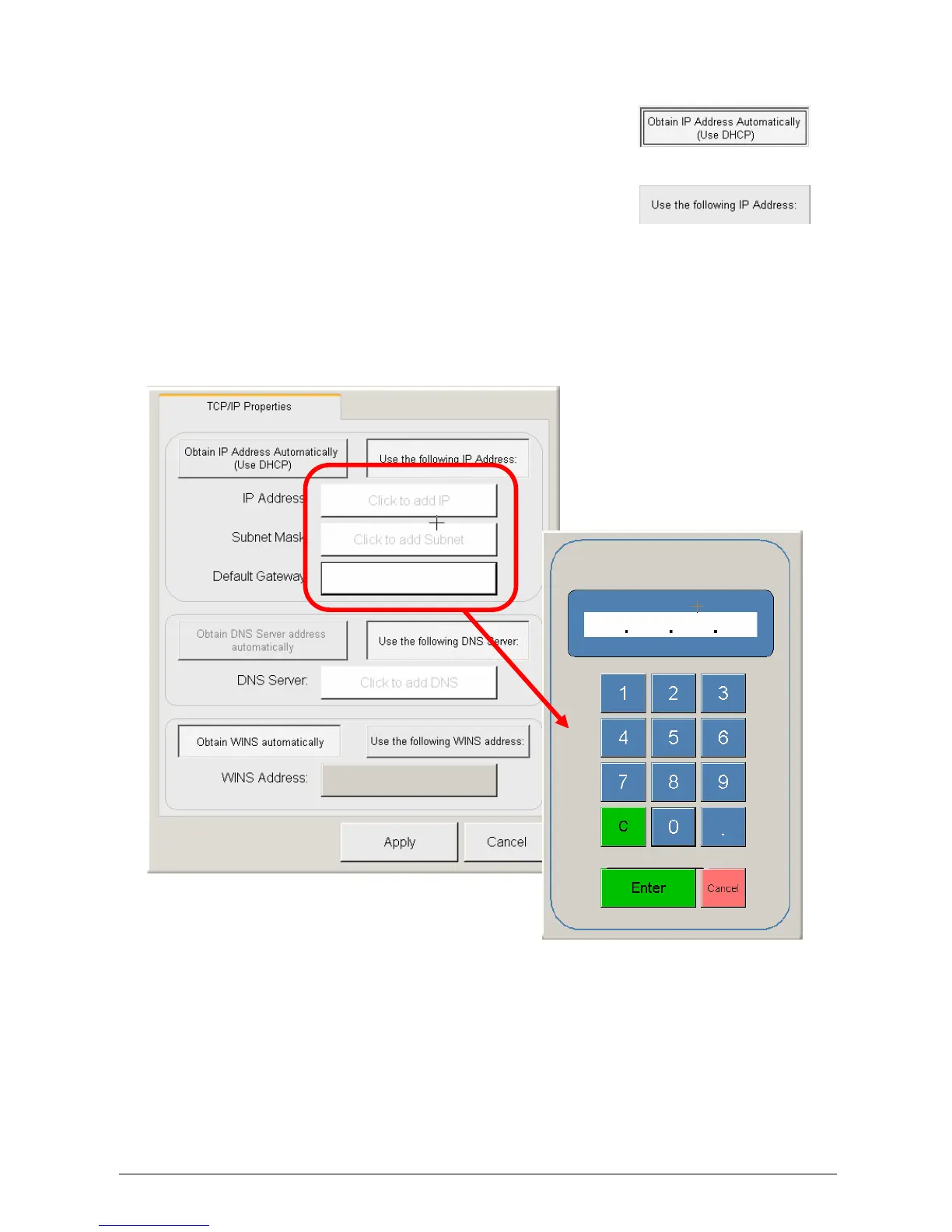
DHCP /
Manual IP Assigment
a)
Pre
ss “Use DHCP” button for DHCP t
o
assign IP address
b)
Press “Use Following IP Add
ress” button to
enter IP address manually
c)
Enter desired IP Addre
ss, Subnet Mask, and
Gateway
247
249
Table of Contents
Main Page
Section 1 Basic Printer Functions
7
Safety Warnings
3
Table of Contents
7
Before Use
9
Installation Requirements
9
Prohibited Originals
10
Key Features
11
Specifications
12
Exterior Views
13
Front View
13
Rear View
14
Touchscreen / Sub Display
15
Job Info Screen
16
Display During Normal Operation
19
Optional Configurations
22
Media Specifications
23
Print Sizes
23
Media Not to be Used
24
Maintaining the Media
25
Environmental Condition - Correction
26
Basic Functions
28
Turning on the Printer
28
Turning off the Printer
30
Replacing the Roll Media
31
Replacing the Toner Cartridge
39
Setting Cut Sheet Paper
43
Dehumidifying the Roll Media
44
User Modes
47
User Mode 0: Image Area Expanded
48
User Mode 1: Image Enhancement Setting
49
User Mode 2: Auto Power off Timer Setting
51
User Mode 3: Auto Power off Setting
52
User Mode 4: Cold Sleep Timer Setting
53
User Mode 5: Cold Sleep Setting Mode
54
User Mode 6: Warm Sleep Timer Setting
55
User Mode 7: Warm Sleep Setting
56
User Mode 8: Short Interval Setting
57
User Mode 9: L/L Environment Setting
58
User Mode A: H/H Environment Setting
58
Paper Mis-Feed Errors
61
Error Correction
61
Paper Mis-Feed in Manual Feeder Section
65
Paper Mis-Feed in Paper Feeder Section
66
(J-10, J-11, J-12)
66
Paper Mis-Feed in Fuser Section
68
Open Cover Errors
72
Roll Deck Open (U-01, U-02)
72
Lever / Toner Cover Open (U-05)
73
Exit Cover Open (U-06)
74
Other Errors
75
Toner Low
75
Roll Empty
75
No Manual Paper
76
Call Service Errors
77
Section 2 Job Info Screen
78
Operation Details
80
User Name
81
Status
82
Delete
83
Pause
85
Page Scroll
86
Change Media Information
87
Job History
88
Section 3 "?" Screen
90
Configuration Screen
91
Overview
91
Screen - General
92
Information Region
93
Main Screen - Details
93
Meter a
93
Firmware Version
94
IPS Number
94
Machine Serial Number
94
Meter B
94
Scan Count
94
Scan Count- Temp
94
Software Version
94
Total Run
94
Supplier / Technical Support
95
User Guides
96
Configuration
97
Printer Density
97
Default Mode
98
Power Save Settings
98
Master Lead / Trail Adjustment
99
Test Pattern
99
Network
100
Options
100
Reset Timer
100
Language
101
Copy and Scan Menu Defaults
102
Cut Sheet
103
Fold
103
Interrupt
103
Current Time
104
Reboot IPS
104
Reset Job Info
104
Color Configuration
105
Printer Model
105
Other Buttons
108
Output Format
112
Paper Size
113
Mirrored Output
115
Custom Settings
144
Kip Request
151
Introduction
153
Main Screen
154
Simple Printing
155
Display File Types "Browse for
157
File Select
157
Folder Select
157
Folder up
157
Function / Feature Details
157
Select a File
157
Select a Folder
157
Job List
158
Recall Last File(S)
158
Select All
158
Selected Files
158
Unselect All
158
Enlarge / Reduce
159
Fold
159
Pen Table
159
Stamp
159
File Order
160
Date
161
Description
161
Enlarge / Reduce
161
Job Number
161
Key Job Settings
161
Media Type
161
Requester
161
Advanced Job Settings
162
Collate
162
Of Copies
162
Pen Table
162
Pen Configuration
163
Advanced Settings Button
165
Line Width Compensation
165
Vector Line Dither Pattern
165
Clip to Image Size
166
Raster Photo Mode
166
Turn Merge on
166
Use Round End Capping
166
Photo Dither Pattern (Raster)
167
Raster Density Level
167
Enlarge / Reduce
168
Stamp
170
Current Font Area
171
Set Font
171
Stamp Placement and Margin Area
171
Stamp Schemes
171
Text Rotation - Pull down
171
Use Image
171
Use Text
171
Graphic Placement - Pull down
172
Graphic Rotation - Pull down
172
Macro - Pull down Menu
172
Merge Type - Pull down
172
Screening - Pull down
172
Text / Graphic Gap - Text Field
172
Text Settings Area
172
Fold
173
Graphic Image Settings Area
173
Preview Stamp
173
Orientation
174
Use Folder Settings
174
Fold Patterns (Available)
175
Header Label
175
Invert
175
Matrix Folding
175
Mirror
175
Roll Size
175
Scheme
175
Manage
176
Quick View
176
File
177
Menu
177
Printer Information
177
Printer Selection
177
View
177
Sort
178
Manage
181
Dropbox
182
Transfer
182
Mailbox Retrieval
183
Retrieve Scans
183
Mailbox File Deletion
185
KIP 5000 Copier Configurations
186
CD Installation
187
First Time Run
187
Installation
187
Request Installation
187
Windows Driver Access
187
Connection to KIP Printers
188
Find KIP Printers
188
Advanced Configuration and Settings
189
Other Installation Considerations
189
Pen Tables
189
Prompt Setup
189
Appendix
190
Folding - Technical Description
190
INI Configuration
192
Creating Productivity Reports
197
Printing DWF Files
203
Section 7 Kip Printnet
205
Admin Setup
209
Requester Region
209
File Selection
210
File Selection Area
210
Remove All
211
Submit Print Job
212
Email Settings
221
Advanced Configuration
225
Unified Accounting
227
Configuration Mode
246
Related product manuals
KIP 7000
82 pages
KIP 700 C Series
203 pages
KIP 7900
67 pages
KIP Color 80
150 pages
KIP 7970
65 pages



 To Next Page