Section 2 Job Info Screen 2-2
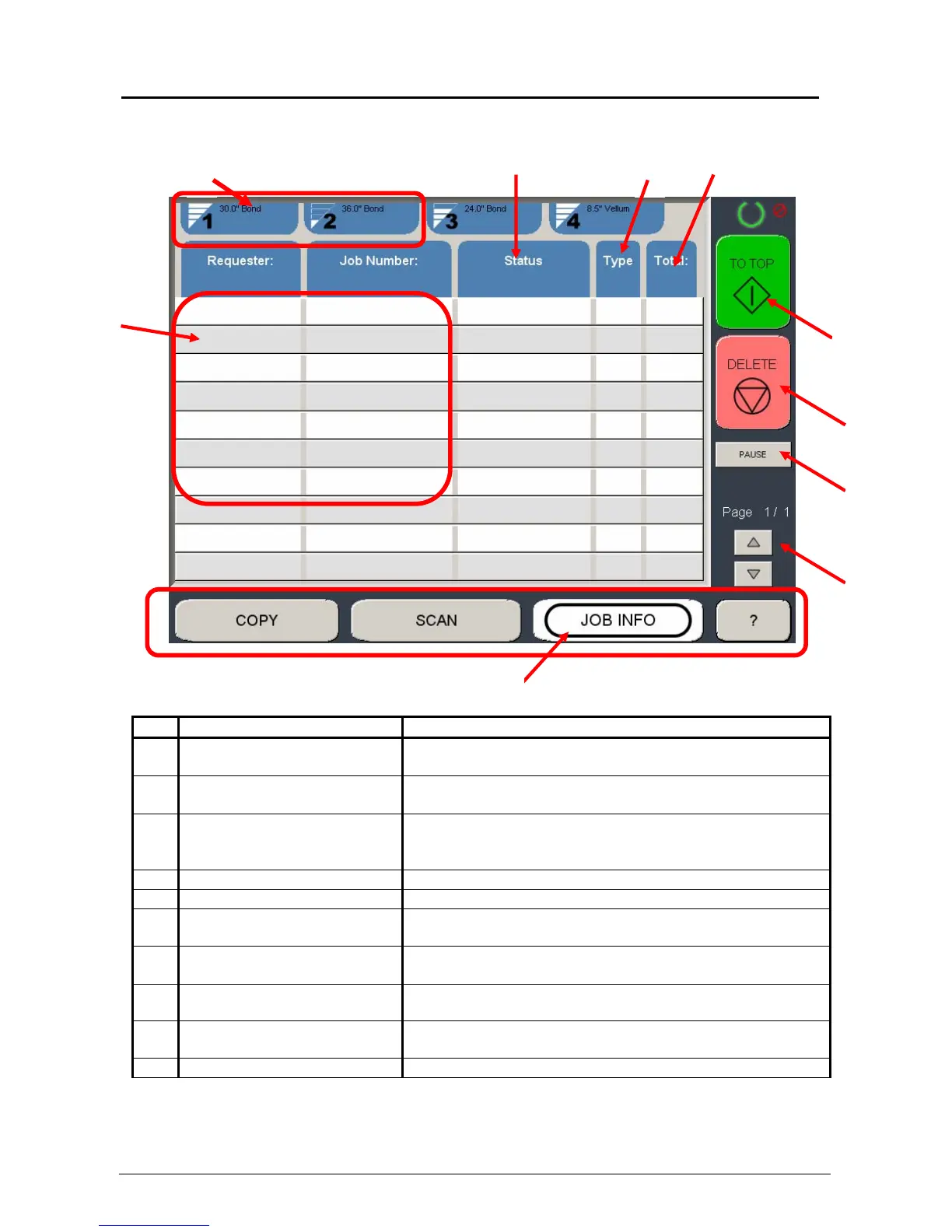
1. 0 Job Info Screen
1.1 Main Screen
No. Name Function
1 Mode Selects the “Mode” of the system. (Job Mode for this
screen shown)
2 User Name – Job # Display the User and any user info for the job ID. A job
can be selected for other functions noted below.
3 Media Information Displays and allows change of the Width and Type.
Shows the amount remaining per roll deck. (two or four
rolls depended on system)
4 Status Shows the current status of a job and media selection.
5 Type Displays a copy or network print job
6 Total Displays the total number of prints and current number
printed.
7 To Top After a job is selected (see #2) the position in the queue
can be changed to the next job printed.
8 Pause Pauses printer to allow media change, etc
9 Delete After a job is selected (see #2) it can be removed from
printing.
10 Up/Down Scrolls through pages in the queue if so available.
1
3
2
4
5
6
8
7
9
10



 To Next Page