152
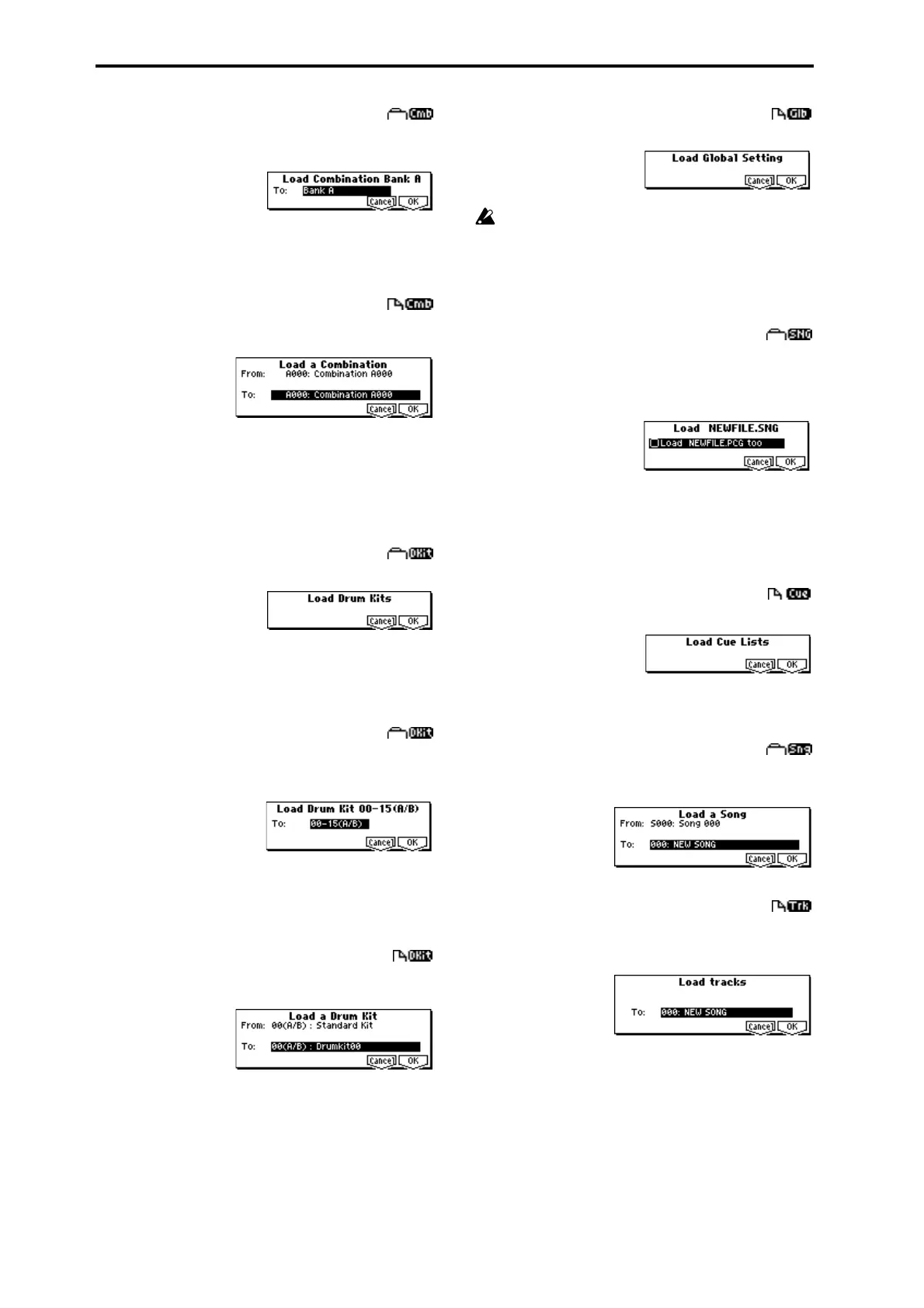
6) Load Combination Bank [A...F] : selected icon
All combinations in the selected bank will be loaded into the
bank you specify.
1 In “To,” specify the loading destination bank.
2 To load the data, press the [F8] (“OK”) key. To cancel
without loading, press the [F7] (“Cancel”) key.
7) Load a Combination: selected icon
The combination you select will be loaded into the loading
destination combination bank/number you specify.
1 If desired, use “From” to re-select the combination to be
loaded.
2 In “To,” select the bank and combination into which the
data will be loaded.
3 To load the data, press the [F8] (“OK”) key. To cancel
without loading, press the [F7] (“Cancel”) key.
8) Load Drum Kits: selected icon
All drum kits in the .PCG file will be loaded.
1 To load the data, press the [F8] (“OK”) key. To cancel
without loading, press the [F7] (“Cancel”) key.
9) Load Drum Kit [00-15(A/B),16-31(C, 32...47(D),
48...63(User)]:
selected icon
All drum kit data of the selected drum kit block will be
loaded into the drum kit block you specify as the loading
destination.
1 In “To,” select the drum kit block into which the data will
be loaded.
2 To load the data, press the [F8] (“OK”) key. To cancel
without loading, press the [F7] (“Cancel”) key.
10) Load a Drum Kit: selected icon
The selected drum kit will be loaded into the drum kit num-
ber you specify as the loading destination.
1 If desired, use “From” to re-select the drum kit to be
loaded.
2 In “To,” select the loading destination drum kit.
3 To load the data, press the [F8] (“OK”) key. To cancel
without loading, press the [F7] (“Cancel”) key.
11) Load Global Setting: selected icon
Global setting data in the .PCG file will be loaded.
This includes Global mode parameters other than drum
kits.
Memory protect and LCD screen contrast settings will
not be loaded.
1 To load the data, press the [F8] (“OK”) key. To cancel
without loading, press the [F7] (“Cancel”) key.
12) Load .SNG: selected icon
All data in the .SNG file will be loaded.
If the current directory contains a .PCG file of the identical
filename, the “Load ********.PCG too” check box will appear,
and you can select whether to load the .PCG file as well.
1 If a .PCG file of the same name exists in the current direc-
tory, you can select the “Load ********.PCG too” check
boxes.
2 To load the data, press the [F8] (“OK”) key. To cancel
without loading, press the [F7] (“Cancel”) key.
13) Load Cue Lists: selected icon
The cue list data in the .SNG file will be loaded.
1 To load the data, press the [F8] (“OK”) key. To cancel
without loading, press the [F7] (“Cancel”) key.
14) Load a Song: selected icon
Data for the selected song will be loaded into the song num-
ber you specified as the load destination.
15) Load tracks: selected icon
The selected Track file will be loaded into the song you spec-
ify as the loading destination. However, it is not possible to
specify an uncreated song as the loading destination.
1 In “To,” specify the loading destination song.
2 To load the data, press the [F8] (“OK”) key. To cancel
without loading, press the [F7] (“Cancel”) key.





 To Next Page