218
100: LCR BPM LDly
(L/C/R BPM Long Delay)
The L/C/R delay enables you to match the delay time with
the song tempo. You can set the delay time up to 2,730msec.
f: Time Over? >
You can set the delay time up to 2,730msec. If the delay time
exceeds this limit, the error message “OVER!” appears on the dis-
play. Set the delay time parameters so that this message will not
appear. "Time Over?>" is only a display parameter.
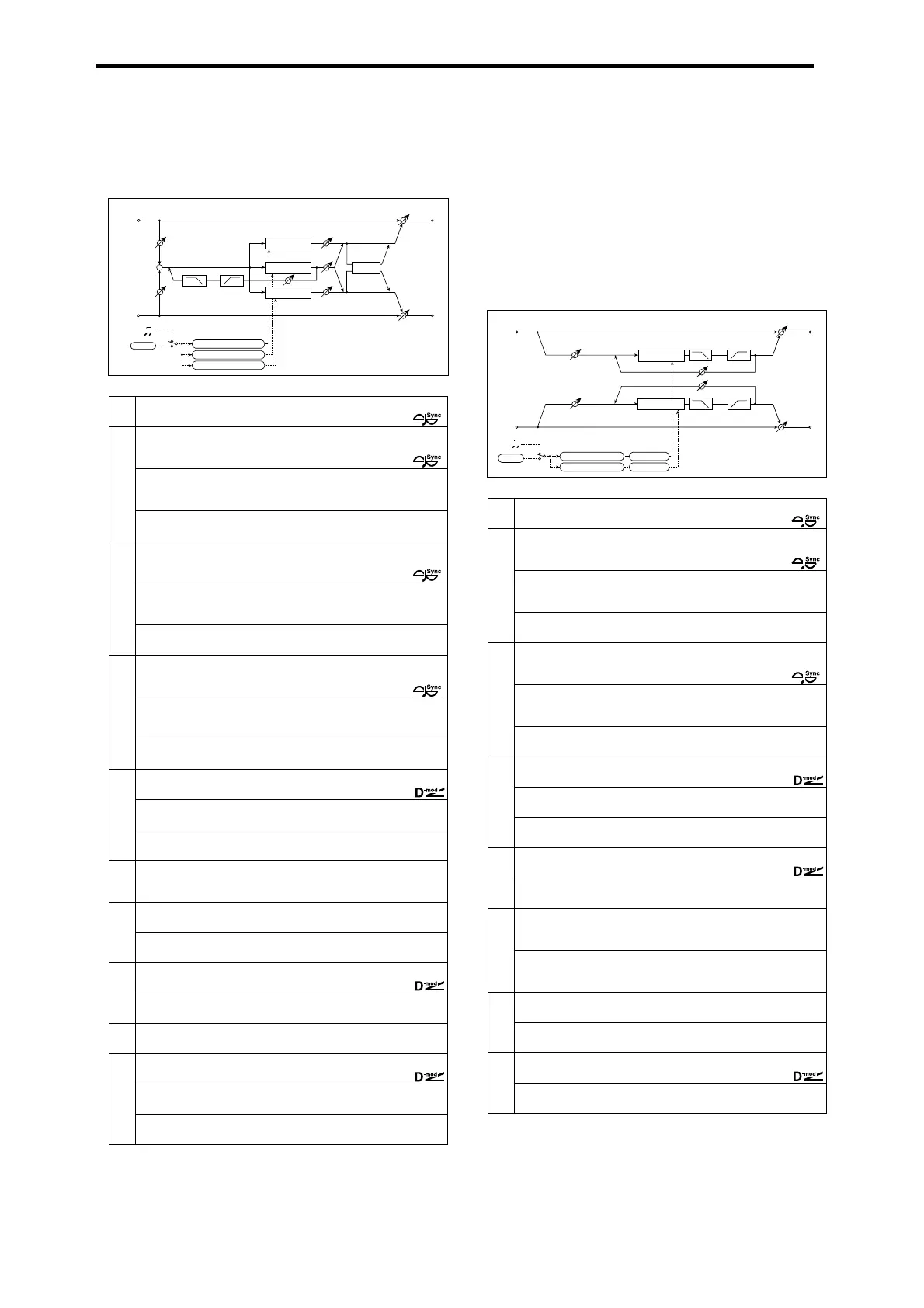
101: St.BPM LDelay
(Stereo BPM Long Delay)
The stereo delay enables you to match the delay time with the
song tempo. You can set the delay time up to 1365msec.
a
BPM MIDI, 40...240
Selects MIDI Clock and assigns tempo
☞ Fx:049,
b
L Bs (L Delay Base Note)
Selects the type of notes to specify the delay time for TapL
☞ Fx:049,
Times 1...16
Sets the number of notes to specify the delay time for TapL
☞ Fx:049
Level
Sets the output level of TapL
0...50
c
C Bs (C Delay Base Note)
Selects the type of notes to specify the delay time for TapC
☞ Fx:049,
Times 1...16
Sets the number of notes to specify the delay time for TapC
☞ Fx:049
Level
Sets the output level of TapC
0...50
d
R Bs (R Delay Base Note)
Selects the type of notes to specify the delay time for TapR
☞ Fx:049,
Times 1...16
Sets the number of notes to specify the delay time for TapR
☞ Fx:049
Level
Sets the output level of TapR
0...50
e
C Fb (C Delay Feedback)
Sets the feedback amount of TapC
–100...+100
(Source) Off...Tempo
Selects the modulation source for the TapC feedback
(Amount) –100...+100
Sets the modulation amount of the TapC feedback
f
Time Over? > ----, OVER!
Displays an error message when the delay time exceeds the upper
limit
☞
g
HiDamp (High Damp)
Sets the damping amount in the high range
0...100%
☞ Fx:043
LoDamp (Low Damp)
Sets the damping amount in the low range
0...100%
☞ Fx:043
h
InLvl Mod (Input Level Dmod [%]) –100...+100
Sets the modulation amount of the input level
☞ Fx:037,
Src (Source)
Selects the modulation source for the input level
Off...Tempo
☞ Fx:037
i
Spread 0...50
Sets the width of the stereo image of the effect sound
☞ Fx:043
j
W/D (Wet/Dly) Dry, 1:99...99:1, Wet
Sets the balance between the effect and dry sounds
(Source) Off...Tempo
Selects the modulation source of the effect balance
(Amount)
Sets the modulation amount of the effect balance
–100...+100
C Delay
R Delay
Left
Right
Feedback
Spread
Wet / Dry
Wet / Dry
Wet: Mono In - Stereo Out / Dry: Stereo In -Stereo Out
Input Level D-mod
High Damp
Low Damp
L Delay
Input Level D-mod
+
Level
Level
Level
Tempo
BPM
BPM
Base Note x Times
Base Note x Times
Base Note x Times
a
BPM MIDI, 40...240
Selects MIDI Clock and assigns tempo
☞ Fx:049,
b
L Bs (L Delay Base Note)
Selects the type of notes to specify the left channel delay time
☞ Fx:049,
Times 1...16
Sets the number of notes to specify the left channel delay time
☞ Fx:049
Adj (Adjust)
Fine-adjust the left channel delay time
–2.50...+2.50%
c
R Bs (R Delay Base Note)
Selects the type of notes to specify the right channel delay time
☞ Fx:049,
Times 1...16
Sets the number of notes to specify the right channel delay time
☞ Fx:049
Adj (Adjust)
Fine-adjust the right channel delay time
–2.50...+2.50%
d
L Fb (L Feedback)
Sets the feedback amount for the left channel
–100...+100
(Source) Off...Tempo
Selects the modulation source of feedback amount
(Amount L) –100...+100
Sets the modulation amount of the left channel feedback
e
R Fb (R Feedback)
Sets the feedback amount for the right channel
–100...+100
(Amount R) –100...+100
Sets the modulation amount of the right channel feedback
f
Time Over? L > ----, OVER!
Display the error message if the left channel delay time exceeds the
upper limit
☞
R > ----, OVER!
Display the error message if the right channel delay time exceeds the
upper limit
☞
g
HiDamp (High Damp)
Sets the damping amount in the high range
0...100%
☞ Fx:043
LoDamp (Low Damp)
Sets the damping amount in the low range
0...100%
☞ Fx:043
h
InLvl Mod (Input Level Dmod [%]) –100...+100
Sets the modulation amount of the input level
☞ Fx:037,
Src (Source)
Selects the modulation source for the input level
Off...Tempo
☞ Fx:037
Delay
Delay
Left
Right
Feedback
Wet / Dry
Wet / Dry
Stereo In - Stereo Out
Input Level D-mod
Input Level D-mod
High Damp Low Damp
High Damp
Low Damp
Tempo
BPM
BPM
Base Note x Times
Adjust [%]
Base Note x Times
Adjust [%]



 To Next Page