Appendices
223
Flt KT +/+ (Filter Keyboard Track +/+)
Flt KT +/– (Filter Keyboard Track +/–)
Flt KT 0/+ (Filter Keyboard Track 0/+)
Flt KT +/0 (Filter Keyboard Track +/0)
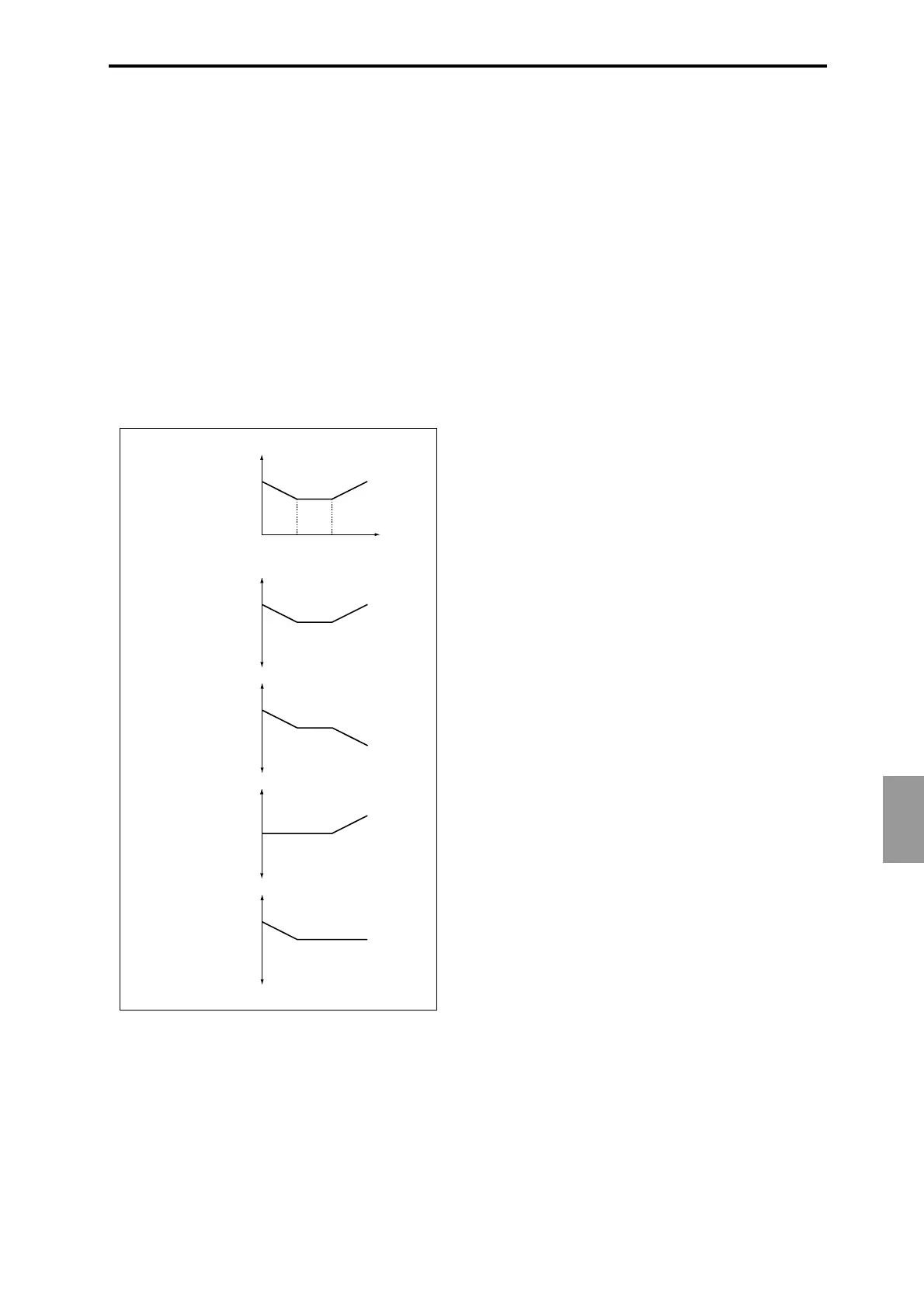
Amp KT +/+ (Amp Keyboard Track +/+)
Amp KT +/– (Amp Keyboard Track +/–)
Amp KT 0/+ (Amp Keyboard Track 0/+)
Amp KT +/0 (Amp Keyboard Track +/0)
+/+: The direction of the effect will be determined by the
sign (positive or negative) of the “Ramp Low” or “Ramp
High” setting.
+/–: The direction of the effect will be determined by the sign
of the “Ramp Low” setting, and by the opposite sign of the
“Ramp High” setting (–50 for a setting of +50, and +50 for a
setting of –50).
0/+: “Ramp Low” will have no AMS effect. The sign of the
“Ramp High” setting will determine the direction of its
effect.
+/0: The sign of the “Ramp Low” setting will determine the
direction of its effect. “Ramp High” will have no AMS effect.
JS+Y&AT/2 (Joy Stick +Y & After Touch/2)
The effect will be controlled by the joystick +Y (vertically
upward) and by after touch. In this case, the effect of after
touch will be only half of the specified intensity.
JS-Y&AT/2 (Joy Stick-Y & After Touch/2)
The effect will be controlled by the joystick –Y (vertically
downward) and by after touch. In this case, the effect of after
touch will be only half of the specified intensity.
Pedal #04 (Foot Pedal: CC#04)
If you wish to use the assignable foot pedal as an AMS, set
“Foot Pedal Assign” (GLOBAL 6.1–1a) to Foot Pedal
(CC#04) (☞p.233 “Foot Pedal Assign”).
A foot controller etc. connected to the ASSIGNABLE PEDAL
jack will control the effect.
Slider #18 (Value Slider: CC#18)
When the “Program Select” or “Comb Select” edit cell is
selected in Program mode or Combination mode, the
[VALUE] slider will function as a controller corresponding
to CC#18.
KnobM1#17 (Knob Mod1: CC#17)
KnobM2#19 (Knob Mod2: CC#19)
KnobM3#20 (Knob Mod3: CC#20)
KnobM4#21 (Knob Mod4: CC#21)
If you wish to use a REALTIME CONTROLS knob [1]–[4] as
an AMS, make settings in Program, Combination, Song, or
Song Play modes to set the Ctrls tab parameter “Knobs B
Assign” to the following settings respectively: “Knob1-B” to
Knob Mod.1 (CC#17), “Knob2-B” to Knob Mod.2 (CC#19),
“Knob3–B” to Knob Mod.3 (CC#20), or “Knob4-B” to Knob
Mod.4 (CC#21). (☞p.231 “Knob 1...4 B Assign”)
When you set REALTIME CONTROLS to B mode and oper-
ate knobs [1]–[4], the specified modulation will apply.
If AMS intensity is set to a positive (+) value, moving the
knob to the 12 o’clock position will produce an AMS effect of
0. Rotating the knob toward the right will produce a positive
change in the effect, and rotating it toward the left will pro-
duce a negative change. (With negative (–) settings, the
opposite effect will result.)
KnobM1 [+] (Knob Mod1: CC#17 [+] )
KnobM2 [+] (Knob Mod2: CC#19 [+] )
KnobM3 [+] (Knob Mod3: CC#20 [+] )
KnobM4 [+] (Knob Mod4: CC#21 [+] )
These differ from KnobM1#17–KnobM4#21 in the knob
position and direction of the effect. If AMS intensity is set to
a positive (+) value, rotating the knob to the far left will pro-
duce an AMS effect of 0. Rotating the knob toward the right
will apply an effect only in the positive direction. (With neg-
ative (–) settings, the opposite effect will result.)
SW 1 #80 (SW1 Mod.: CC#80)
SW 2 #81 (SW2 Mod.: CC#81)
If you wish to use the [SW1] or[SW2] key as an AMS, make
settings in Program, Combination, Song, or Song Play
modes to set the Ctrls page parameter “SW1/2 Assign” to
the following values respectively: “SW1” to SW1
Mod.(CC#80), or “SW2” to SW2 Mod.(CC#81) (☞p.230
“SW1/2 Assign”).
These are controlled by the [SW1] or [SW2] keys.
Foot SW #82 (Foot Switch: CC#82)
If you wish to use an assignable foot switch as an AMS, set
“Foot SW Assign” (GLOBAL 6.1–1a) to Foot SW (CC#82)
(☞p.232 “Foot Switch Assign”).
The effect will be controlled when you operate a foot switch
etc. connected to the ASSIGNABLE SWITCH jack.
Note Number
Amp
Key Low
Key High
AMS = Amp KT +/+
AMS Intensity = positive (+) value
Ramp Low
= +50
Ramp High
= +50
Depth and direction of modulation
zero
+ max
- max
example of Amp
Keyboard Track settings
AMS = Amp KT +/–
AMS Intensity = positive (+) value
Depth and direction of modulation
zero
+ max
- max
AMS = Amp KT 0/+
AMS Intensity = positive (+) value
Depth and direction of modulation
zero
+ max
- max
AMS = Amp KT +/0
AMS Intensity = positive (+) value
Depth and direction of modulation
zero
+ max
- max





 To Next Page