266
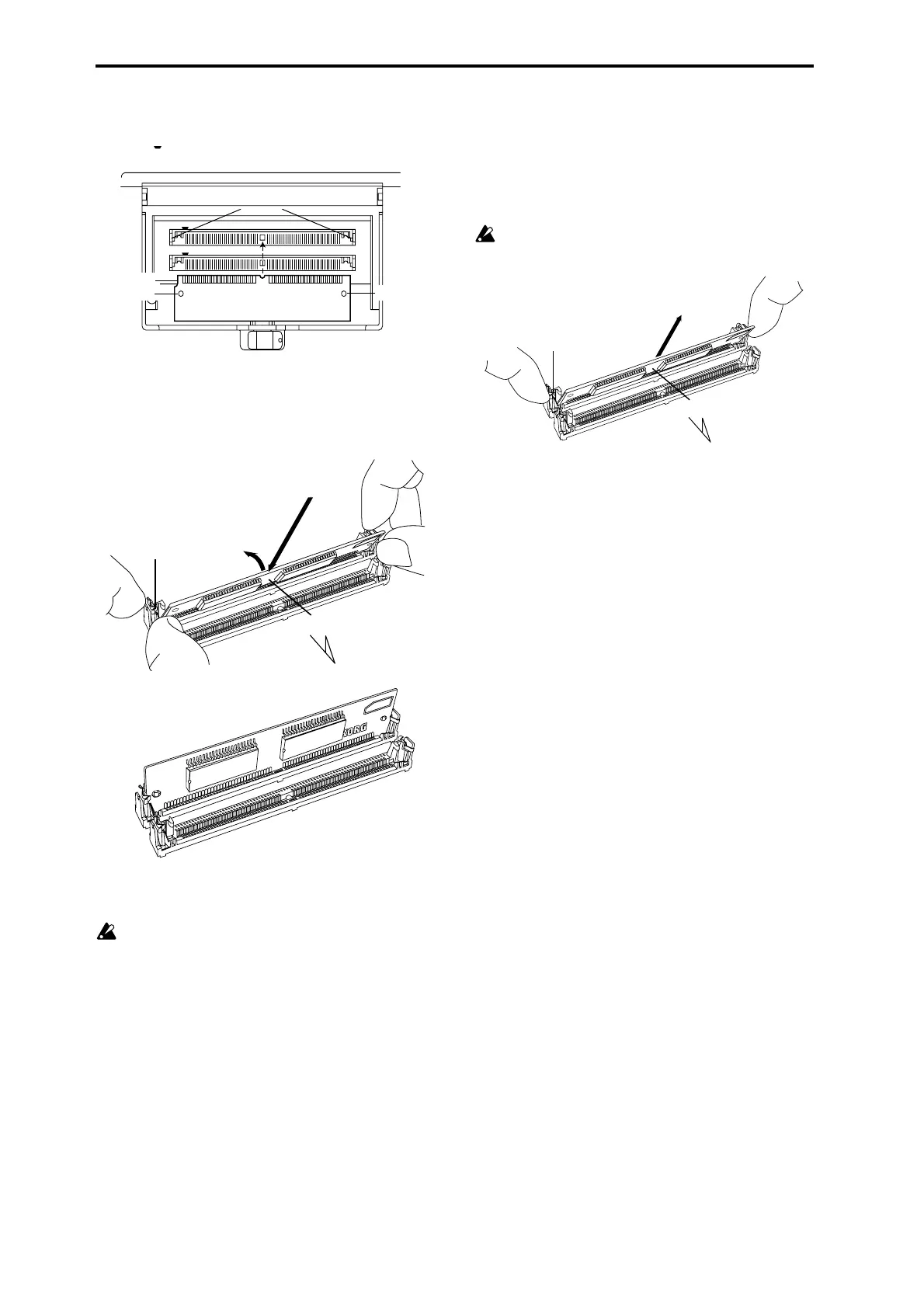
4 The notched side of the EXB-PCM is PIN 1. Install the
EXB-PCM with its PIN 1 side aligned with the PIN 1
mark ( ) of the slot.
5 At a slant, press the EXB-PCM firmly all the way into the
slot, and raise it to the vertical position until the catches
of the slot click into the locking holes of the EXB-PCM.
When doing so, pressing the catches of the slot apart to
the left and right will help the board go in smoothly.
6 Close the EXB-PCM cover, and set the [LOCK/
UNLOCK] switch to the LOCK position.
The cover will not close if the [LOCK/UNLOCK]
switch is in the LOCK position. Move it to the
UNLOCK position and close the cover before moving it
to the LOCK position.
7 When all steps have been completed, turn on the power
and make sure that the EXB-PCM has been installed cor-
rectly. (☞p.265 “Checking after installation”)
Removing an EXB-PCM
• Spread the catches of the slot apart to the left and right,
and (after removing the stoppers from the catches) tilt
the EXB-PCM and pull it out.
If you wish to remove the rear EXB-PCM board, you must
first remove the forward EXB-PCM.
When you spread the catches of the slot apart, the EXB-
PCM may pop out vigorously and fall into an opening
(inside the instrument). Please be careful.
Catches
EXB–PCM slot2
Locking hole
Locking hole
Notch
rear side of EXB-PCM
1PIN
72PIN
Front
Catch
EXB-PCM
1. Firmly press in at an angle.
2. Tilt up vertically.
EXB-PCM
Front
Catch





 To Next Page