10-16
Troubleshooting > Responding to Error Messages
P
R
S
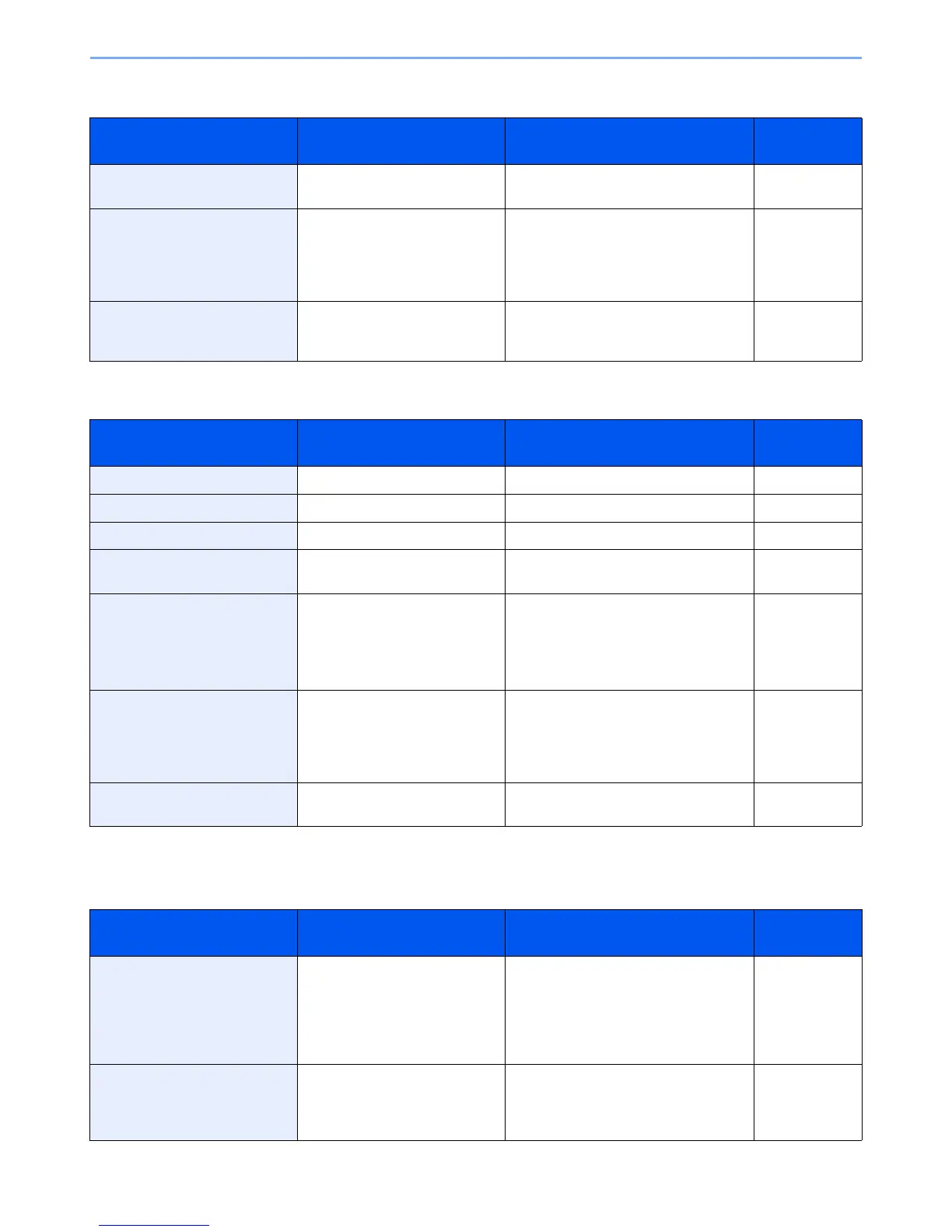
Error Message Checkpoints Corrective Actions Reference
Page
Paper is left. — Remove paper from the document
finisher.
—
Paper jam. — If a paper jam occurs, the machine will
stop and the location of the jam will be
indicated on the touch panel. Leave the
machine on and follow the instruction to
remove the jammed paper.
10-21
Print overrun. — Warning. Low printer memory. The job
was paused. Press [Continue] to re-start
the job.
—
Error Message Checkpoints Corrective Actions Reference
Page
RAM disk error.*
* When Auto Error Clear is set to [On], processing resumes automatically after a set amount of time elapses.
— Job is canceled. Press [End]. —
Removable memory error.* — This job is canceled. Press [End]. —
Removable Memory is full.* — This job is canceled. Press [End]. —
Remove originals in the
document processor.
Are there any originals left in the
document processor?
Remove originals from the document
processor.
—
Replace all originals and press
[Continue].
— Remove originals from the document
processor, put them back in their original
order, and place them again. Press
[Continue] to resume printing.
Press [Cancel] to cancel the job.
—
Replace MK. — Replacement of the parts in the
maintenance kit is necessary at every
300,000 pages of printing and requires
professional servicing. Contact your
Service Representative.
—
Replace the toner container to
our specified toner container.
— Install our genuine product that is
specified for this machine.
10-2
Error Message Checkpoints Corrective Actions Reference
Page
Scanner memory is full.* — Scanning cannot be performed due to
insufficient memory of scanner. Only
one copy of the scanned pages is
available. Press [Continue] to print,
send or store the scanned pages. Press
[Cancel] to cancel the printing job.
—
Send error.* — An error has occurred during
transmission.Refer to Responding to
Send Error for the error code and
corrective actions.
10-18













 To Next Page