Power Core User Manual Version: 6.6.0/3 421/539
21. Networking Power Core
Client - Source Configuration
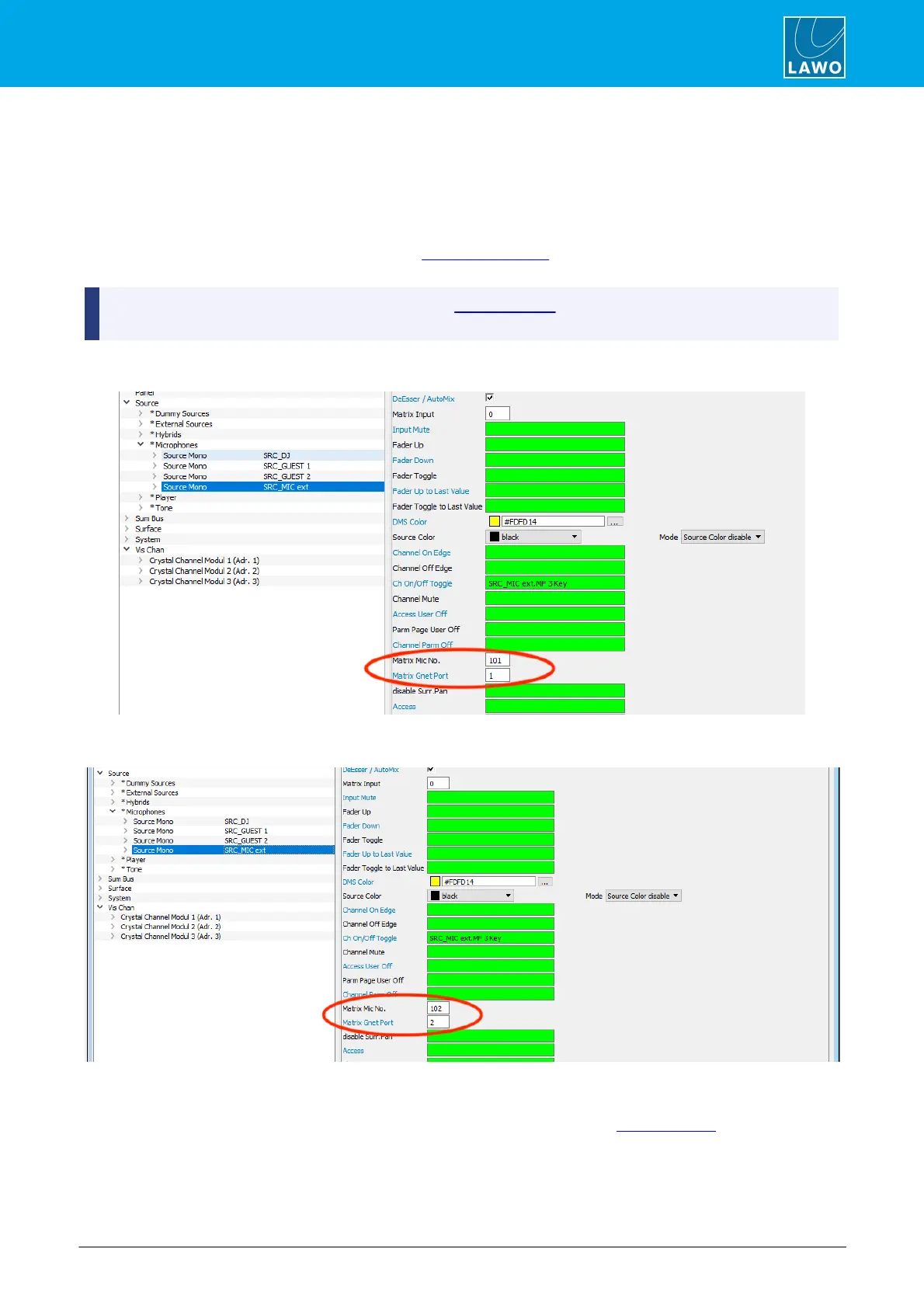
The final step is to add and configure the sources within each client configuration. This is done by opening the
Source element you wish to configure:
1. Assign the Audio Input which will receive the incoming microphone signal – in our example, via the
MADI link from the server.
2. In the Matrix Mic Nr box, enter the reference number you defined earlier within the server's
configuration – in our example, 101.
If a Mic Arb Offset was entered within the server's GPI/O Network configuration, then the offset is applied
here.
3. In the Matrix Gnet Port box, enter the GPI/O Network port number which connects to the Nova17 – in
our example, port 1.
4. Repeat these steps for the second client, this time entering 102 for the Matrix Mic Nr, and port 2 for
the Matrix Gnet Port.
5. Save and download all of the server and client configurations.
You can now switch control of the microphone settings between clients by triggering the corresponding control
signals - i.e. the Condition signals for Mic Input Nr x (defined in the servier's Mic Arbitration element).



 To Next Page