Power Core User Manual Version: 6.6.0/3 95/539
10. Audio Mix Engine
10.1 Sources
10.1.1 Source Anatomy
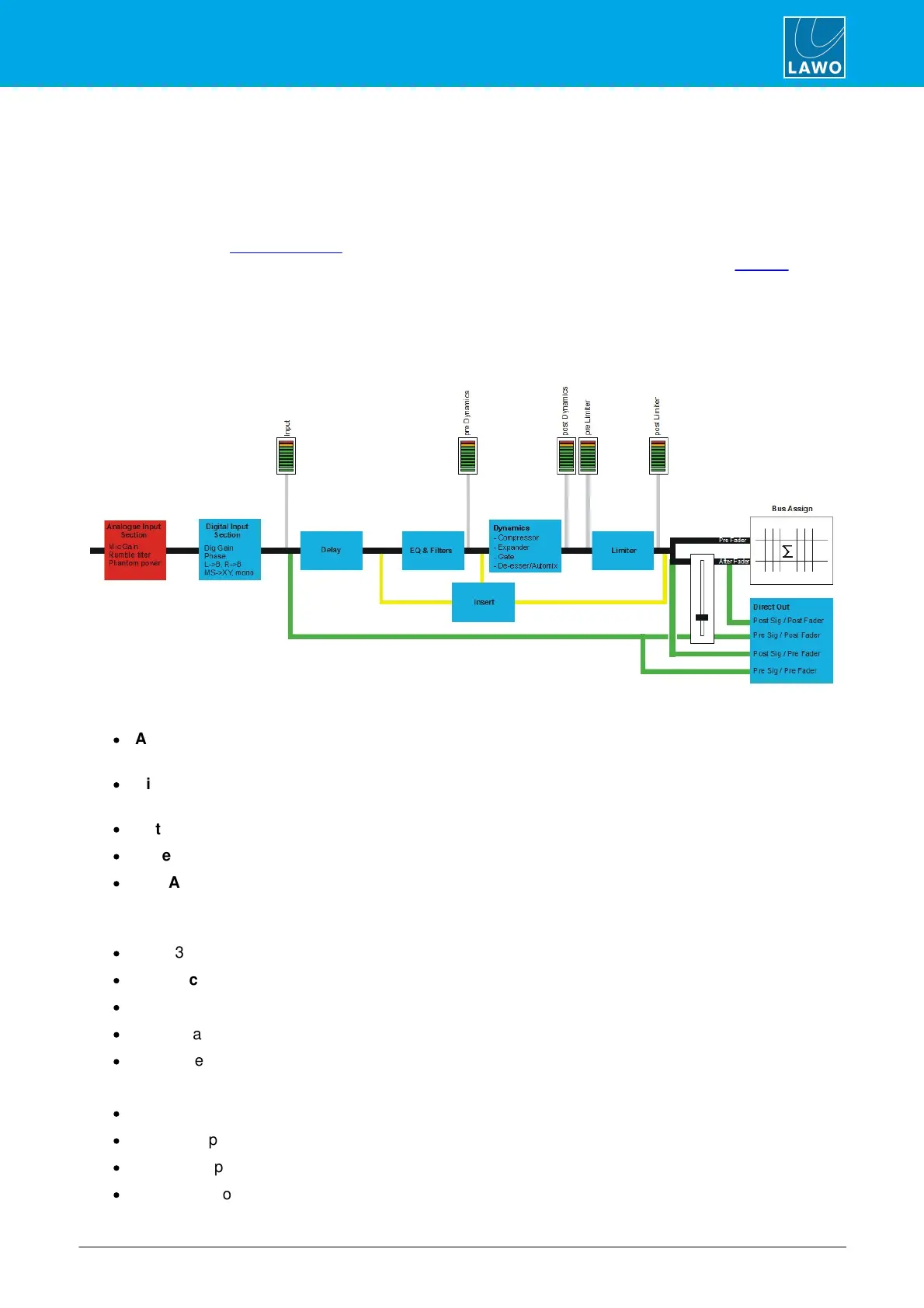
Each input channel is called a ‘source’. Sources can be mono, stereo, 5.1 or 5.1/stereo.
The maximum number of sources which can be summed together simultaneously is determined by the type of
System Core and its license package. Note that a stereo source uses two summing resources; a 5.1 source
uses 6 summing resources, and so on. You can monitor the available summing points from the Web UI (via the
Sum Inputs tab).
All sources assigned to fader strips are active in the mix. This includes sources assigned to “hidden” layers or
virtual bays. The naming of sources, assignment of signal processing and other attributes are all made by the
system configuration. Physical inputs are normally ‘hard wired’ to sources. This allows source-specific channel
features such as fader start or mic live signaling to follow the source when it is assigned to a different fader strip.
Every source includes:
·
Analog Input section – available for sources fed from microphone inputs; includes mic gain, 48V and
high pass rumble filter.
·
Digital Input section – available for every source; includes digital gain, phase reverse, pan or balance,
surround parameters.
·
Metering – meter points for input, pre and post processing.
·
Fader – a motorised fader for level control.
·
Bus Assign – bus sends with pre/post fader selection and variable level control.
In addition, the following DSP modules can be enabled or disabled by the configuration on a source-by-source
basis:.
·
EQ – 3-band parametric EQ plus High and Low Pass Filters.
·
Dynamics – Gate, Expander, Compressor and De-Esser/AutoMix sections.
·
Limiter – independent limiter.
·
Delay – adjustable in ms, metres or frames.
·
Insert – external insert point which can be Pre EQ; Post EQ; or Post Dynamics.
Each fader (not source) can also be assigned a Direct Out. This can be:
·
Pre fader, pre processing.
·
Pre fader, post processing.
·
Post fader, pre processing.
·
Post fader, post processing.



 To Next Page