21.1.7 Ember+ A-stage
An Ember+ A-stage element allows microphone and GPIO parameters within an A__stage device to be
remotely controlled via Ember+. It is supported by Power Core only.
Each element must be assigned to a Local Consumer and, therefore, up to 15 devices can be configured. Each
A__stage device supports up to 32 mic inputs, plus 8 GPIs and 8 GPOs.
The A__stage device must be connected to the Lawo control network and configured separately (via its
own interface) to allow Ember+ control.
To configure the Power Core side:
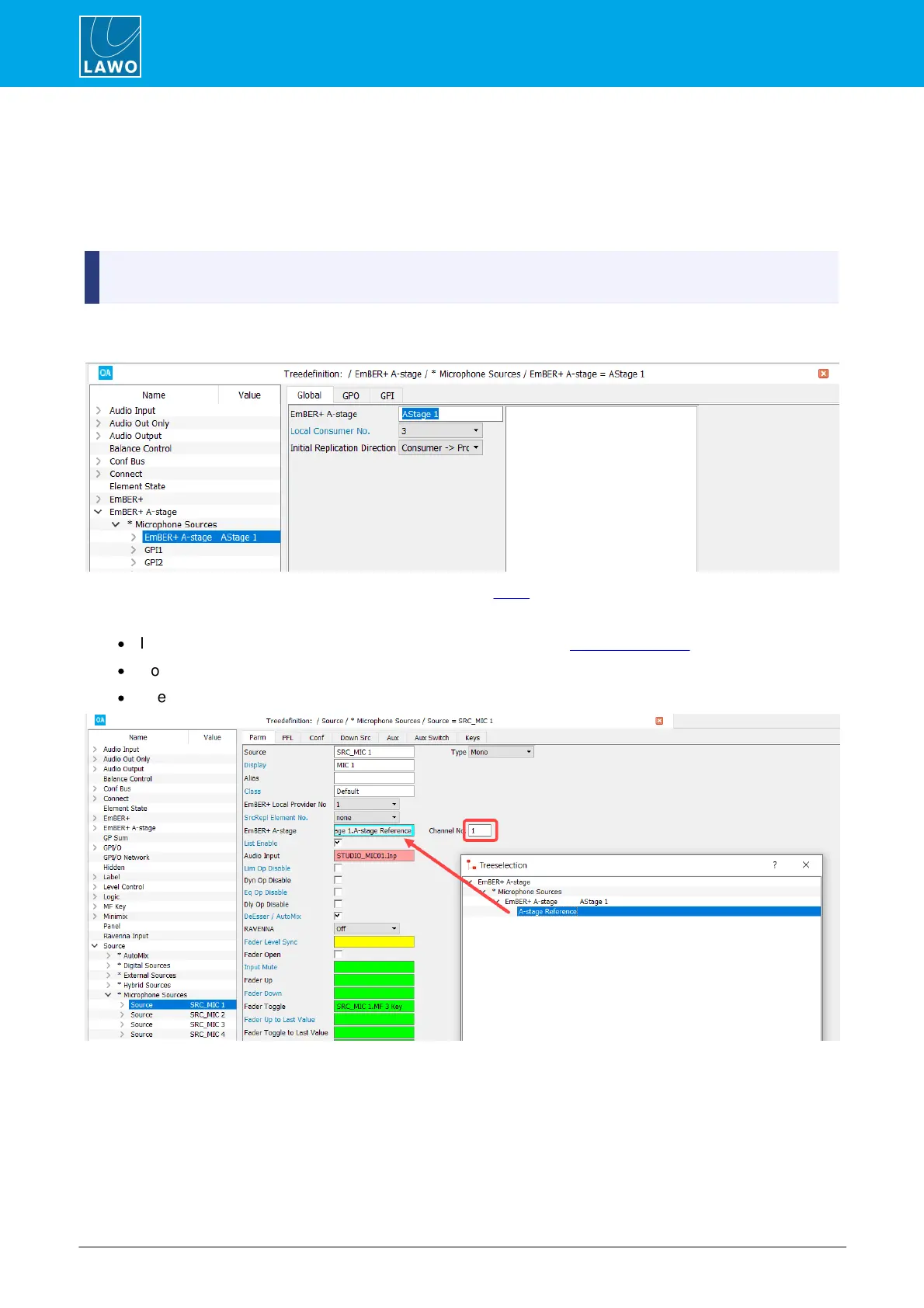
1. Create an Ember+ A-stage element for each A__stage device, and assign it to a Local Consumer:
2. Enter the parameters for the Local Consumer in the usual manner.
3. To configure the remote mic amp control:
·
Insert a new Source for the mic input in the usual manner, see Creating Sources.
·
Double-click on the EmBER+ A-stage field to assign the element created in step 1.
·
Use the Channel No. to enter the A__stage mic input number you wish to control (from 1 to 32).
Once the configuration is in place, the operator can remotely adjust mic input parameters within the A__stage
device by assigning this source to the surface.
4. To configure the remote GPIO control, return to the Ember+ A-stage element and define the fields in
the GPO and GPI tabs (as described below).



 To Next Page