Power Core User ManualVersion: 6.6.0/3488/539
24. Maintenance
24.4.2 Configuring an Alarm Log Server
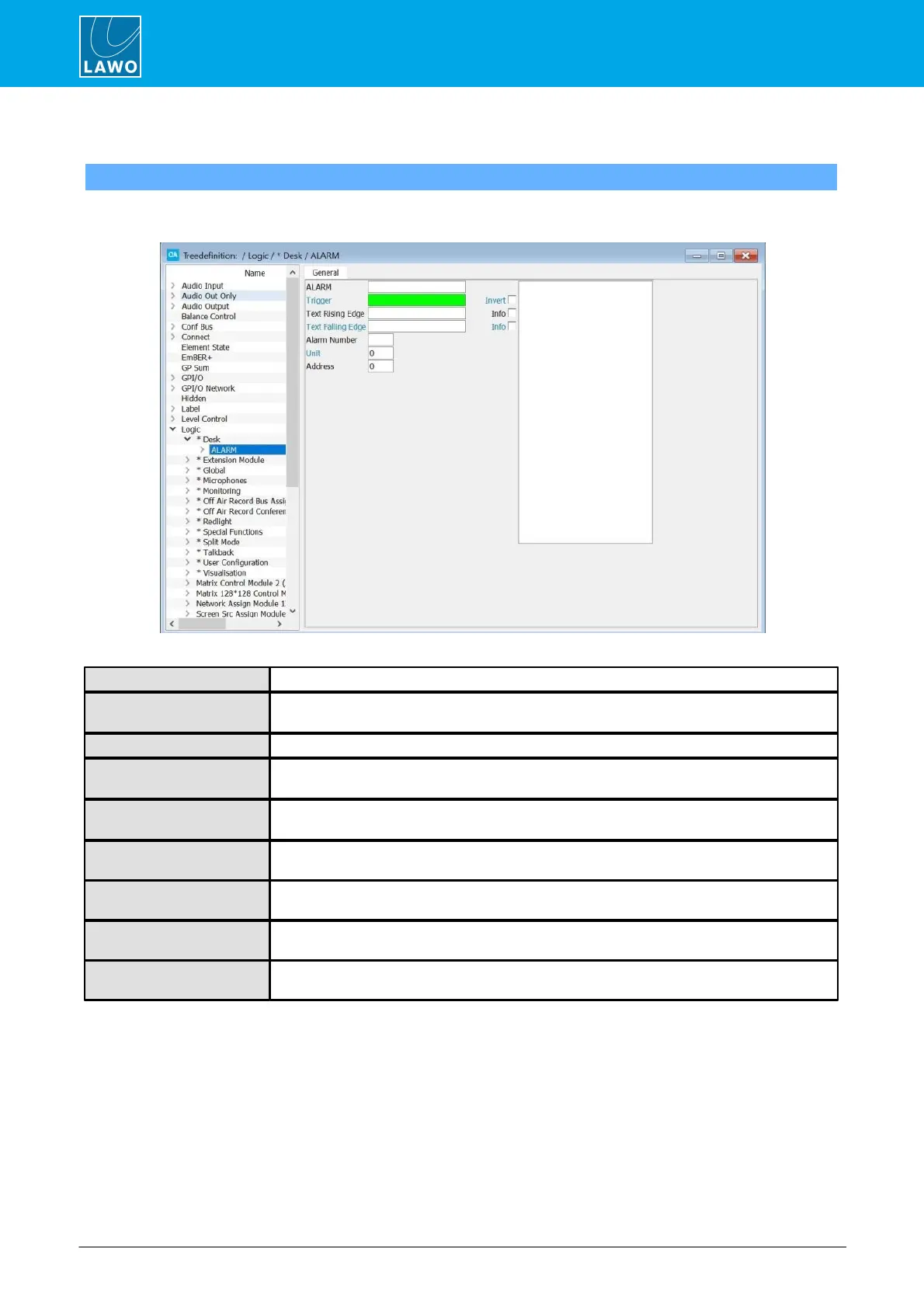
To support an external Alarm Log Server, you will need to define an Alarm element to the "Logic" branch of the
'Tree Definition'.
Reference name for the element.
Assigns the input control signal which will transmit the Text Rising and Text Falling Edge
messages at each status change.
When checked, the input control signal is inverted.
Enter the text which will be transmitted to the external Alarm Log Server system at the rising
edge of the Trigger signal.
Enter the text which will be transmitted to the external Alarm Log Server system at the falling
edge of the Trigger signal.
When checked, this output is treated as an ‘Info’ message within the Alarm Log Server
system, as opposed to an ‘Alarm’ message.
Enter a specific error code which you wish to be transmitted to the external messaging
system.
The unit number is transferred to the Alarm Log Server. For example, you may set Studio 1
as Unit 1, etc.
This is an Address transferred to the Alarm Log Server. For example, you may use this to
identify different system addresses.



 To Next Page