3-38
(f) Adjusting Economy Mode
With this economy mode, the engine output can be adjusted to improve the fuel consumption in economy
mode.
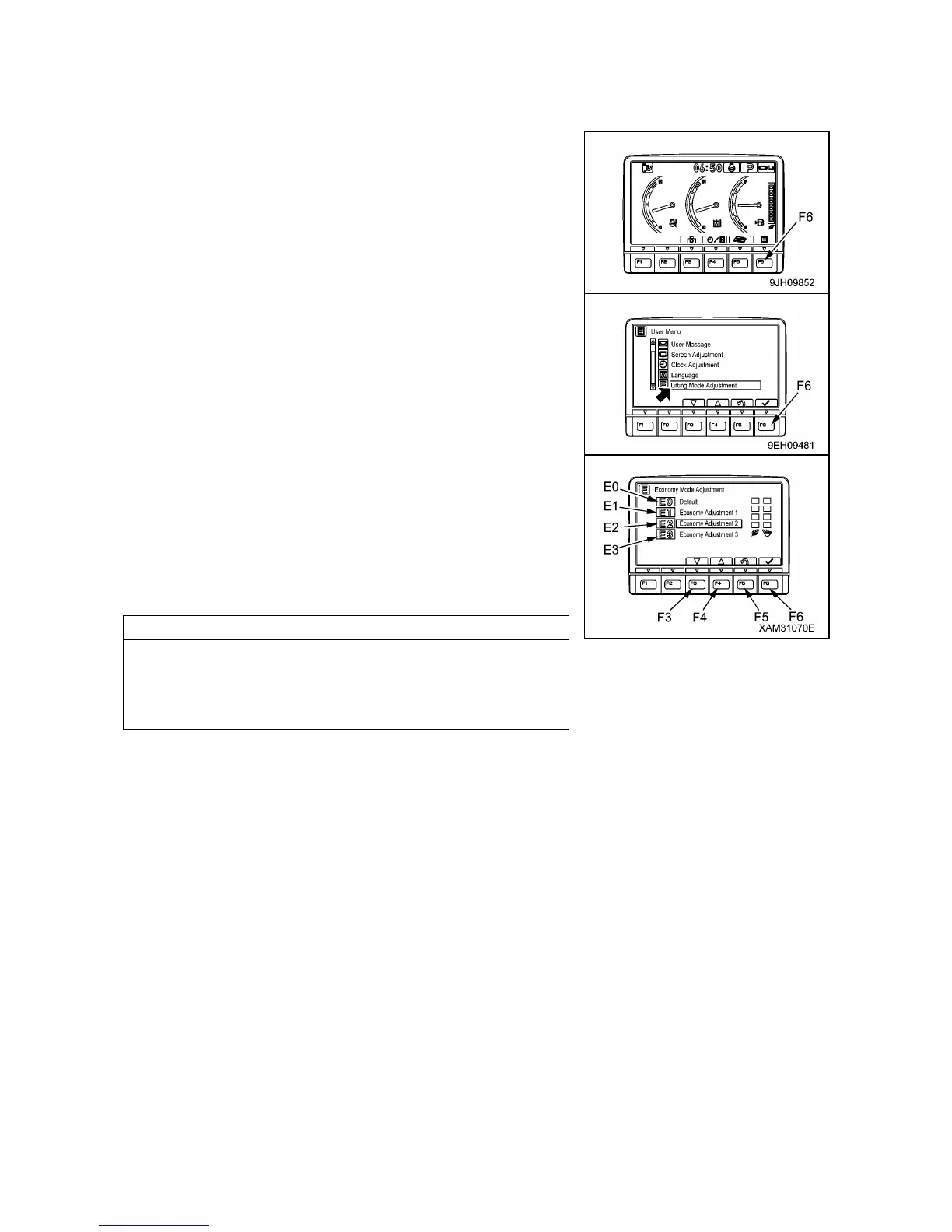
1. On the standard screen, press switch (F6).
2. Select “Economy Mode Adjustment” on the user menu screen,
then press switch (F6).
The screen switches to the “Economy Mode Adjustment”
selection menu screen.
3. Select the desired economy mode from the “Economy Mode
Adjustment” selection menu.
The levels that can be set are as follows.
• (E0): Default
• (E1): Economy Adjustment 1
• (E2): Economy Adjustment 2
• (E3): Economy Adjustment 3
• The higher the selection is made from (E0) to (E3), the better
the fuel consumption becomes, but the production is reduced
accordingly.
• When the machine is shipped, it is set to (E0).
On the “Economy Mode Adjustment” menu screen, it is possible to carry out the following operations
with switches (F3 to F6).
• Switch (F3): Moves to item below.
• Switch (F4): Moves to item above.
• Switch (F5): Cancels change and returns to user menu screen.
• Switch (F6): Accepts change and returns to user menu screen.



 To Next Page