3-73
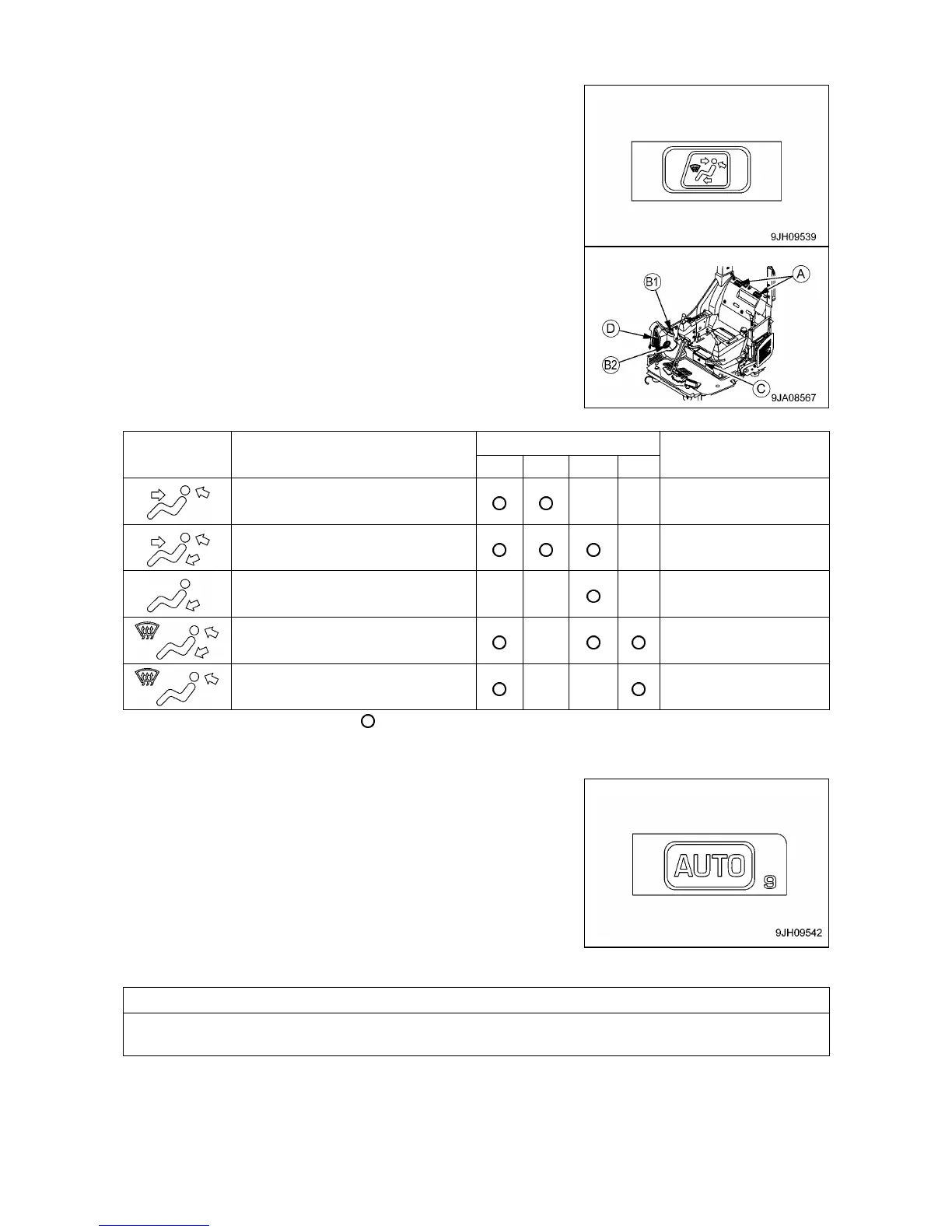
[4] VENT SELECTOR SWITCH
This switch (4) is used to select the vents.
• When switch (4) is pressed, the display on monitor display (7)
switches and air blows out from the vents displayed.
• During automatic operation, the vents are automatically selected.
• (A): Rear vents (2 places)
• (B1): Face vent (1 place)
• (B2): Foot vent (1 place)
• (C): Foot (1 place)
• (D): Front window glass vents (2 places)
Front, rear and foot vents
Foot vents and defroster vent
Cannot be selected for
automatic operation
Cannot be selected for
automatic operation
Note: Air blows from vents marked .
[5] AUTO SWITCH
This switch (5), the air flow, vents, and air source (FRESH/
RECIRC) air automatically selected according to the set
temperature.
• Press switch (5), then use temperature control switch (3) to set
the temperature, and run the air conditioner under automatic
control.
• When switching from automatic operation to manual operation, it
is possible to use the switches to select the vents and air source
(FRESH/RECIRC).
When Auto Mode is selected, if the set temperature is set to 18 degrees C or 32 degrees C, the air flow
is always set to High, but this is not a problem.



 To Next Page