12
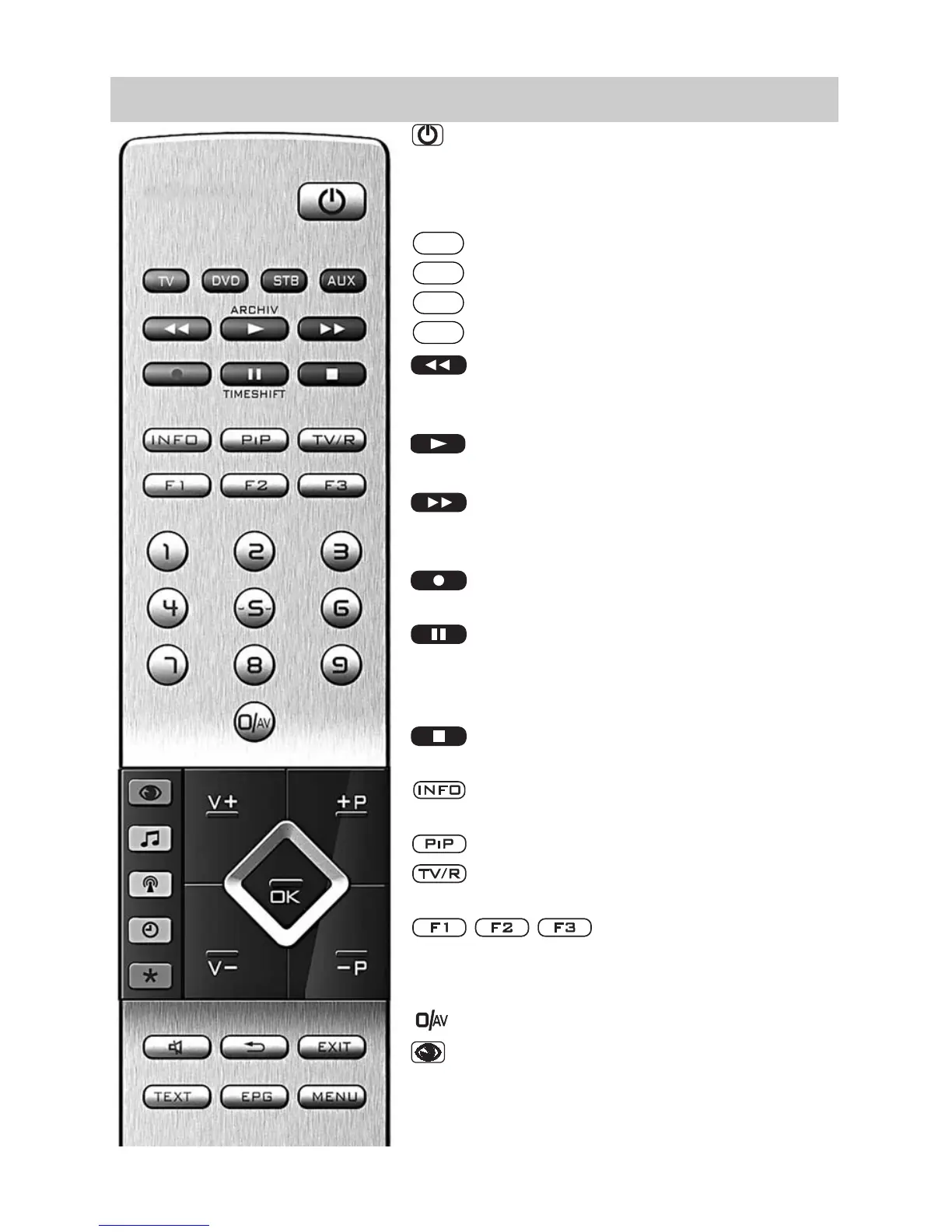
3.2 The Remote Control (RM 17)
ON at program position 1 or at the pro-
grammed start program position.
OFF, shut down digital recorder & switch
to stand-by setting.
Switch to Metz-TV
Switch to DVD
Switch to STB (Set Top Box)
Switch to AUX (audio devices)
When set to Play: Rewind
When set to time shift: Skip backwards
20 seconds
Open archive / in archive: Play
When set to Play: Fast forward
When set to time shift: Skip forwards one
minute
Start direct recording / EPG direct recor-
ding
In TV mode: Start time shift /
when set to Play: Still picture/Pause
When set to Play: hold down: Slow
motion.
Stop (when set to Play: Return to archive /
when set to time shift: Switch to “Live”)
Select “Information” / In “Information”
back to table of contents
Picture in picture on/off
Switch to TV -> Radio / Radio -> TV
PVR stop and back to TV picture
Function keys
Press briefly: for factory programming
Hold down:
display of the special functions selection.
Select AV device
Select picture settings
In TV menu: Adjust the settings “picture
and sound”
In “File Manager“: Switch from USB stick
to digital recorder
AUX
STB
DVD
TV
ARCHIV
TIMESHIFT



 To Next Page