6 Functions and settings
Maschinenfabrik Reinhausen 2014 672374092/04 EN TAPCON® 260
4. Press .
ð The delay time T1 is set.
Setting control response T1
The control response T1 can be set to linear or integral.
With linear control response, the device responds with a constant delay time
regardless of the control deviation.
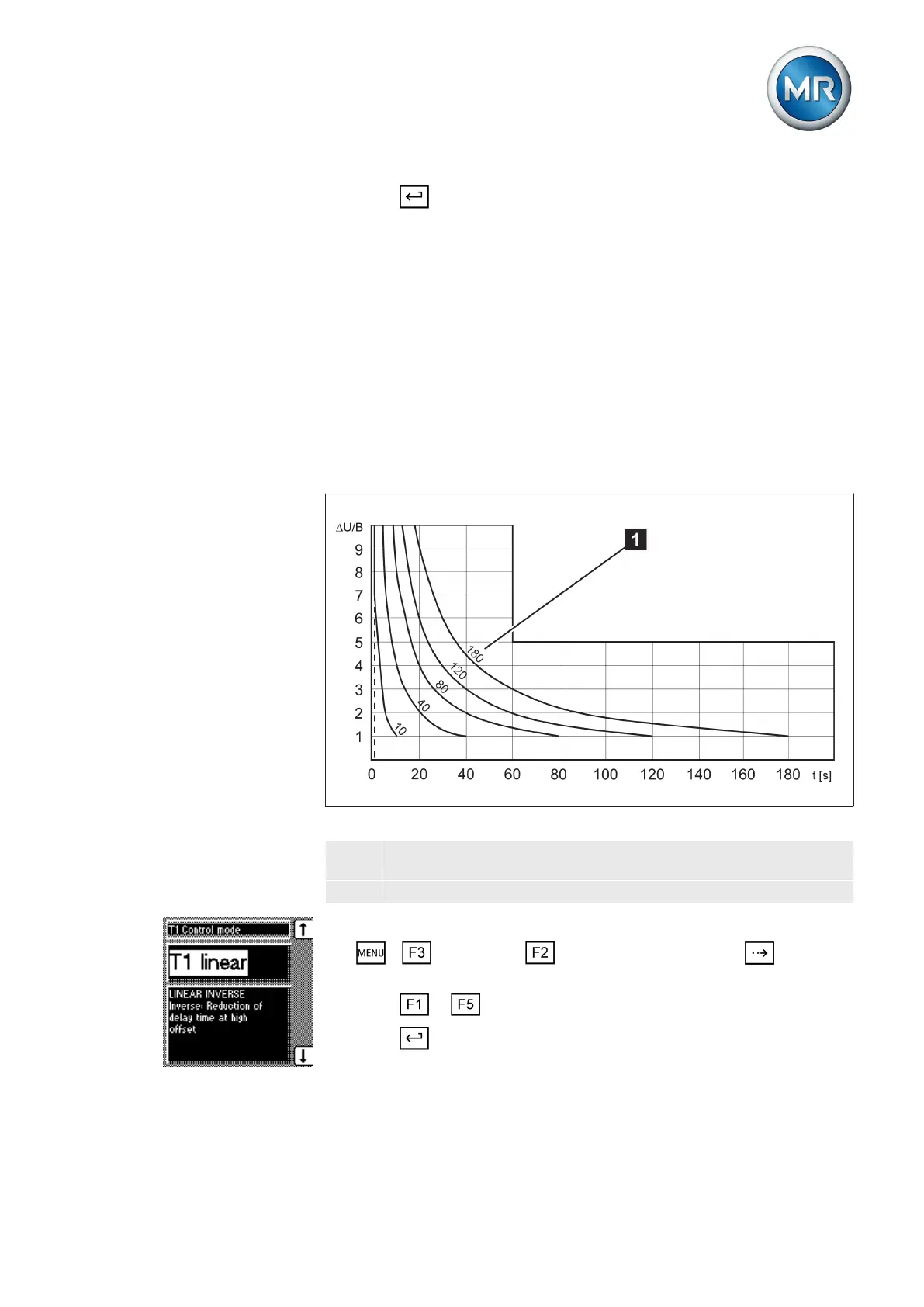
With integral control response, the device responds with a variable delay
time depending on the control deviation. The greater the control deviation
(ΔV) in relation to the set bandwidth (B), the shorter the delay time. The de-
lay time can therefore be reduced down to 1 second. This means that the
device responds faster to large voltage changes in the grid. Regulation accu-
racy improves as a result but the frequency of tap-changes increases too.
Figure 44: Diagram showing integral control response
ΔV/B Control deviation "ΔV" as % of desired value as ratio to the set
bandwidth "B" as % of desired value
1 "Delay time T1" parameter
To set the control response T1, proceed as follows:
1. > Parameter > Control parameter > Press until the
desired parameter is displayed.
2. Press or to set the response you want.
3. Press .
ð The control response T1 is set.
6.5.4
Linear control response T1
Integral control response
T1



 To Next Page