5 Measuring with the NBM-550 and HF probes
50 NBM-550 Narda
Measuring discrete values
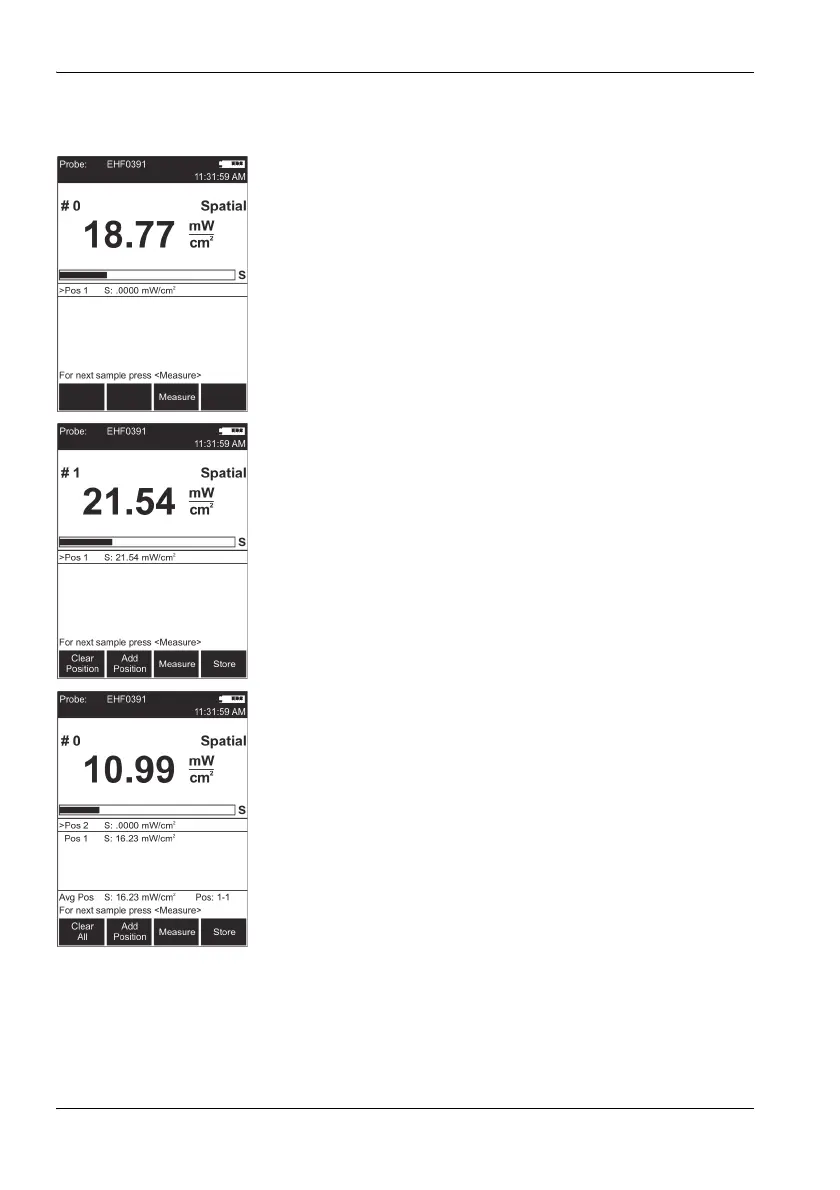
✓ You selected Discrete as the Spatial AVG Mode.
1. Press the Spatial Average key.
Spatial measurement mode is displayed
The result counter top left shows #0, indicating that
no values have been measured yet.
2. Press the Measure key.
The measured value is stored,
#1 indicates that one result has been stored,
Pos. 1 shows the measured value.
3. Press the Measure key again to make another
measurement.
The measured values are stored,
#... indicates the number of measurements.
The average of all the measurements is shown after
Pos. 1.
4. When you have recorded all the measured values,
– you can either add positions so you can record more
results (e.g. at different locations) or
– you can store the entire measurement.
Adding a position
1. Press the Add Position key.
Pos. 2 is displayed,
The result counter shows #0.
2. Record new measured values as described above.
3. You can add more positions and record more results if
necessary.
Avg Pos shows the average value for all the positions
measured, along with the positions used to form the
average (e.g. 1-4 for positions 1 through 4).
You can store the measurement results when you have
recorded all the measured values.
Storing the results
Press the Store key.
The average of all positions and the averages for
each separate position are stored.



 To Next Page