6 Measurements with the NBM-550 and EHP-50
74 NBM-550 Narda
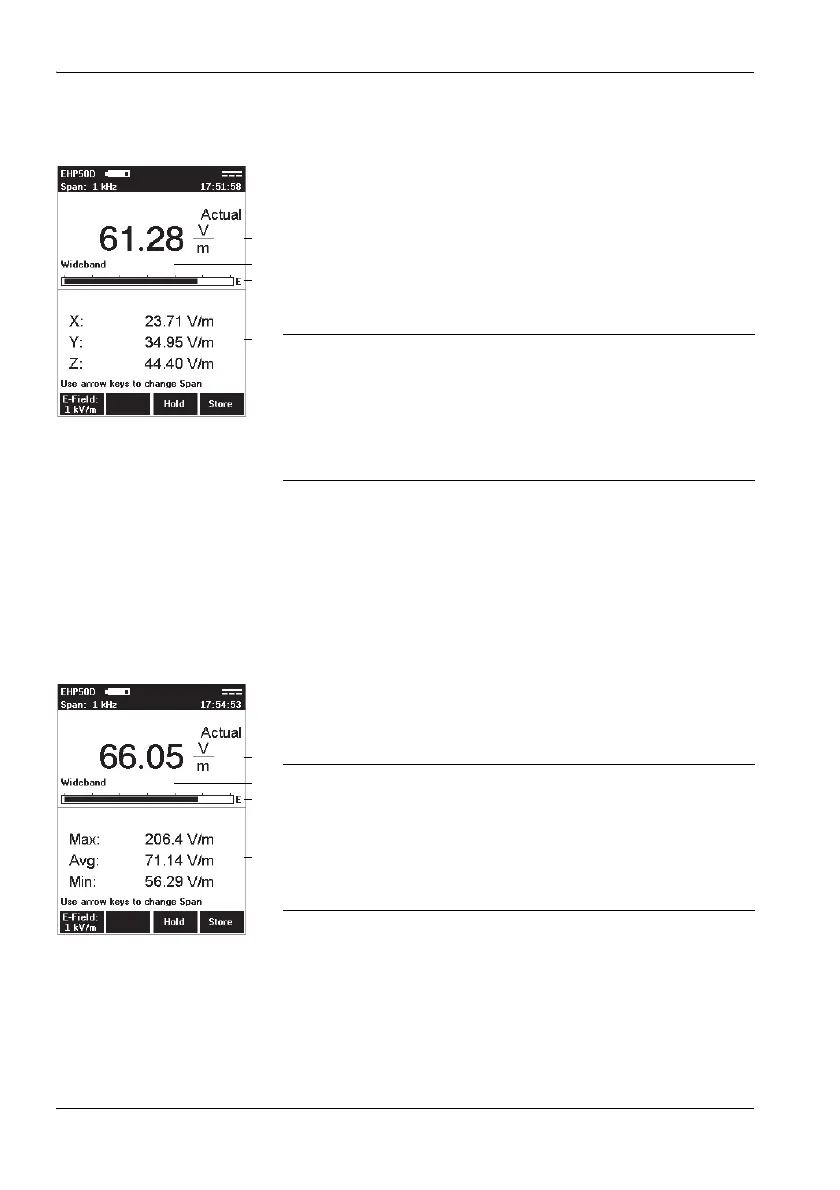
6.7 XYZ display mode
XYZ display mode allows you to display the numerical
measurement results for each separate axis of the EHP-50
as well as the isotropic value (RSS). This display mode is
useful for optimum alignment of the EHP-50 and allows you
to see if an axis is overdriven and correct this by adjusting
the alignment. The result type displayed is always the actual
value (Actual).
Other functions
The other functions are the same for all display modes and
are described under “General settings” on page 66.
6.8 Monitor display mode
Monitor display mode shows the numerical actual,
maximum, average, and minimum measured values
simultaneously.
Other functions
The other functions are the same for all display modes and
are described under “General settings” on page 66.
1 Numerical display of the actual measured value
2 Wideband or frequency of the highest field strength
3 Graphical display of field strength with indication of
the selected field type (E-field in the example)
4 Numerical display of the measured values for the X, Y
and Z axis.
1 Numerical display of the actual measured value
2 Wideband or frequency of the highest field strength
3 Graphical display of field strength with indication of
the selected field type (E-field in the example)
4 Numerical display of the maximum (Max), average
(Avg) and minimum (Min) values.



 To Next Page