5 Measuring with the NBM-550 and HF probes
56 NBM-550 Narda
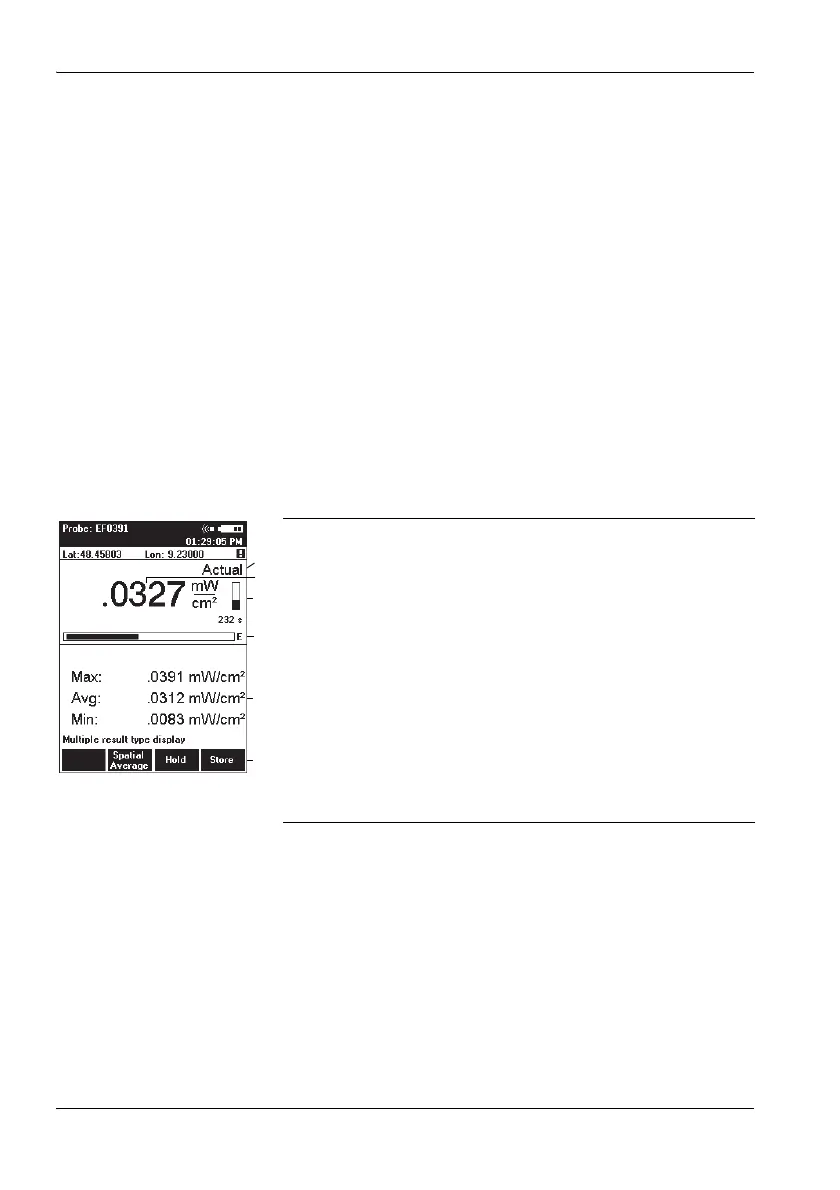
5.6 Measuring in Monitor display mode
Monitor display mode simultaneously shows the maximum,
average, and minimum measured values as well as the
latest measured value.
Changing to Monitor display mode
✓ The display is in measurement mode.
1. Press the OK key to open the MAIN menu.
2. Press the Display function key until Display: Monitor
appears.
3. Press the ESC key to return to measurement mode.
Measurement and determination of the maximum,
average, and minimum values starts immediately.
Display overview
Resetting the values shown in the lower display area:
Press the ESC (Clear) key.
1 Field strength result type shown in upper display area
2 Display of latest field strength value
3 Remaining averaging time
4 Graphic display of field strength showing the selected
field type (E-field in the example shown here)
5 Calculated values since the beginning of
measurement:
– Max: Maximum value
– Avg: Average value
– Min: Minimum value
6The Result Type function cannot be selected. Other
functions are as for Normal display mode (see
“Measuring in Normal display mode” on page 46).



 To Next Page