6.2 Display types
Narda NBM-550 65
6.2 Display types
The measurement settings you used last time will be
applied after the EHP-50 and NBM-550 have started up.
You can change the settings by opening a previously saved
setup (see “Saving and loading instrument settings” on
page 90) or change the measurement parameters manually.
WPM, Spectrum, Standard, XYZ, and Monitor display types
are available in LF mode. The features common to all
display types in LF mode as well as the differences are
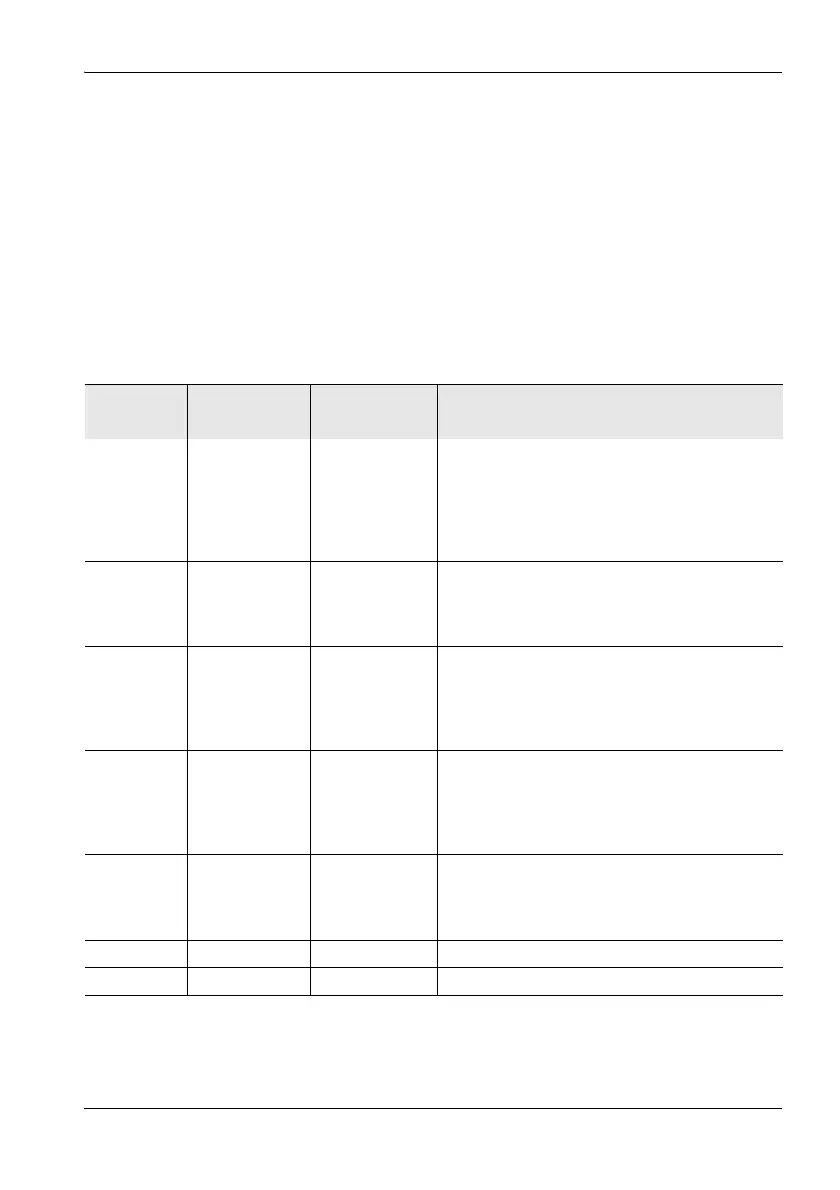
shown in the table below:
Display
type
LF mode (with
EHP-50)
HF mode (with
HF probe)
WPM
(Weighted
Peak
method)
X-Numerical display of the percentage of the limit
value reached referred to the selected safety
standard (wideband from 1 Hz to 400 kHz) with
graphical display of time characteristic. See
“WPM display mode (Weighted Peak
method)” on page 69.
Spectrum X – Graphical display of field strength versus
frequency. Numerical display of the wideband
value or the highest spectral line. See
“Spectrum display mode” on page 71.
Standard X – Graphical display as Spectrum mode but with
the measured values referred to the limit values
of a safety standard and indicated as
percentage values. See “Standard display
mode” on page 73.
XYZ X X Numerical display of measurement results for
each separate axis of the EHP-50 with display
of the isotropic value (RSS). Display of the
wideband value or the highest spectral line. See
“XYZ display mode” on page 74.
Monitor X X Numerical display of measurement results for
the wideband value or the highest spectral line
(Actual, Max, Avg, Min). See “Monitor display
mode” on page 74.
History – X
Normal – X



 To Next Page