Copyright© Orphée SA. All Rights Reserved.
3. INSTRUMENT SET UP
3.1 USER’S IDENTIFICATION
3.1.1 Login
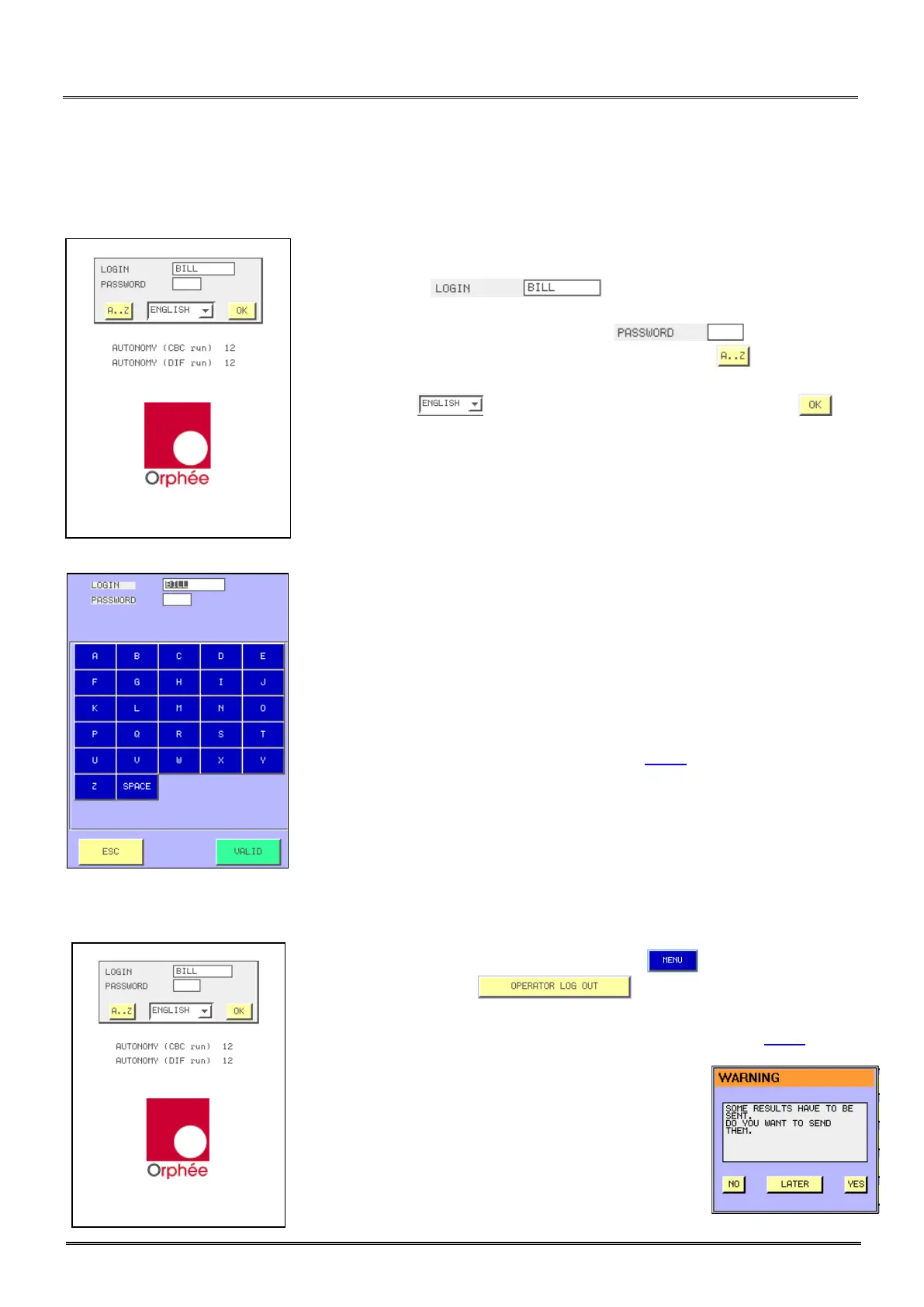
- After the instrument’s initialization, the identification window is
displayed.
- In the window , the last operator’s identification
appears.
- Either the identification is yours, press and enter your
password, or leave it empty in case of user use, press to enter your
login.
- The window enables to change the language. Press to
validate it.
- AUTONOMY (run) indicates the number of samples (runs) you can
perform (calculated with the smaller quantity of reagents).
- Enter your identification name with the alphabetic keyboard.
- Place the cursor in the password window.
- Enter your password for identification.
- For the first login, MYTHIC 22 proposes 3 access levels :
o User : No password,
o Biologist : Password by default 1- 2- 3 ,
o Service people.
- Biologist Password can be modified in section 3.4.6.
3.1.2 In process
- To change operator during the process, press to return to the main
menu, and then press on .
- To change identification, proceed as described above (section 3.1.1).
- If this window appears, it means that several results
in memory have not been sent before the MYTHIC 22
was switched off.
- Press YES to send them immediately, or press
LATER to wait at another time or NO if you do not
want to send them.



 To Next Page