Copyright© Orphée SA. All Rights Reserved.
7. CALIBRATION
The calibration of the MYTHIC 22 should be carried out minimum once a year or if the QC
carried out on a blood control used under the recommended conditions, is out of the limits to
a significant degree (see section 6).
Before the launch of a calibration, make sure that the analyzer is ready for use.
Do not hesitate to run a cleaning cycle followed by a STARTUP cycle.
The calibration blood must be used before its expiry date, be carried out of the cooler 20
minutes before use, manually mixed and stored back in accordance with the instructions for
use recommended by ORPHEE.
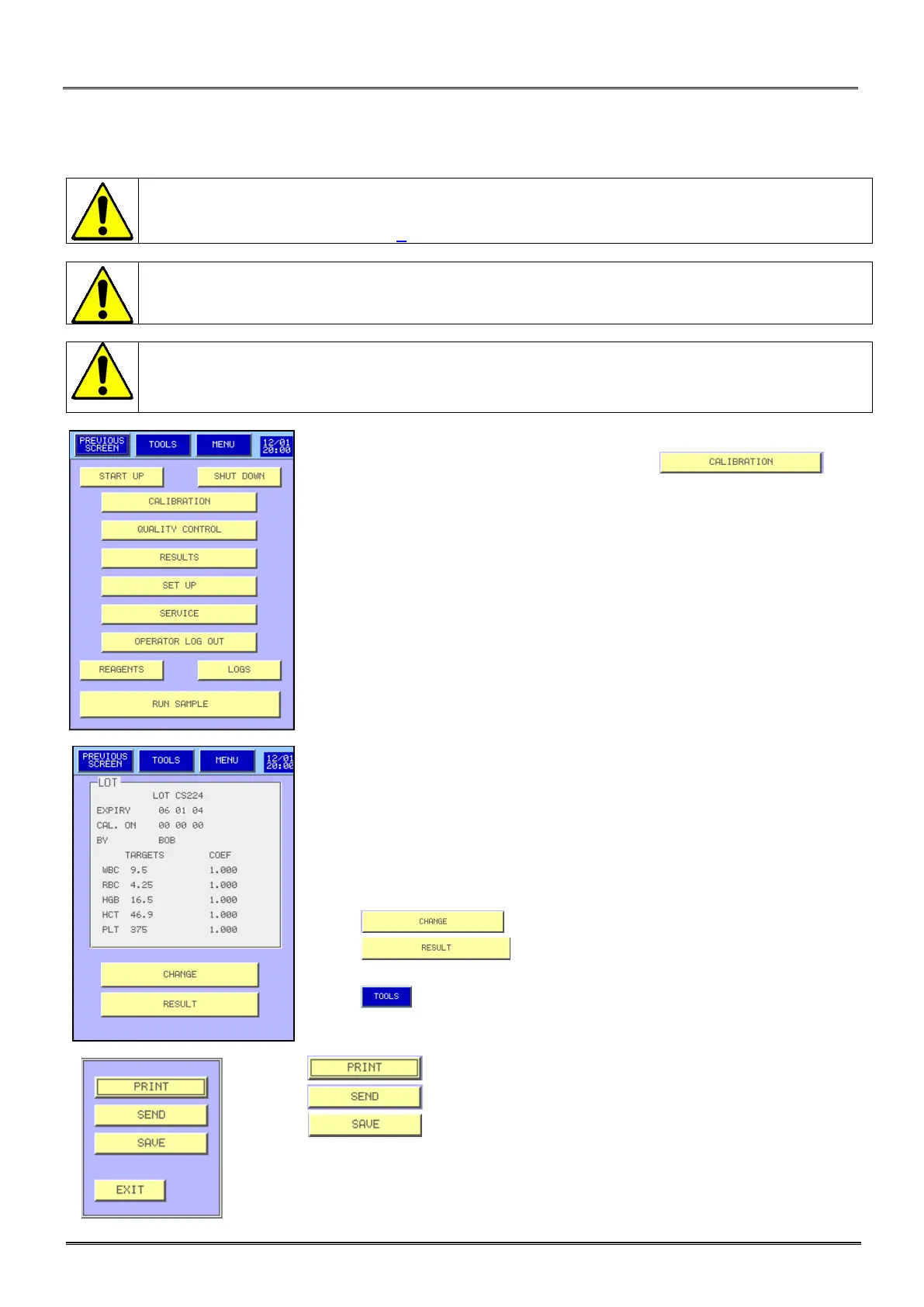
- To reach the screen Calibration, press the key from
the main menu.
- This menu sends the following information:
o Lot number of the last used calibrator.
o The expiry date of the current lot.
o The last date of calibration.
o The operator name.
o The target values.
o The current coefficients of calibration.
- Press to enter new values or to modify the values.
- Press to calibrate.
- Press then:
, to print these information (see the print out report above).
, to send this information.
to store these information in the USB key.



 To Next Page