Copyright© Orphée SA. All Rights Reserved.
5.10.1 Results
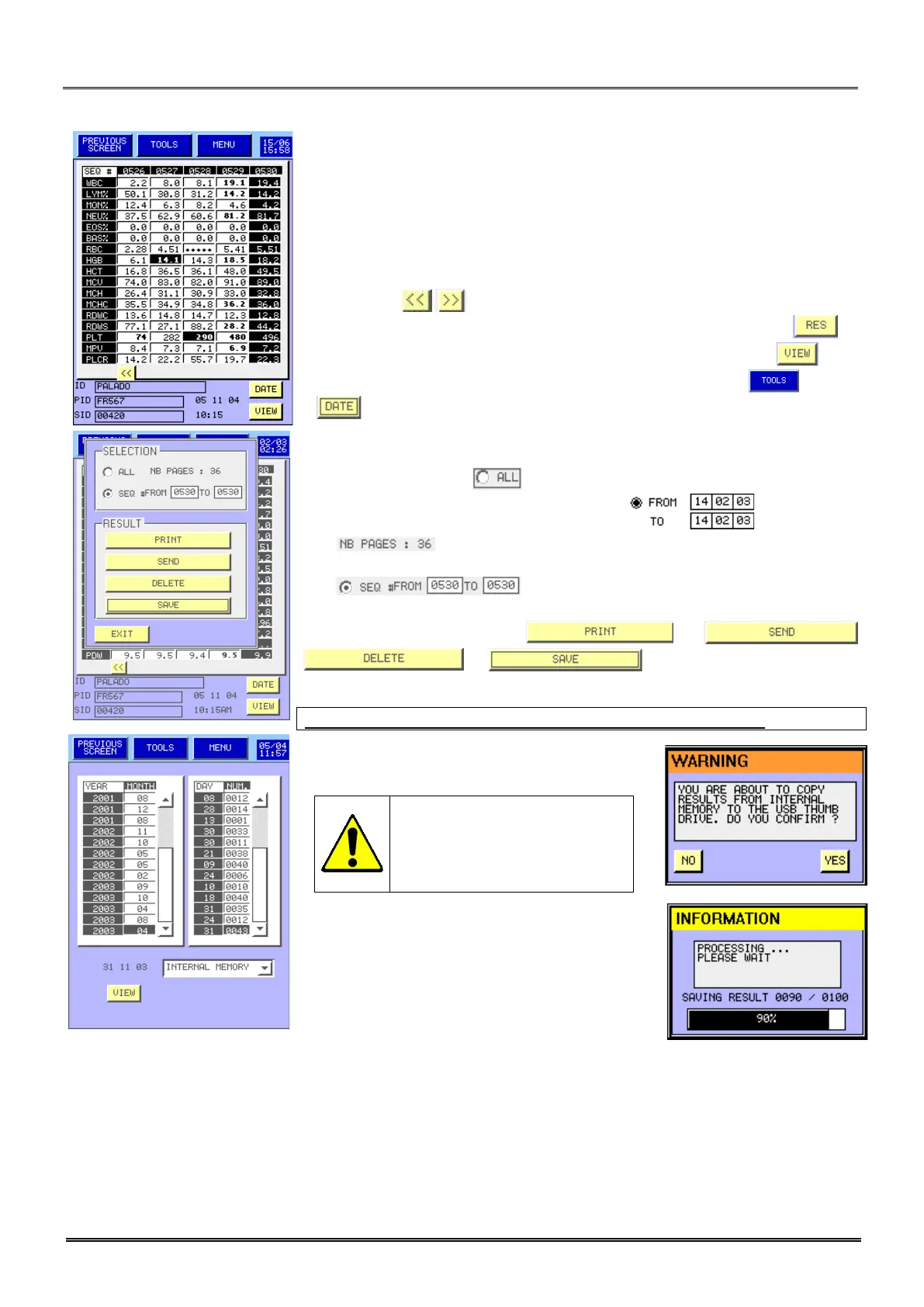
- The Archive display allows viewing the results of the analysis.
- The first column presents the name of the different parameters, the
first line the result number.
- The results of the patients are presented in column.
- At the bottom of the display, under the table, the ID, PID, SID, SEQ
number, date and time of the selected patient (dark background) are
presented for each result selected.
- The button , located under the table, allows changing pages.
- To find a result in the list, select the SEQ number wanted, press .
- To view an entire result, select the SEQ number wanted, press .
- To print, send, delete or save (in an USB key) results press .
- allows to accede to the results date list.
- It is possible to print, send, delete or save (in a USB key) :
. All results: Press .
Between two days of the same month: press
for printing.
Selected results: Select the first and the last results:
.
- Then press on
or
- This prompt appears to confirm the storage
in the USB key.
If you press YES the selected
results will be deleted from
the internal memory and
stored in the USB key.
- This prompt allows following the storage.
NOTA : the printed report is a list of all selected patients.



 To Next Page