Copyright© Orphée SA. All Rights Reserved.
7.1.2 Calibration
Before starting
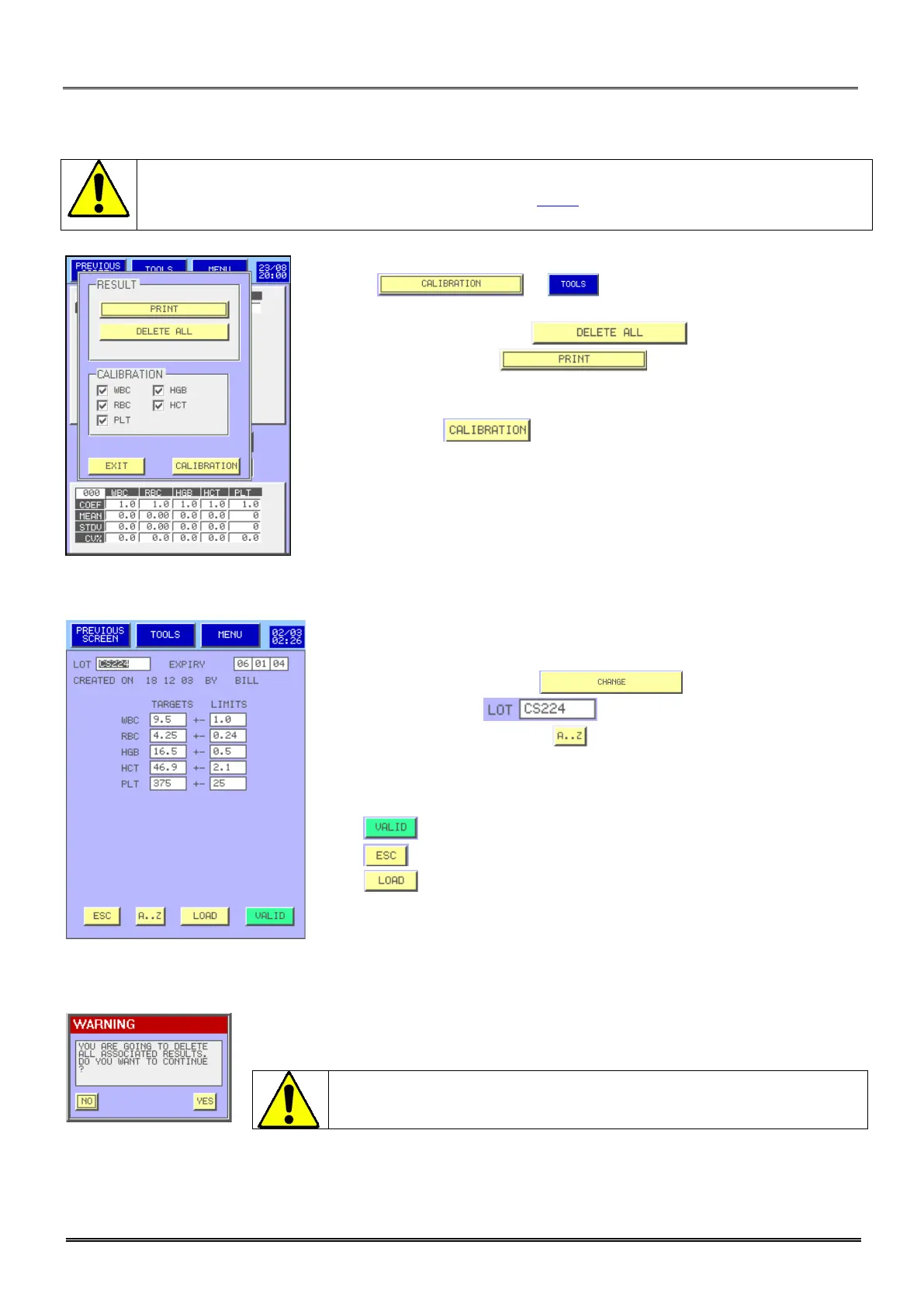
the calibration, unselect the results which you do not wish to use for the
calculation of the calibration (See above section 7.1.1
). Minimum 3 results are needed to
calibrate.
- The key or allows:
To calibrate with the selected results.
To delete all the results. Press .
To print the results. Press (see below the print report).
To calibrate one or more parameters:
• Select the parameter.
• Press the key .
7.2 TARGET VALUE MODIFICATIONS
- To modify information relative to a batch or to create a new batch,
please follow the following steps:
From Calibration Menu, press .
Select the lot number .
To modify the lot number press .
Select the field to be modified.
Enter your new value with the numerical keyboard or with the alphabetical
keyboard.
Press to validate your modifications or the loading.
Press to leave the menu without modification.
Press to load the target and tolerances values and expiry date and
lot number from a USB key.
This screen inform you about deletion of the previous calibration (all patients or
controls results are kept).
Any modification (lot number, date or target values) involves the
deletion of all the associated results always in memory.



 To Next Page